
Tested May 2026 · Tested on a paid Premium account
Our Real-World Setup
- Internet: 1 Gbps fiber line
- Gear: Mac running Chrome & JDownloader 2
- Testing account: Daofile Premium (official cap: 50 GB / 3-day window)
- Test files: 767 MB free-tier archive; four-part set (~3.796 GiB total) on premium
Our Daofile review covers browser speed, JDownloader 2 compatibility, free-tier restrictions, the real traffic limit versus what JD2 reports, current pricing, and practical usability. Read our full testing methodology.
Our rating: 7/10 — a genuinely fast JD2 result, undercut by a free tier with an escalating wait and a traffic figure that doesn’t match what Daofile itself publishes.
Daofile Pricing 2026: The Discount Curve Is Real, But So Is the Traffic Question
Daofile sells three terms, each discounted per day the longer you commit. Official pricing at daofile.net:
| Plan | Cost per day | Total price |
|---|---|---|
| 31 days | $0.64/day | $19.95 |
| 90 days | $0.44/day | $39.95 |
| 365 days | $0.24/day | $89.95 |
The 365-day plan is roughly 2.7× cheaper per day than the 31-day plan. That’s a steeper discount curve than most hosts in this category offer, and it’s the headline reason Daofile shows up in “cheapest premium host” roundups.
But the traffic figure attached to every one of these plans is unusual, and worth reading carefully before you commit to a year upfront: Daofile’s own support page describes the allowance as 50 GB per 3-day window, not a daily reset. Run out inside that window, and you wait for the full 3 days to cycle before your traffic resumes — there’s no next-day top-up like you’d get on a daily-reset host.
Check Current Daofile Pricing →Affiliate link. See our disclosure.
The “Unlimited” Traffic Display Doesn’t Match Daofile’s Own Numbers
This is the discrepancy that matters most if you’re planning a heavy download session.
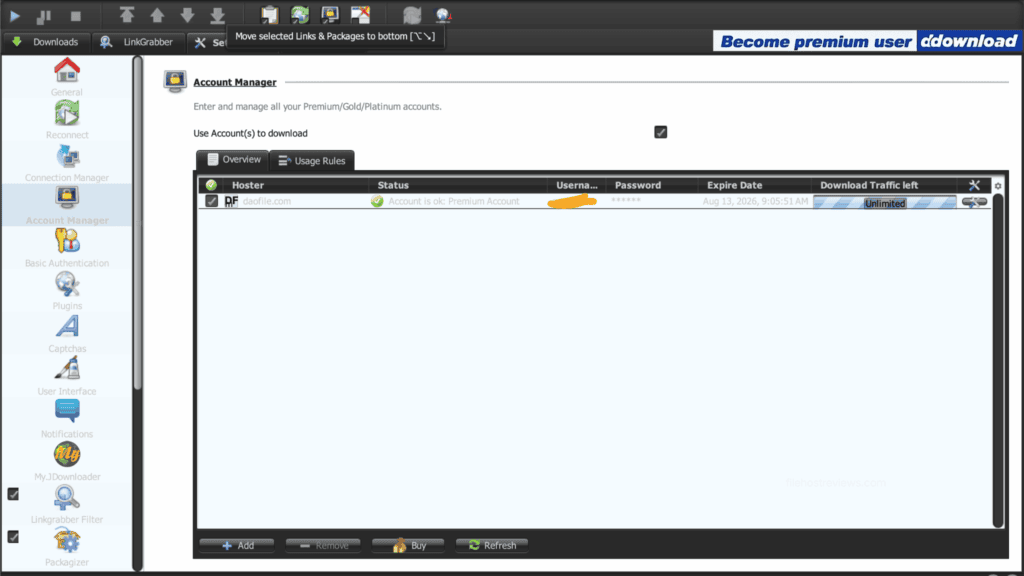
When we added our premium account in JDownloader 2, the Account Manager displayed “Unlimited” in the Download Traffic left column.
That’s not what Daofile’s own FAQ says. Their support page states plainly: “Download limit is 50 GB for 3 days window. If you run out of traffic you need to wait 3 days and the traffic will resume again.” Our test session didn’t approach 50 GB, so we can’t confirm exactly when the cap bites — but the gap between what JD2 shows and what Daofile itself publishes is real, and it’s the same pattern we’ve now flagged on other hosts that display “Unlimited” in JD2 while third-party or official sources describe a real ceiling.
Treat “Unlimited” as unverified. Budget your downloads against the 50 GB / 3-day figure Daofile publishes itself, not the number JD2 shows on screen.
Daofile Free Tier: An Escalating Wait, Not Just a Slow Download
The free tier bundles a countdown timer, an hCaptcha check, and a wait time that grows the more you use it in a short window.
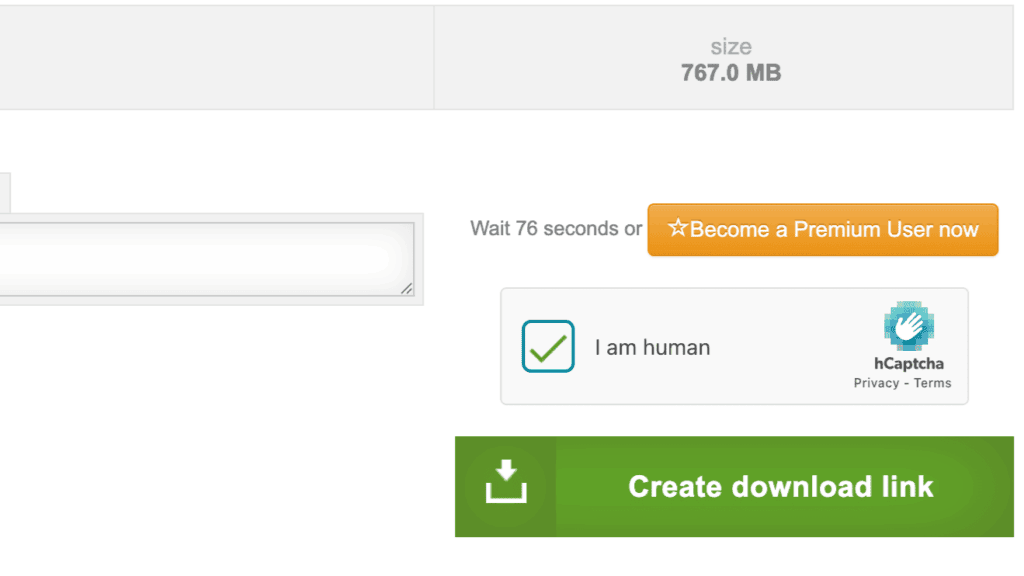
Our first free download carried a 76-second wait, with the hCaptcha already ticked in this particular session.
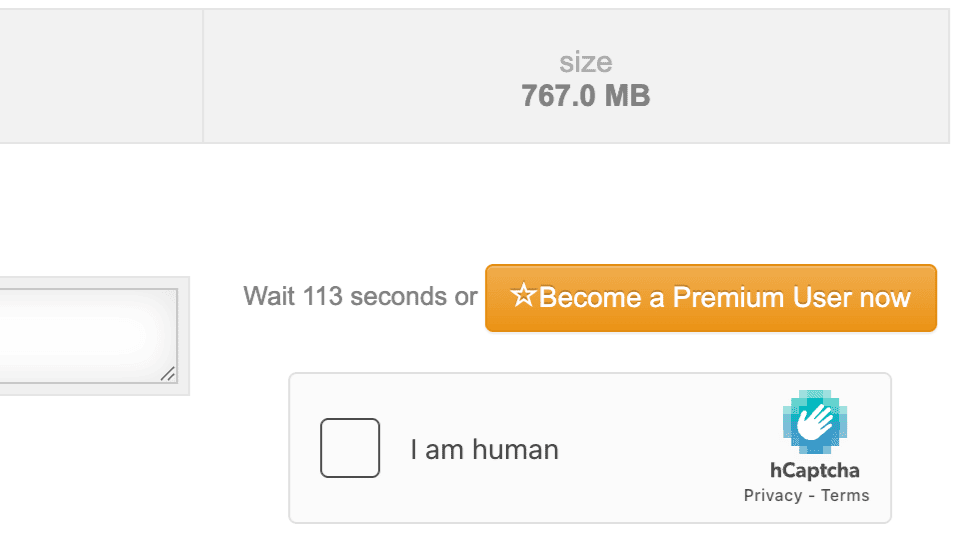
A second free download in the same test window carried a longer wait: 113 seconds, with the hCaptcha unchecked and requiring a fresh click.
That’s a smaller jump than the 20-second-to-56-minute escalation we measured on Keep2Share’s free tier, but the pattern is the same: the wait between downloads is not fixed, and it tends to move in the wrong direction the more you use the free tier in a short period.
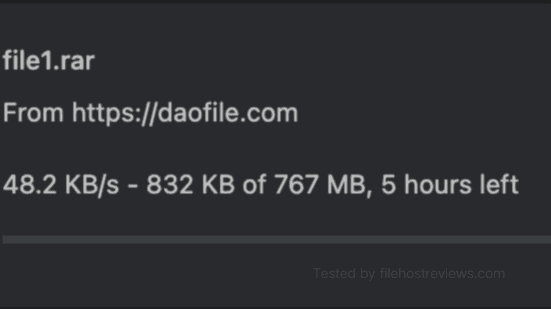
Once a download actually started, Chrome measured 48.2 KB/s, with an estimated 5 hours remaining on the 767 MB file.
Full free-tier restrictions, per our test:
- ~48.2 KB/s measured download speed
- A wait timer that escalated from 76 to 113 seconds within the same session
- hCaptcha required, and not always pre-solved
- No parallel downloads
- No resume support confirmed
Verdict on the free tier: usable to confirm a link is alive, nothing more. The escalating wait makes it worse for repeated small downloads than a host with a single fixed timer.
Official Claims vs. What We Measured
Daofile’s premium page advertises “Unlimited Speed,” “No Waiting Time,” and “24/7 support” on every plan tier. Here’s how those claims held up against our test:
| Claim | Daofile’s marketing | What we measured |
|---|---|---|
| Premium speed | “Unlimited Speed” | 2.8–2.9 MB/s single-file in Chrome; 43.56–48.96 MiB/s combined in JD2 across four files |
| Waiting time (premium) | “No Waiting Time” | Confirmed — premium downloads started instantly in both Chrome and JD2 |
| Support | “24/7 support” | We found no live chat option during our test; only a standard account/ticket interface |
| Daily traffic | Not stated as a hard cap on the pricing page | Official FAQ describes 50 GB per 3-day window; JD2 displayed “Unlimited” |
The “No Waiting Time” claim holds up completely — this was the one part of Daofile’s marketing that matched our experience exactly. “Unlimited Speed” is marketing language rather than a literal claim, and reads more sensibly as “no artificial throttle,” which is roughly consistent with what we saw. The traffic question is the one area where Daofile’s own documentation and the JD2 display genuinely disagree.
Premium Browser Test: Consistent, But Capped Per File
A single premium file in Chrome held steady at 2.8 MB/s through the bulk of the transfer.
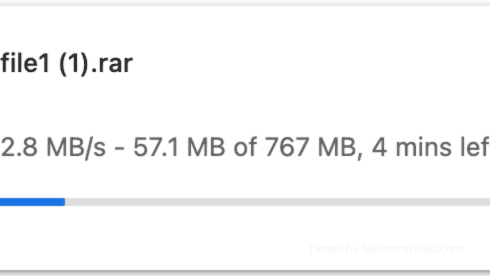
We then ran three files simultaneously. All three held within a tight band: 2.8, 2.9, and 2.9 MB/s — a combined roughly 8.6 MB/s.
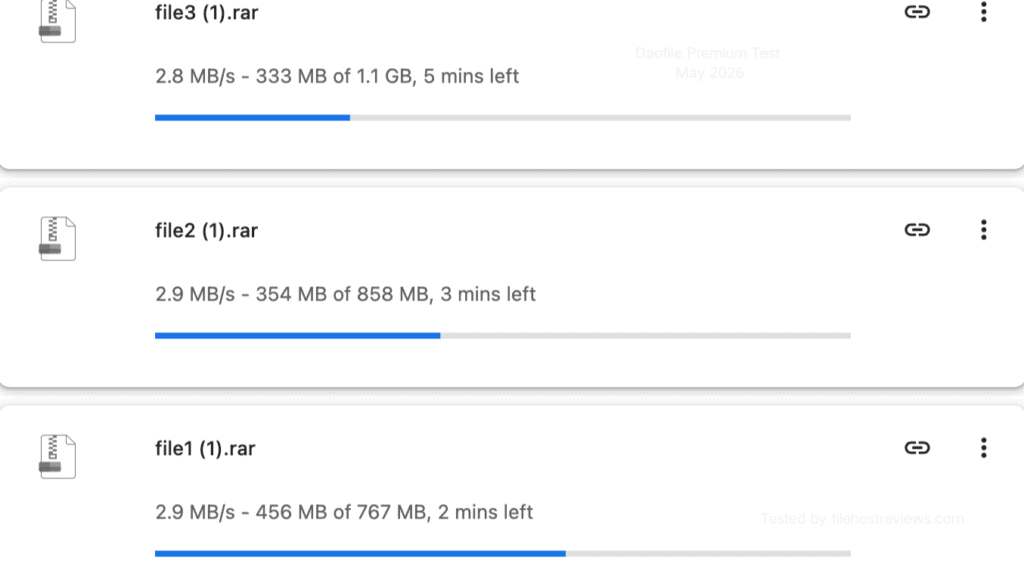
The consistency here stands out. Where some hosts show one file racing ahead while another crawls, Daofile’s three files stayed within 0.1 MB/s of each other. Chrome alone is a reasonable option for two or three files at a time, even without JD2.
JDownloader 2 Test: The Real Reason to Buy This Host
Setup in JD2 was clean. We searched “daofile” in the Account Manager, and it appeared as daofile.com with “Cookie login optional” — standard email and password login works by default.
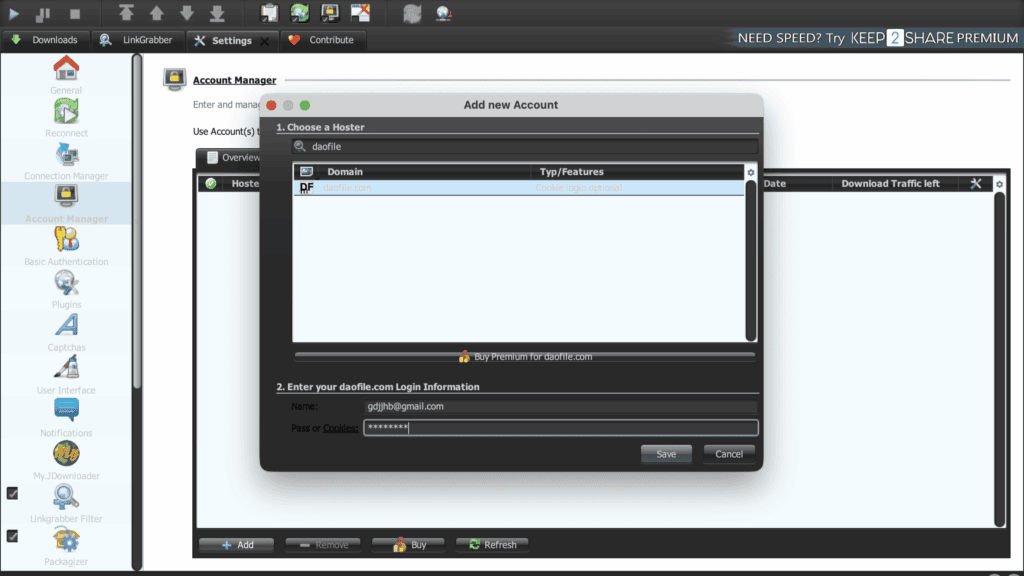
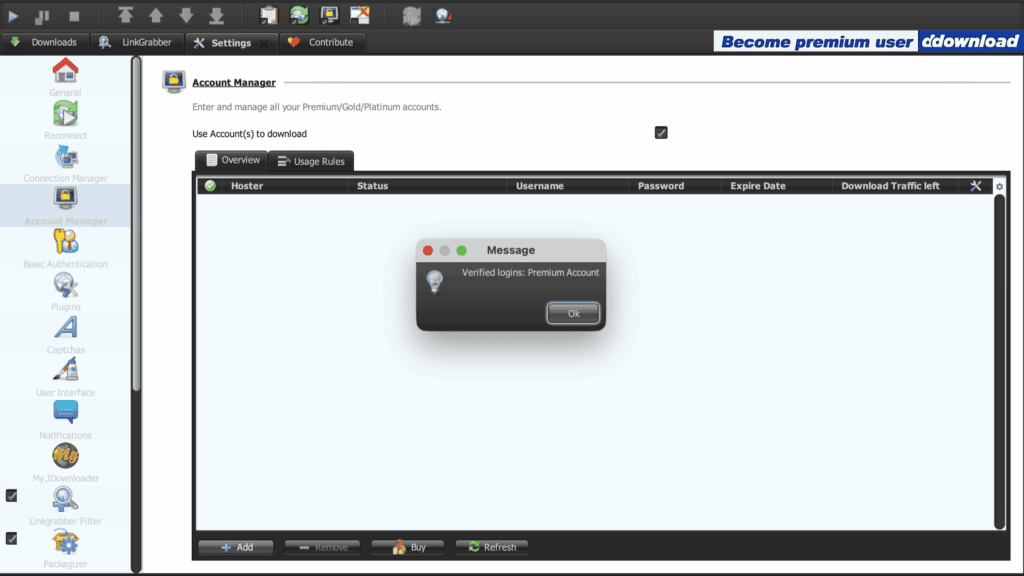
JD2 verified the account immediately, with no captcha step required.
The account row then showed premium status, an expiry date of August 13, 2026, and — as covered above — “Unlimited” in the traffic column.
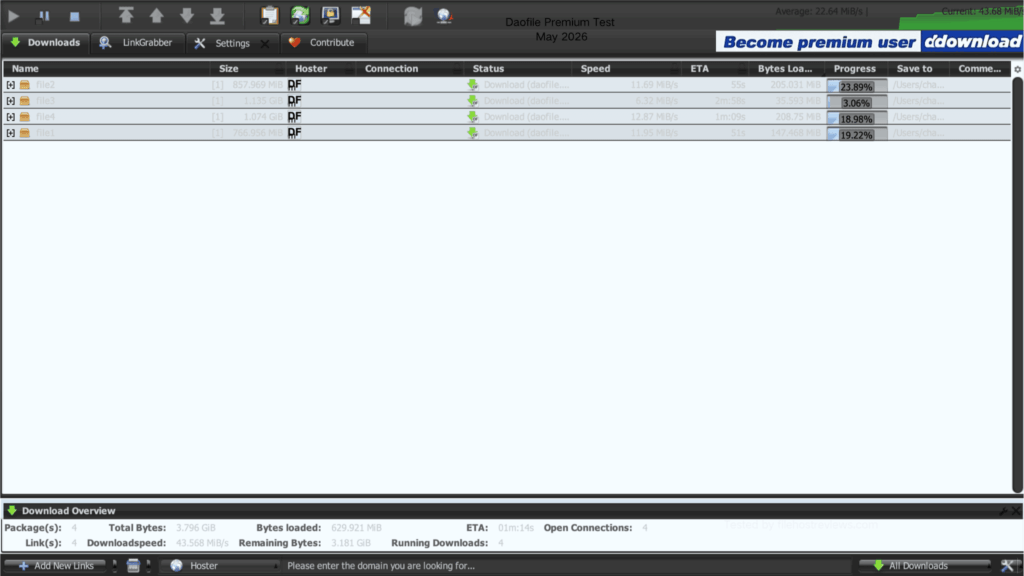
We then queued four files (~3.796 GiB total). The first run reached a combined 43.568 MiB/s, with individual files at 11.69, 6.32, 12.87, and 11.95 MiB/s.
We repeated the test to check consistency. The second run reached 48.96 MiB/s combined, with per-file speeds of 12.07, 12.43, 12.97, and 11.06 MiB/s — a noticeably tighter spread than the first run.
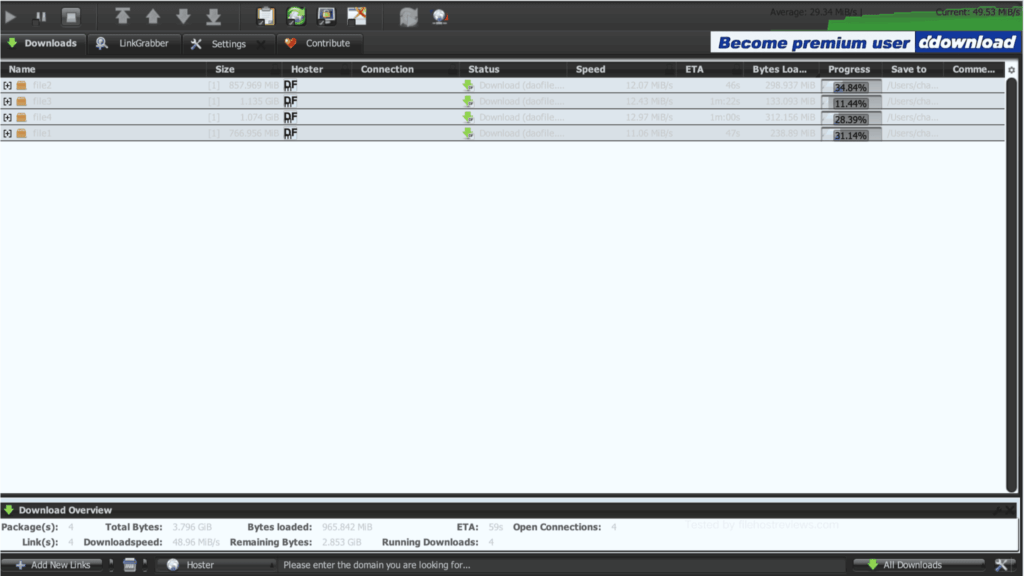
Both runs landed in the 43.5–49 MiB/s range — roughly 5–5.7× the combined browser result (8.6 MB/s across three files). Same account, same connection, only the client changed. This is the entire case for using Daofile with a download manager rather than a browser alone.
Get Daofile Premium →Who Should Buy Which Plan
31 days ($19.95, $0.64/day) — the right starting point for anyone testing whether their target files are actually mirrored on Daofile. At this length, overpaying for a plan you might not use is the smaller risk.
90 days ($39.95, $0.44/day) — a reasonable middle ground once you’ve confirmed the host suits your usage and you’re comfortable with the 50 GB / 3-day traffic model.
365 days ($89.95, $0.24/day) — the best per-day rate by a wide margin, but only worth it if you’ve already tested a shorter plan and are confident the 3-day traffic window won’t feel restrictive for your typical download volume.
Free — fine for confirming a link is alive on a small file. Budget extra time for the wait, which grew from 76 to 113 seconds within a single test session.
Pros and Cons
Pros
- 43.57–48.96 MiB/s combined in JD2 across two separate four-file test runs
- “No Waiting Time” claim held up exactly as advertised on premium
- JD2 setup verified instantly, no captcha step required
- Three parallel Chrome downloads stayed remarkably even (2.8–2.9 MB/s each)
- Steep discount curve on longer plans (365 days at $0.24/day)
Cons
- JD2 displays “Unlimited” traffic, but Daofile’s own FAQ describes a 50 GB / 3-day cap — verify before a large queue
- Free tier wait escalated from 76 to 113 seconds within our test session
- Single-file Chrome speed capped around 2.8–2.9 MB/s regardless of plan
- “24/7 support” claim could not be confirmed — no live chat found during our test
- Traffic resets on a 3-day window, not daily, which is easy to overlook when budgeting usage
Verdict
Daofile Premium is worth buying specifically for JDownloader 2 users whose target files are hosted there. That’s the same narrow, honest recommendation we’d give for several hosts in this price bracket.
The free tier is hard to recommend for anything beyond confirming a link works: 48.2 KB/s, a wait that grew from 76 to 113 seconds in the same session, and an hCaptcha that isn’t always pre-cleared.
Premium delivers real value, but only through the right client. Chrome tops out around 8.6 MB/s combined across three files; JD2 reached 43.57–48.96 MiB/s on the same four-file test, repeated twice for consistency. If you’re downloading through a browser alone, you’re leaving most of what you paid for on the table.
On the traffic question: don’t take JD2’s “Unlimited” display at face value. Daofile’s own support page states a 50 GB per 3-day allowance, and that’s the number to plan around, especially before committing to the 365-day plan.
Our pick: 31-day plan first
$0.64/day · confirm your usage pattern before the longer terms · 43.57–48.96 MiB/s in our JD2 test
Visit Daofile →Affiliate link — we may earn a commission at no extra cost to you.
Daofile FAQ
Is Daofile worth it in 2026?
Yes, if your target files are hosted there and you pair it with JDownloader 2. We measured 43.57–48.96 MiB/s combined in JD2 versus about 8.6 MB/s in Chrome across three files. Without a download manager, most of the value goes unused.
How slow is the Daofile free tier really?
48.2 KB/s in our test — about 5 hours estimated for a 767 MB file. The wait timer also grew from 76 to 113 seconds within the same session.
Does Daofile work with JDownloader 2?
Yes. Search “daofile” in Account Manager, log in with your email and password, and JD2 verifies instantly with no captcha step.
What is Daofile’s real traffic limit?
JD2 displays “Unlimited,” but Daofile’s own FAQ states a 50 GB allowance per 3-day window, not a daily reset. Budget around the published figure rather than the JD2 display.
How much does Daofile premium cost?
$19.95 for 31 days ($0.64/day), $39.95 for 90 days ($0.44/day), or $89.95 for 365 days ($0.24/day).
Does Daofile really offer 24/7 support?
We could not confirm this during our test. No live chat option was found; support appeared to run through a standard account interface.
Is there a free trial or short plan?
No dedicated trial. The shortest paid term is 31 days at $19.95.
Related: Best File Hosting Services · Fastest File Hosts Tested · JDownloader Compatible File Hosts · Cheapest Premium File Hosts