
Best File Hosting Services in 2026: Speed-Tested Premium Hosts
Last tested: [July] 2026 · 12 hosts · Method: Chrome + JDownloader 2 with paid accounts
Most “best file hosting” articles rank cloud storage — Google Drive, Dropbox, pCloud. This guide does something different.
It ranks premium one-click file hosts: the services you buy an account for because a file you need is sitting on Rapidgator, Keep2Share, Nitroflare or Upstore, and the free tier is too slow to be usable.
Every number below came out of our own downloads — a real paid account, a real multi-part archive, measured in both a browser and JDownloader 2.
Backing up your own files? Wrong guide — you want Google Drive, pCloud or Backblaze.
Downloading from a specific file host? You’re in the right place.
Quick verdict
| Your situation | Buy this | Why |
|---|---|---|
| Safest all-round choice | Rapidgator | Widest file availability + 54.28 MB/s in JD2 |
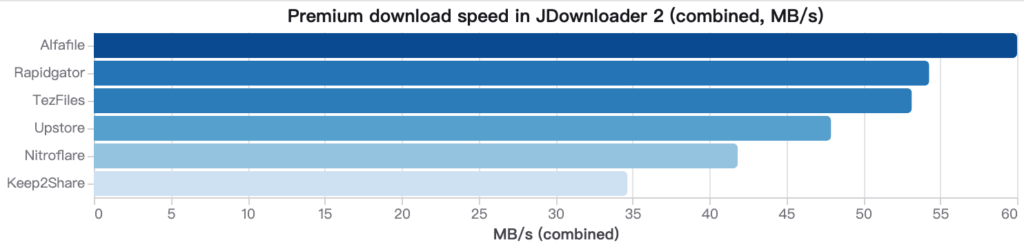
| Maximum raw speed | Alfafile | Fastest host we measured (~60 MiB/s) |
| Files are on K2S / FileBoom | Keep2Share Premium Pro | Only real option — skip the basic plan |
| Occasional bursts, not daily use | Upstore | Clean free tier, 47.90 MB/s premium |
| Lowest monthly cost | See Cheapest Premium File Hosts | Price-per-GB beats headline speed |
| Browser-only, no download manager | Upstore or Clicknupload | Both hold up without JD2 |
One-line answer: if you’re buying a single account and don’t want to think about it, buy Rapidgator and use JDownloader 2.
Speed test results at a glance
| Host | JD2 combined | Browser (premium) | Free tier | JD2 support | Review |
|---|---|---|---|---|---|
| Alfafile | ~60 MiB/s | 11.7 MB/s | ~50 KB/s | Works | Review → |
| Rapidgator | 54.28 MB/s (8 parts) | Well below JD2 | Restricted | Works | Review → |
| TezFiles | 53.15 MB/s | Much weaker than JD2 | Restricted | Works | Review → |
| Upstore | 47.90 MB/s (4 parts) | 8.3–8.7 MB/s | Clean but slow | Works | Review → |
| Nitroflare | 41.84 MB/s | Fast | Extremely slow | Works | Review → |
| Keep2Share | 34.67 MB/s (3 parts) | 5 MB/s | ~22.4 KB/s | Works | Review → |
| FileJoker | 12.62 MB/s | 11.8 MB/s | 125–130 KB/s | Works | Review → |
| Clicknupload | 41.212 MB/s | 10–13 MB/s | 30.0 KB/s | Works after retest | Review → |
| Uploadgig | 37.8 MB/s | 14.4 MB/s | 30.0 KB/s | Works | Review → |
| DDownload | 32.64 MB/s | 13.9 MB/s | 28.5 KB/s | Works | Review → |
| Katfile | No Works | 10.6 MB/s | 100 KB/s | No Works | Review → |
| DailyUploads | 34.0 MB/s | 12.6 MB/s | 3.0 MB/s | Works | Review → |
JD2 = JDownloader 2, combined throughput across simultaneous connections. Single-file browser speed is always lower. That gap is the most misunderstood thing about premium file hosts.
How we test — and why it changes the ranking
Speed figures on file host homepages are marketing copy. Ours are reproducible:
- One test file for everyone. A multi-part archive, 3–8 parts, so multi-connection behaviour is actually visible. Single small files hide it.
- Two clients, both reported. Chrome (one stream) and JDownloader 2 (parallel). They differ by 4–6× on some hosts — quoting only one number is how other sites get this wrong.
- Free tier measured first. We record the free limit before paying, so you can see exactly what your money buys you out of.
- Account verification in JD2. Several hosts fail to authenticate a valid premium account on the first try. We note which ones needed a retry, because that’s a real cost in your time.
- Traffic caps counted as part of speed. A 50 MB/s host with a 30 GB daily cap gives you roughly ten minutes of fast downloading per day. We score the cap, not just the peak.
Full methodology: Review Rating System · Editorial Policy · Affiliate Disclosure
1. Rapidgator — best overall
JD2: 54.28 MB/s (8-part archive) · Widest file availability
Rapidgator wins on the metric that actually decides whether a premium account was money well spent: the file you’re looking for is probably on it. Coverage across link sites and forums is broader than any other host here.
Speed is a strong second. In our 8-part archive test, JDownloader 2 pulled a combined 54.28 MB/s — dramatically more than a single browser stream managed on the same file, same account, same session.
Strengths
- Best file availability of any host tested
- Excellent JD2 throughput
- Long-established, stable service
Weaknesses
- Browser-only downloading wastes most of what you paid for
- Free tier is heavily restricted
Buy it if: you download from many different sources and want one account that works most of the time.
Skip it if: you refuse to install a download manager.
→ Full Rapidgator review · Rapidgator alternatives
2. Alfafile — fastest host we measured
JD2: ~60 MiB/s
The single fastest result in our test set. If your target file is on Alfafile, nothing else here moves it quicker.
Strengths
- Highest raw throughput measured
- JD2 handled the account cleanly, no retries
Weaknesses
- Narrower file availability than Rapidgator — a poor choice as your only account
Buy it if: you have a confirmed Alfafile source and speed is the priority.
Skip it if: you’re buying blind and hoping it covers whatever you find later.
3. TezFiles — biggest JD2 advantage
JD2: 53.15 MB/s
TezFiles produced the widest browser-vs-JD2 gap we recorded. Through a browser it feels unremarkable. Through JDownloader 2 it sits near the top of the chart.
That makes it a conditional recommendation: the host is only as good as your client.
Buy it if: you already run JD2 as your default.
Skip it if: you download through the browser — you’ll never see the speed you paid for.
4. Upstore — best balance of free tier and premium speed
JD2: 47.90 MB/s (4 parts) · Chrome: 8.3–8.7 MB/s
Upstore is the most predictable host in this list. Premium browser downloads held a steady 8.3–8.7 MB/s in Chrome, and JD2 reached 47.90 MB/s across four active downloads. The free tier is slow but clean — no aggressive interstitials, no wait-time games.
Strengths
- Solid performance in both browser and JD2
- Free tier is usable for testing a link before you pay
- Consistent, low-drama behaviour
Weaknesses
- Not the fastest at peak
- File availability below Rapidgator
Buy it if: you download in occasional bursts and want something that just works.
5. Nitroflare — fast premium, punishing free tier
JD2: 41.84 MB/s · Browser: fast
Nitroflare has one of the sharpest free-to-premium contrasts we measured. Premium browser downloads are genuinely quick, and JD2 reached 41.84 MB/s combined. The free tier, by contrast, is close to unusable — slow enough that a large archive becomes an overnight job.
That’s not necessarily a criticism. It means the free tier tells you nothing useful about the paid one, so don’t judge Nitroflare by a free test.
Strengths
- Strong browser performance, unusual at this speed tier
- Reliable JD2 authentication
- Good availability on mainstream link sites
Weaknesses
- Free tier is extremely slow, effectively a paywall
Buy it if: you want good speed without depending on a download manager.
Skip it if: you were hoping to get by on the free tier.
6. Keep2Share — buy Premium Pro or don’t bother
JD2: 34.67 MB/s (3 parts) · Free: ~22.4 KB/s
Keep2Share is a targeted purchase, not a general-purpose one. It’s worth buying when your files are specifically on K2S and you use JDownloader 2 — in that case it performs respectably at 34.67 MB/s combined.
Two warnings. First, the free tier measured around 22.4 KB/s in our test, which is functionally broken for anything above a few megabytes. Second, and more important: the basic Premium plan’s daily traffic allowance is too small for heavy use. If you’re buying K2S at all, buy Premium Pro. The basic tier looks cheap and then stops working halfway through your queue.
Strengths
- Solid JD2 performance
- Consistent availability across the K2S / FileBoom / TezFiles family
Weaknesses
- Free tier is unusable
- Basic Premium traffic cap runs out fast
Buy it if: your target files are on K2S. Choose Premium Pro.
Skip it if: you want a single all-purpose account — buy Rapidgator instead.
→ Full Keep2Share review · Keep2Share alternatives
7. FileJoker — archive-focused, slowest usable free tier
Free: 125–130 KB/s
FileJoker’s free tier held a steady 125–130 KB/s in Chrome. That’s slow, but unlike Keep2Share’s 22 KB/s it’s at least usable for a small file or a link test before committing.
FileJoker tends to appear on archive-heavy and long-term storage sources, which is where it earns its place. Premium figures: [确认].
Buy it if: your sources consistently point to FileJoker links.
Skip it if: you can find the same file on Rapidgator.
→ Full FileJoker review · FileJoker alternatives
8. Clicknupload — decent browser speed, watch the JD2 setup
Browser (premium): 10–13 MB/s · JD2: verified after retest
Clicknupload delivered a reasonable 10–13 MB/s on premium browser downloads. The notable finding was in setup: JDownloader 2 did not verify the premium account on the first attempt and only recognised it after a retest.
We’re flagging that specifically because it’s the kind of thing that gets misread as “my account doesn’t work” and turns into a refund request. It works — it just needs a second pass.
Strengths
- Consistent browser speed
- Works with JD2 once authenticated
Weaknesses
- JD2 account verification needed a retry
- Speed below the top tier
Buy it if: your links are on Clicknupload and you’re comfortable troubleshooting JD2 once.
9–12. Also tested: Uploadgig, DDownload, Katfile, DailyUploads
These four are worth knowing about but rarely the right first purchase. They come up most often as alternatives when a primary host doesn’t carry your file, or as budget picks.
| Host | Typical use case | Review |
|---|---|---|
| Uploadgig | Budget-oriented plans; check price-per-GB rather than peak speed | Review → |
| DDownload | Common Rapidgator substitute on link sites | Review → |
| Katfile | Appears frequently as a mirror host | Review → |
| DailyUploads | Secondary mirror; verify traffic cap before buying | Review → |
Measured figures for each: — see individual reviews.
→ Full budget comparison: Cheapest Premium File Hosts
How to choose: a 4-step decision path
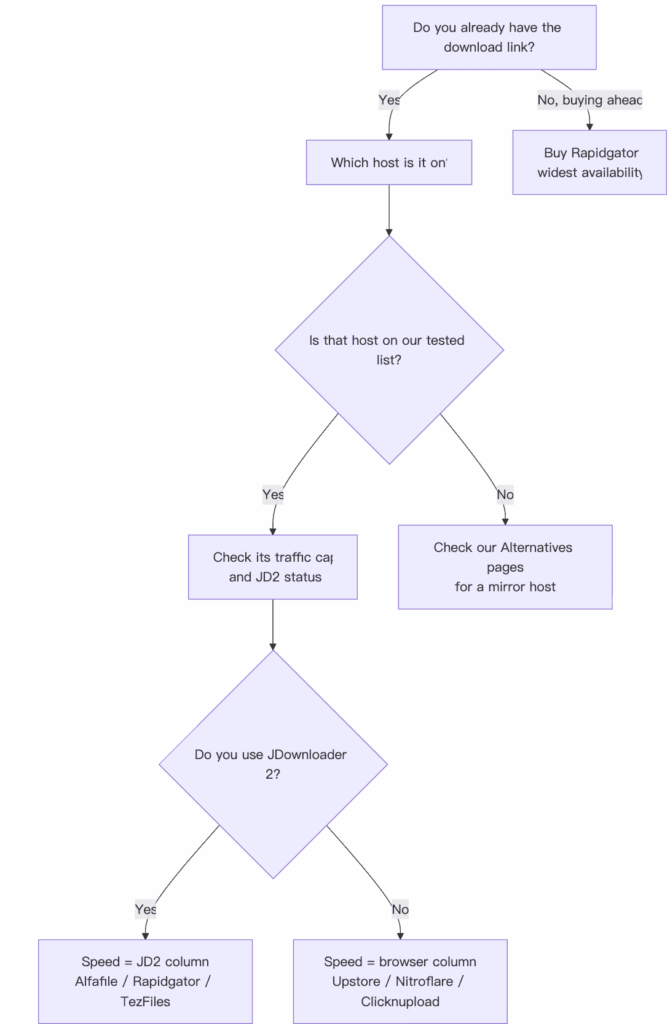
Step 1 — Find the file first, buy second. The most common expensive mistake is buying an account and then discovering the file is hosted somewhere else. Locate the link, identify the host, then buy.
Step 2 — Install JDownloader 2 before you judge speed. On several hosts, JD2 is 4–6× faster than a browser. If you only ever download in Chrome, you’re paying premium prices for a fraction of the throughput. This alone matters more than which host you pick.
Step 3 — Read the traffic cap, not the headline speed. 50 MB/s with a 30 GB daily limit is about ten minutes of full-speed downloading. Divide your monthly download volume by the daily cap before comparing prices.
Step 4 — Start with the shortest plan. Buy 30 days first. Hosts change limits, pricing and JD2 compatibility without notice. Commit to a year only after a month has gone the way you expected.
Common mistakes we see
- Testing the free tier and concluding the host is slow. Keep2Share free is ~22.4 KB/s; premium is 34.67 MB/s in JD2. They’re barely the same service.
- Buying a lifetime plan on day one. File hosts change terms.
- Assuming a failed JD2 login means a bad account. Clicknupload needed a retest before it authenticated correctly. Retry before requesting a refund.
- Comparing MB/s numbers from different sources. Combined multi-connection throughput and single-stream browser speed are different measurements. Ours are labelled; most sites’ aren’t.
- Ignoring payment friction. Some hosts have limited payment options or awkward renewal flows. Check before you need to renew urgently.
Frequently asked questions
Which file host is fastest in 2026?
Alfafile, at roughly 60 MiB/s in JDownloader 2. Rapidgator (54.28 MB/s) and TezFiles (53.15 MB/s) follow closely. See Fastest File Hosts Tested.
Do I need JDownloader 2?
Not strictly, but it changes the outcome substantially. On TezFiles and Rapidgator, JD2 was several times faster than a single browser download. If you download regularly, install it. See JDownloader Compatible File Hosts.
Is any premium file host worth it on the free tier alone?
No. Free tiers ranged from ~22.4 KB/s (Keep2Share) to 125–130 KB/s (FileJoker). Use them to confirm a link is alive, not to download.
Which host should I buy if I only need one account?
Rapidgator. Availability beats peak speed when you don’t know in advance where your files will be hosted.
Are these affiliate links?
Some are. It doesn’t affect the test results or the ranking — the speed figures come from our own downloads. See Affiliate Disclosure and Editorial Policy.
How often is this updated?
Whenever we retest a host or a service changes its limits. Current test date is at the top of this page. Corrections: Contact us.
The bottom line
- Buying one account, unsure what you’ll need: → Rapidgator
- Chasing maximum speed on a known source: → Alfafile
- Your files are on K2S: → Keep2Share Premium Pro (not basic)
- You won’t use a download manager: → Upstore or Nitroflare
- Cost is the deciding factor: → Cheapest Premium File Hosts
Before paying, verify the current price, traffic allowance and plan duration on the host’s own site. These change more often than any review site can track.
Related guides: Fastest File Hosts Tested · JDownloader Compatible File Hosts · Cheapest Premium File Hosts · All Guides