
Tested: May 2026 · Plans: €9.99 / month, €39.99 / year · Traffic: 200 GB per day
DDownload is one of the cheapest premium file hosts available, and it shows up constantly as a mirror on link sites. We bought a premium account, ran a real 11.3 GiB multi-part archive through both Chrome and JDownloader 2, and measured the free tier on the same file for comparison.
Short answer: DDownload premium reached 51.19 MiB/s combined in JDownloader 2 and around 42.7 MB/s across four parallel browser downloads. But there’s a catch that decides whether it suits you: DDownload allows only one connection (1 chunk) per file. Speed comes entirely from running many files at once, not from accelerating a single one.
Get DDownload Premium — €3.33/moAffiliate link. See our disclosure.
Test results summary
| Free tier | Premium | |
|---|---|---|
| Speed (single file) | 28.4 KB/s | 8.2 – 13.7 MB/s |
| Speed (combined, JD2) | Not available | 51.19 MiB/s (8 parallel) |
| Speed (combined, Chrome) | Not available | ~42.7 MB/s (4 parallel) |
| Wait before download | 55 seconds + Cloudflare check | Instant |
| Chunks per file | 1 | 1 |
| Parallel downloads | 1 | 8+ confirmed in JD2 |
| Daily traffic | Throttled almost immediately | 186.265 GiB (200 GB) / day |
| Download resume | ✘ | ✔ |
| Ads | Heavy pop-ups | None |
| Time to download 1.5 GB | ~15 hours | ~2 |
| JD2 support | Not usable | ✔ Verified first try |
| Price | Free | €9.99 / month · €39.99 / year |
Tested May 2026 on an 11.3 GiB, 8-part RAR archive. All figures are from our own downloads.
See Current DDownload Plans →The 1-chunk limit — the most important finding
This is the thing no other DDownload review mentions, and it changes who should buy this host.
Look at the Connection column in our JDownloader 2 screenshots. Every single file shows 1. That’s the chunk count — the number of simultaneous connections JD2 is allowed to open per file.
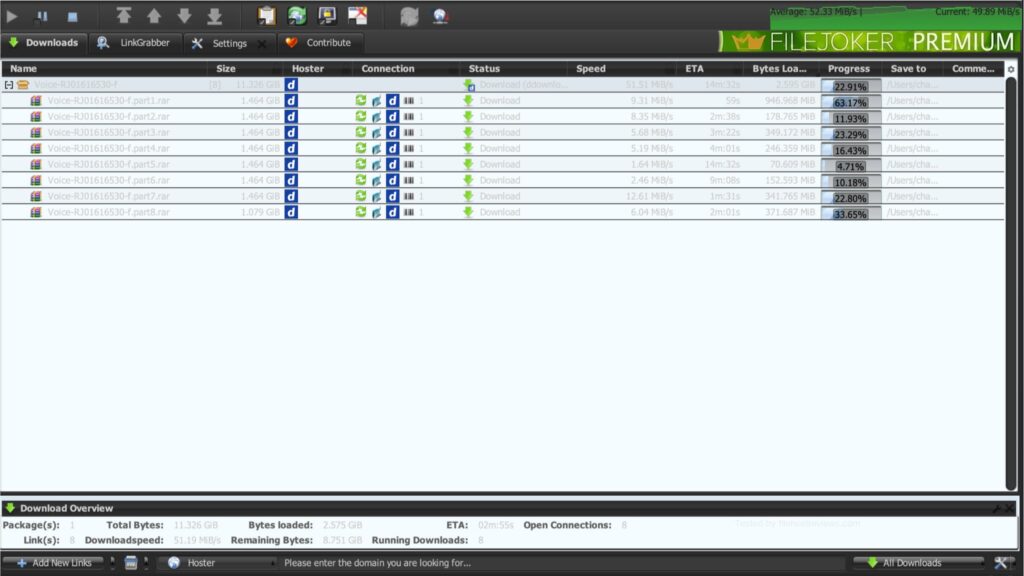
Most premium hosts let a download manager split one file across 4–8 connections. That’s how Rapidgator reached 54.28 MB/s on a single archive in our testing. DDownload does not permit this. The restriction is set by DDownload, not by JDownloader — it’s also confirmed on the official JDownloader support board.
What this means in practice:
| Your download looks like | DDownload result |
|---|---|
| One large single file (e.g. one 8 GB ISO) | Poor. You get one connection. Our per-file speeds ranged 1.64 – 12.61 MiB/s. Nothing you configure will change this. |
Multi-part archive (.part1.rar, .part2.rar…) | Good. 8 parts × 1 chunk each = 51.19 MiB/s combined. |
| A queue of many separate files | Good. Same logic — parallelism does the work. |
Notice the per-file variance in the screenshot: part7 ran at 12.61 MiB/s while part5 crawled at 1.64 MiB/s. Individual connections are inconsistent. The aggregate is what holds up.
If you download single large files, DDownload will feel slow no matter what you pay. That single sentence is the whole review.
Premium speed in JDownloader 2
Our main test used an 11.326 GiB archive split into 8 parts.
Result: 51.19 MiB/s combined, with the running average settling at 52.33 MiB/s and current speed hovering around 49.89 MiB/s. All 8 links downloaded simultaneously with 8 open connections. ETA on the remaining 8.75 GiB was under three minutes.
We also ran a mixed queue of several unrelated packages to see how DDownload behaves under a less tidy workload.
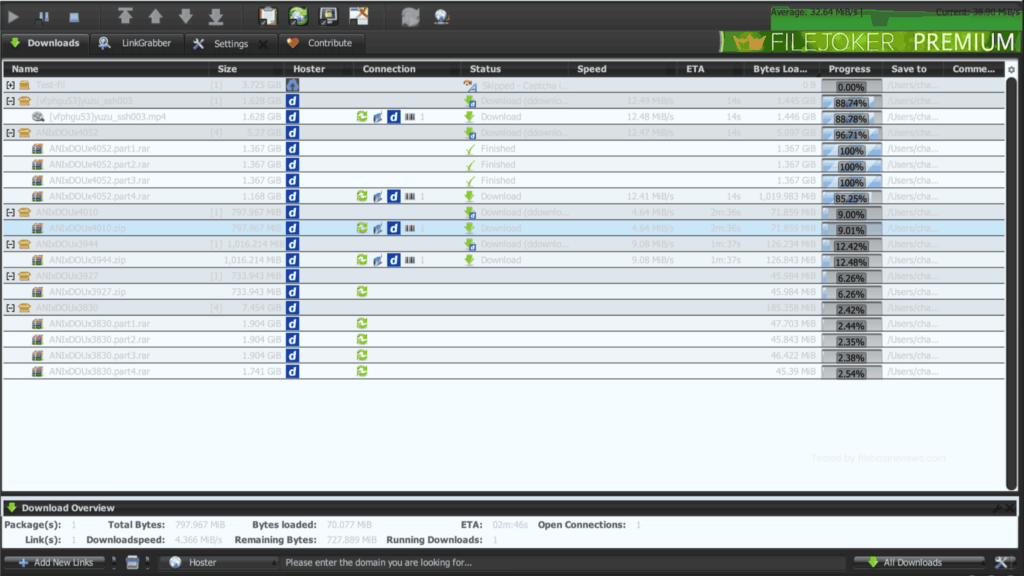
The mixed queue was slower than the clean 8-part run — 32.64 MiB/s versus 51.19 MiB/s. That’s expected: fewer active DDownload connections at any moment, plus one link skipped on a captcha. It’s a useful reminder that the headline number requires you to actually keep the queue full.
Premium speed in the browser
DDownload holds up better in Chrome than most premium hosts, precisely because its speed model is parallel-based rather than chunk-based. A browser can run several downloads at once just fine.
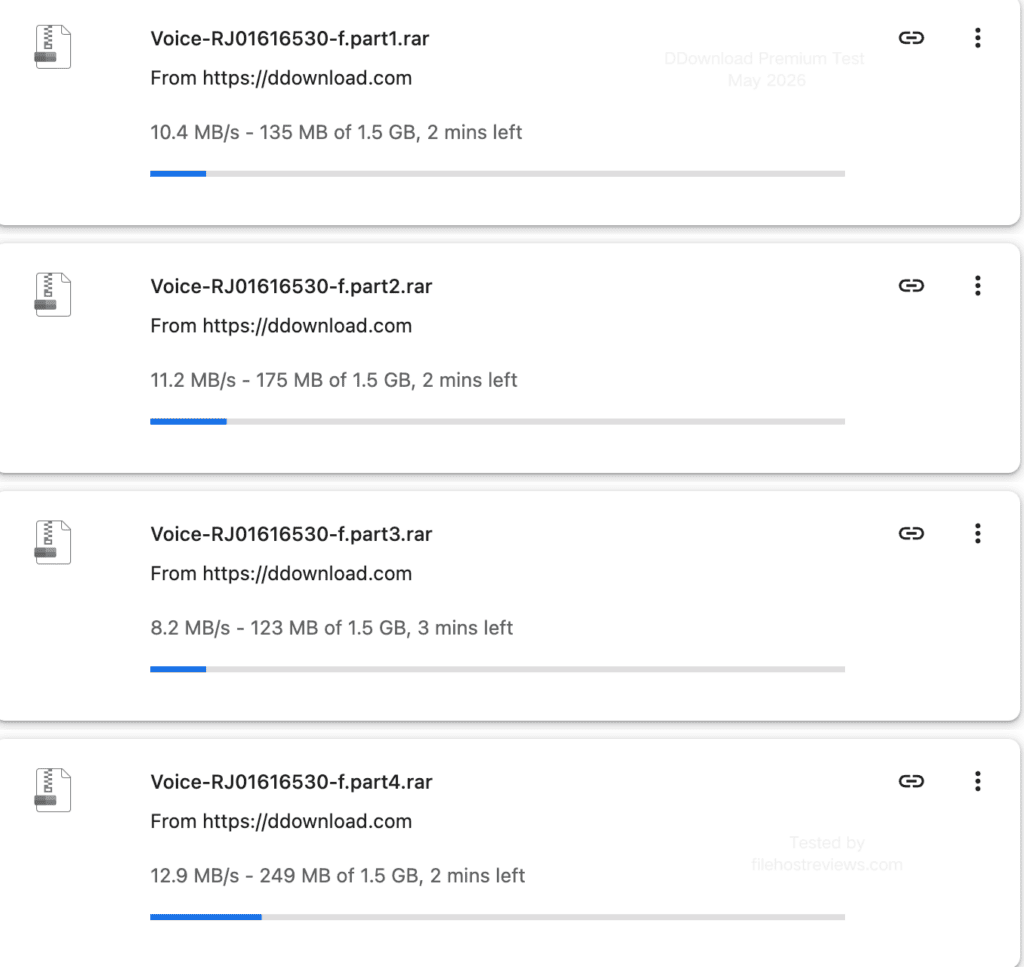
Peak single-connection speed we recorded was 13.7 MB/s, on part2 near the end of its transfer.
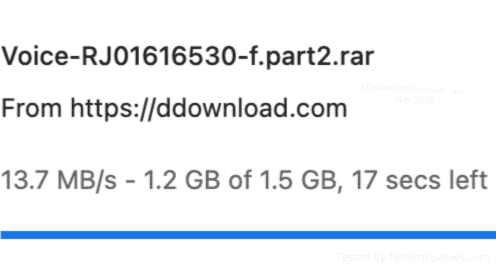
Browser vs JD2 verdict: JD2 was faster (51.19 vs ~42.7 MB/s), but the gap is far smaller than on hosts like TezFiles or Rapidgator, where JD2 is several times quicker. If you refuse to install a download manager, DDownload is one of the more forgiving hosts to buy.
Free membership: what you actually get
DDownload is free to join. The free tier is not a limited version of premium — it’s a different experience entirely.
We downloaded the same 1.5 GB file on a free account:
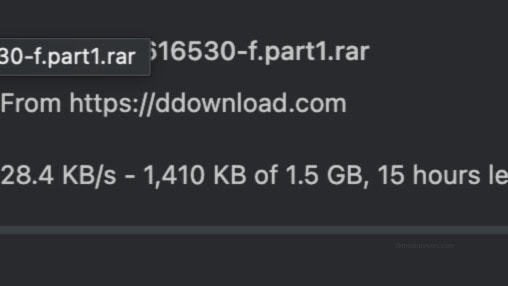
28.4 KB/s. For context, our premium test moved the same file at 13.7 MB/s — roughly 480× faster. A single 1.5 GB part would take about 15 hours free; it took around 2 minutes on premium.
Before that download even starts, you face a countdown and a Cloudflare check:
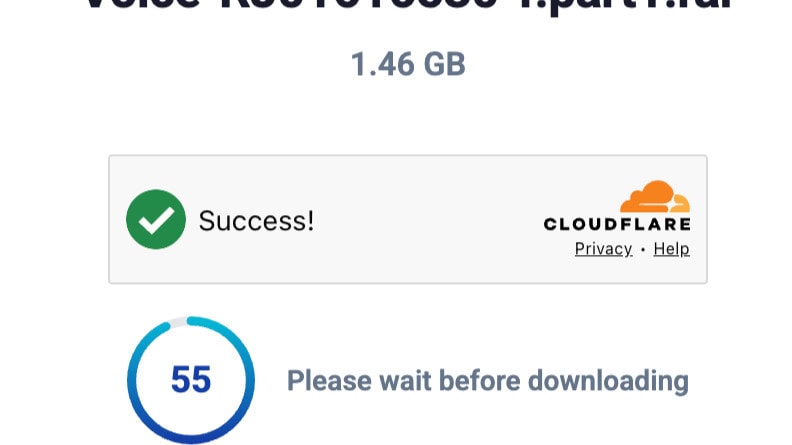
Note that several sources claim a 20 or 30 second wait. We measured 55 seconds.
Full free-tier restrictions:
- 28.4 KB/s measured download speed
- 55-second wait plus Cloudflare verification before each download
- No parallel downloads — one file at a time
- No download resume. A dropped connection means starting the entire file again. On a 15-hour download, this is the real dealbreaker.
- Heavy pop-up advertising throughout the process
- Reduced upload speed and limited storage
Verdict on the free tier: use it to confirm a link is alive. Do not use it to download anything.
Skip the 15-Hour Wait →Setting up DDownload in JDownloader 2
This part went smoothly, which is worth saying because several hosts we’ve tested fail here.
Step 1 — Open Settings → Account Manager → Add, then type ddownload in the hoster search. DDownload appears with “Cookie login optional” in the Typ/Features column — meaning email + password works fine, and cookies are only a fallback if login misbehaves.
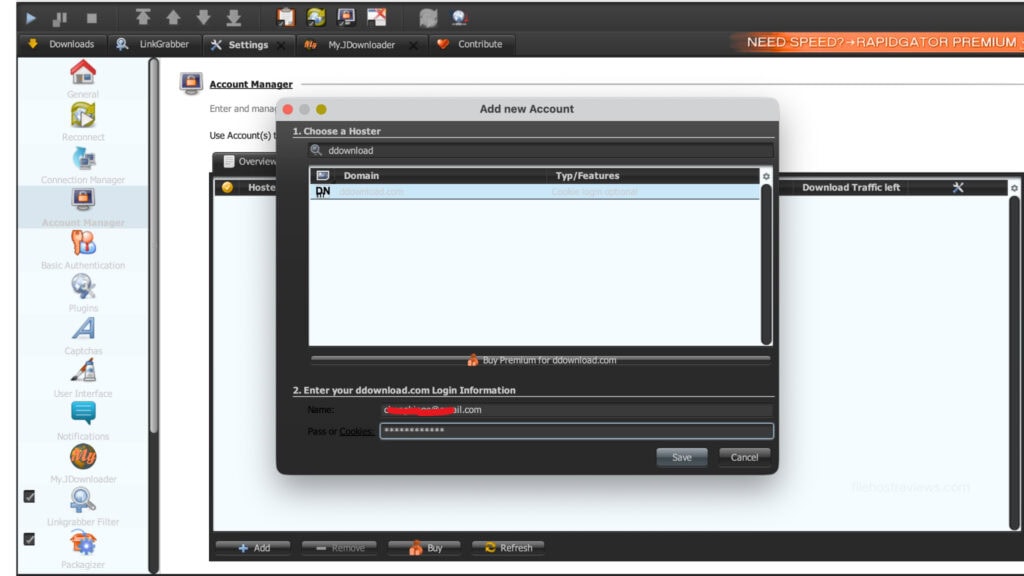
Step 2 — Enter your credentials and save. Our account was recognised on the first attempt:
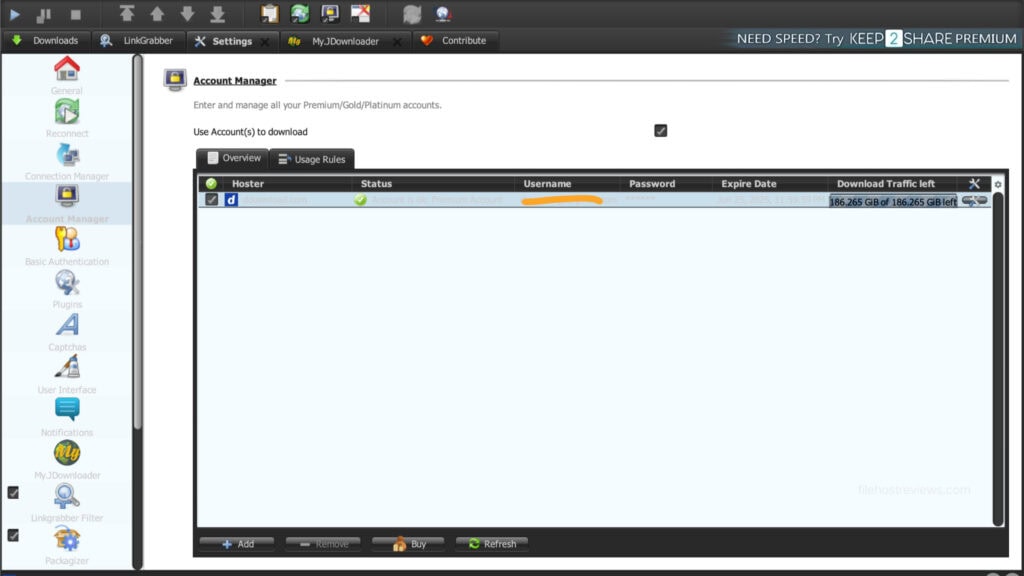
Step 3 — Note the Download Traffic left column. This is the single most useful field on the page. DDownload’s 200 GB daily cap shows here as 186.265 GiB, and it counts down as you download. Check it before starting a large queue.
Tip: because DDownload is limited to 1 chunk per file, increasing “max chunks” in JD2 settings does nothing. Instead raise max simultaneous downloads — that’s the setting that actually affects your speed here.
Daily traffic: 200 GB per day
DDownload’s allowance is generous for the price. JD2 reports it as 186.265 GiB, which is 200 GB in decimal — roughly 6 TB per month if you used it fully every day.
At €39.99/year, that works out to about €3.33/month. Even at a fraction of the allowance, the cost per GB is among the lowest of any host we’ve tested.
Watch for: the cap is daily, not monthly. You cannot bank unused traffic. Heavy users pulling 500 GB in a weekend will hit the wall on day one and wait for a reset.
Pricing
| Plan | Price | Effective monthly | Daily traffic | |
|---|---|---|---|---|
| 1 month | €9.99 | €9.99 | 200 GB | Buy 1 Month |
| 1 year | €39.99 | €3.33 | 200 GB | Buy 1 Year |
The annual plan is 60% cheaper per month. Both plans carry the same 200 GB daily allowance — you’re paying purely for duration, not for a better tier.
Our recommendation: start with the 1-month plan at €9.99. File hosts change limits, pricing and JD2 compatibility without notice, and the annual saving isn’t worth locking in before you’ve confirmed the host actually carries the files you need. If a month goes as expected, renew annually.
Payment options include cards, PayPal, and cryptocurrency.
Customer support
Support is DDownload’s weakest area. Email ticketing only — no live chat, no phone. There is no published response-time guarantee, which can be frustrating if you have a payment or account issue that needs a fast answer.
The FAQ section is genuinely detailed and well written, and it covers most common problems. But if your issue isn’t in the FAQ, you’re waiting on a ticket.
Note: some review sites list “24/7 live chat” for DDownload premium. We could not find any live chat option. Treat that claim as inaccurate.
Pros and cons
Pros
- 51.19 MiB/s combined in JDownloader 2 on an 8-part archive
- ~42.7 MB/s in Chrome without any download manager — unusually browser-friendly
- 200 GB daily traffic, very generous at this price
- €39.99/year (€3.33/month) — among the cheapest premium hosts available
- JD2 account verified on the first attempt, no cookie workaround needed
- Download resume supported
- No ads on premium
- Widely available as a mirror host on link sites
Cons
- 1 chunk per file — single large files cannot be accelerated at all
- Per-file speeds are inconsistent (1.64 – 12.61 MiB/s in the same session)
- Free tier is effectively unusable: 28.4 KB/s and a 55-second wait
- No download resume on free accounts
- Email-only support, no live chat
- Daily cap doesn’t roll over
Who should buy DDownload premium?
Buy it if:
- Your downloads are multi-part archives or queues of many files — this is where DDownload shines
- You want the lowest cost per GB and 200 GB/day covers your usage
- You download in a browser without a download manager — DDownload loses less than most hosts here
- You need it as a cheap secondary account to cover mirror links your primary host doesn’t carry
Skip it if:
- You mostly download single large files — the 1-chunk limit caps you at one connection, and no setting will fix it
- You need fast support — email tickets only
- You were hoping the free tier would be workable. It isn’t.
- You want one account that covers everything — file availability is narrower than Rapidgator’s
Verdict
Rating: [9]/10
DDownload is a good-value specialist, not an all-rounder. At €3.33/month with 200 GB daily traffic, the price-to-allowance ratio is one of the best we’ve measured, and 51.19 MiB/s in JD2 is a legitimately strong result.
But that number only happens under one condition: you’re downloading many files at once. The 1-chunk restriction means a single large file is stuck on a single connection, and our measurements show that connection can drop as low as 1.64 MiB/s.
Know which kind of downloader you are before you pay. If your files come in parts, DDownload is one of the best-value accounts on the market. If they don’t, spend the money on Rapidgator instead.
Get DDownload Premium — €3.33/moFrequently asked questions
How fast is DDownload premium?
In our May 2026 test, 51.19 MiB/s combined in JDownloader 2 across an 8-part archive, and around 42.7 MB/s across four parallel Chrome downloads. Single-file speeds ranged from 1.64 to 13.7 MB/s.
Why is my DDownload premium download slow?
Most likely the 1-chunk limit. DDownload allows only one connection per file, so a single large file cannot be accelerated. Download several files simultaneously instead — that’s the only way to reach the higher speeds. Raising “max chunks” in JD2 will do nothing; raise max simultaneous downloads instead.
Does DDownload work with JDownloader 2?
Yes. Our premium account was verified on the first attempt with standard email and password. Cookie login is available as an optional fallback. JD2 also displays your remaining daily traffic in the Account Manager.
What is DDownload’s daily traffic limit?
200 GB per day, shown in JDownloader 2 as 186.265 GiB. It does not roll over to the next day.
Is the DDownload free tier usable?
No. We measured 28.4 KB/s with a 55-second wait before each download, no resume support, and no parallel downloads. A 1.5 GB file was estimated at 15 hours. Use it to verify a link is alive, nothing more.
How much does DDownload premium cost?
€9.99 for 1 month or €39.99 for 1 year (about €3.33/month). Both plans have the same 200 GB daily allowance.
Is DDownload better than Rapidgator?
Rapidgator has broader file availability and can accelerate single files (54.28 MB/s on one archive in our test). DDownload is cheaper and matches it on multi-part archives, but is weak on single large files. Buy Rapidgator as a primary account, DDownload as a cheap secondary. → Compare alternatives
Related: Best File Hosting Services · Fastest File Hosts Tested · JDownloader Compatible File Hosts · Cheapest Premium File Hosts