
Tested: June 2026 · Plan tested: Premium User · Not compatible with JDownloader 2
Choosing the right file host depends heavily on how you actually download files. Some users run everything through JDownloader 2 queues; others just click links in Chrome and wait. FileQ only really works for one of those groups, and this review is built around that distinction.
Short answer: FileQ Premium reached about 27.6 MB/s combined across three active Chrome downloads in our test, and the free tier was faster than expected at 2.9 MB/s. But there’s a catch that decides whether it suits you: JDownloader 2 does not recognize the FileQ premium account. JD2 detected it as free, skipped every link on captcha, and FileQ’s own team confirmed JD2 support isn’t currently available. If your workflow depends on a download manager, this host doesn’t fit it.
A FileQ Premium User account was provided for testing. This did not affect our editorial judgment, and FileQ did not review or approve this article before publication.
Check Current FileQ Plans →Affiliate link. See our disclosure.
Test results summary
| Free tier | Premium | |
|---|---|---|
| Speed (single file) | ~2.9 MB/s | 5.7 – 13.7 MB/s |
| Speed (combined, Chrome) | Not tested | ~27.6 MB/s (3 parallel) |
| Wait before download | 10-second timer | Automated verification, then manual click |
| Download flow | Ads + redirect friction | Verification screen, no auto-start |
| JD2 support | N/A | ✘ Detected as free account |
| Daily bandwidth (Premium User) | — | 977GB reported at time of testing |
| Ads | Present | None reported |
| Price (Premium User) | Free | $4.99/month (tested tier) |
Tested June 2026 on an ~3.796 GiB, 4-part archive set. All figures are from our own downloads.
Account tier tested: Premium User, not Premium Plus
FileQ sells more than one paid tier, and which one you buy changes what you’re actually getting — this is worth being precise about before anything else.
We tested the standard Premium User plan. At the time of testing, this was listed at $4.99 per month and included a 977GB daily bandwidth allowance. We did not test the higher-priced Premium Plus tier, which FileQ’s own pricing page lists separately with its own storage and upload limits.
Every speed, traffic, and usability note in this review refers specifically to Premium User. If you’re comparing plans on FileQ’s checkout page, don’t assume Premium Plus behaves identically — we haven’t tested it, and pricing/plan structures on hosts like this change without much notice.
See Current FileQ Plans →The JD2 problem — the most important finding
This is the fact that should decide whether you buy FileQ at all, so it goes first rather than buried at the bottom.
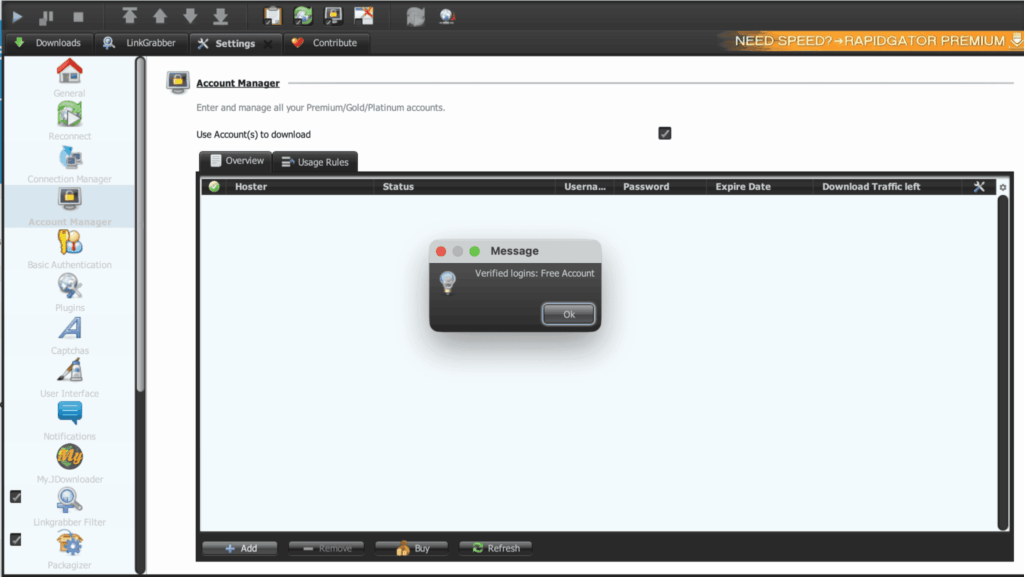
We added the FileQ account inside JDownloader 2’s Account Manager and pointed it at premium links from our test set. JD2 processed the login without error, but the verification message it returned was blunt:
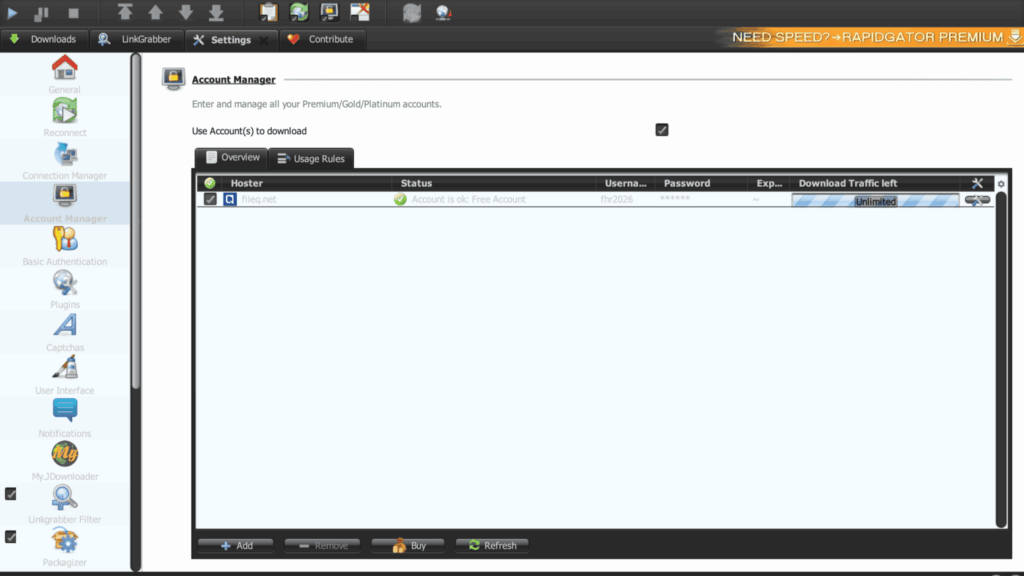
The Account Manager view backed this up — Hoster listed as fileq.net, Status “Account is ok: Free Account,” Download Traffic left showing “Unlimited,” despite this being an active paid subscription.
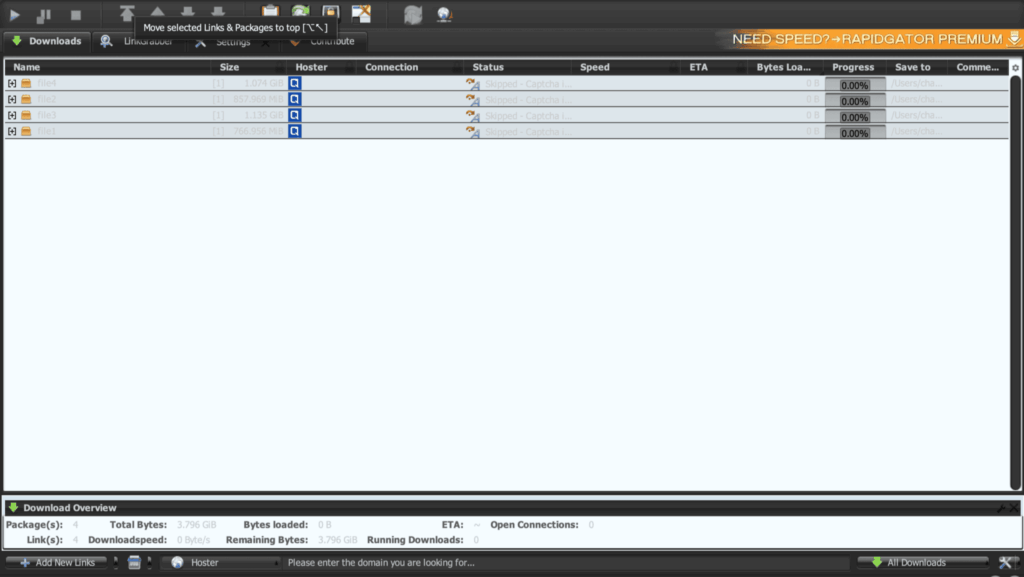
Because JD2 treated the account as free rather than premium, every link in our four-file test queue was skipped, with the Status column reading “Skipped — Captcha…” across the board and zero bytes transferred.
We didn’t stop at the test result. We contacted FileQ directly to ask whether this was a bug or expected behavior. The team confirmed that JDownloader 2 support is not currently available on FileQ. That’s a direct answer from the host itself, not something we’re inferring from a failed test.
What this means in practice: if your download habit involves queuing dozens of links in JD2 and walking away, FileQ premium will not do that for you right now. Treat it as a browser-download service, full stop.
Premium speed in the browser
Setting the JD2 limitation aside, FileQ Premium performed well where it’s actually designed to work — Chrome.
Before any file starts, FileQ runs an automated Cloudflare-style verification check.

Once that clears, the file does not start automatically. We had to click a final “Download” button ourselves for each file — a manual step that FileQ’s premium tier does not skip, unlike some competing hosts that auto-trigger the download after verification.
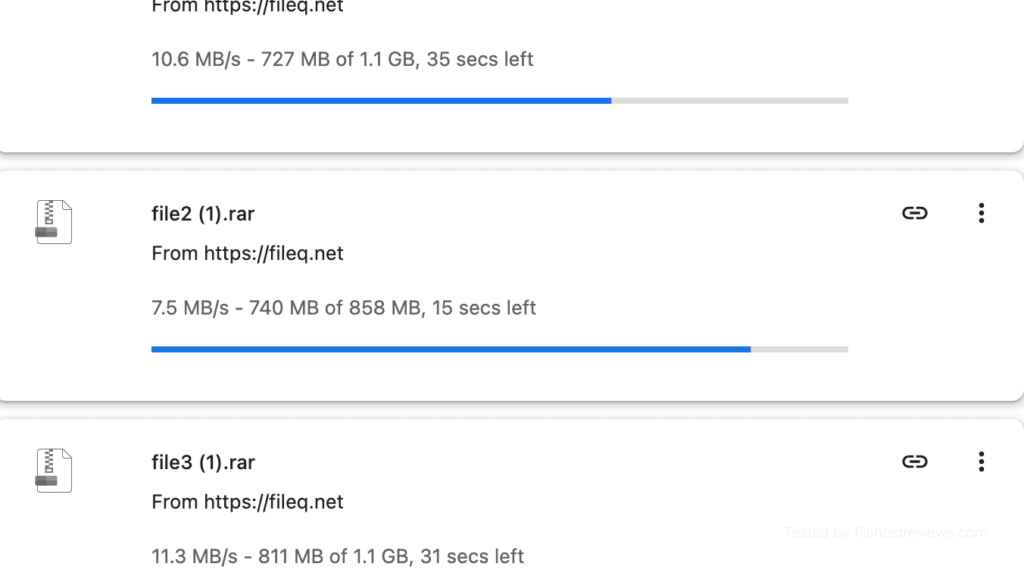
In our three-file Chrome test, individual files ran at 13.7 MB/s, 8.2 MB/s, and 5.7 MB/s.
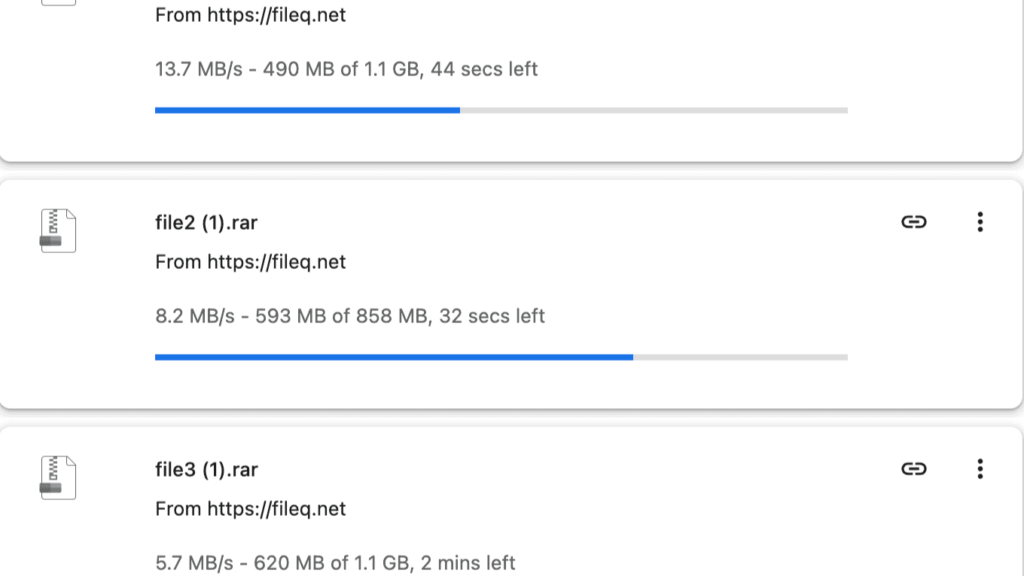
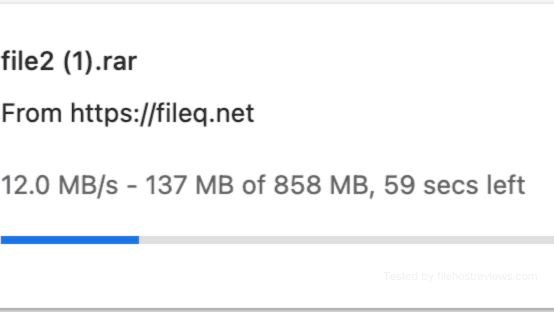
That’s a combined speed of roughly 27.6 MB/s — a strong browser-only result, especially for a host with no working automation layer to fall back on. We also saw a separate two-file run land at 10.6 MB/s and 7.5 MB/s, and another single file settle at a steadier 12.0 MB/s, suggesting the 27.6 MB/s figure wasn’t a one-off fluke but sits within a reasonably consistent range.
Browser verdict: if you’re downloading manually and don’t mind clicking a final button per file, FileQ Premium delivers genuinely competitive speeds. The moment you want a queue to run itself, this host stops being useful.
Free membership: faster than expected, still ad-driven
FileQ’s free tier is not a token gesture — it moved noticeably faster than many older file hosts we’ve tested that cap free users under 100 KB/s.
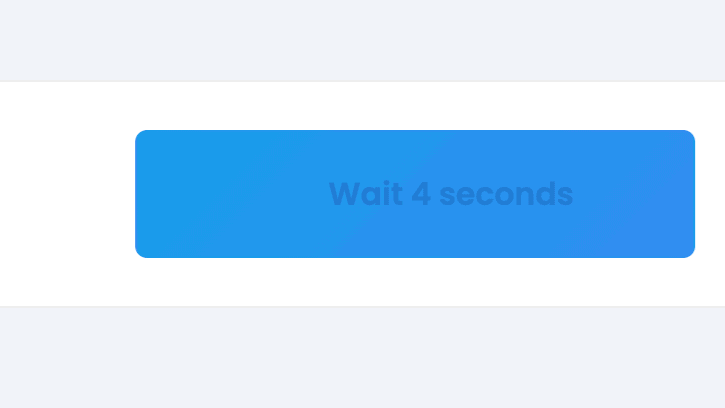
Before the download starts, free users hit a 10-second countdown.
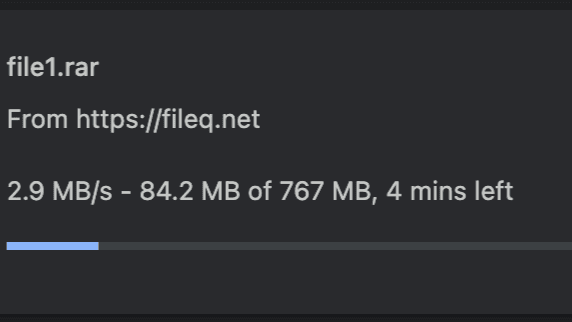
Once that cleared, our free download in Chrome ran at 2.9 MB/s — slow next to premium’s 27.6 MB/s combined result, but far ahead of the sub-100-KB/s free tiers common elsewhere in this category.
Full free-tier notes from our test:
- ~2.9 MB/s measured download speed
- 10-second wait before the download link unlocks
- Popup ads and short redirect behavior during the flow
- No parallel downloads confirmed
Verdict on the free tier: usable for occasional small files, and faster than most comparable free hosts. For repeated archive downloads, the ads and manual steps still make Premium the smoother option — the free tier’s speed advantage over other hosts doesn’t erase the friction.
Setting up FileQ in JDownloader 2
We’re documenting this step even though the outcome above makes clear it doesn’t lead anywhere useful for premium automation — it’s still worth showing exactly where it breaks down.
Searching “fileq” in JD2’s Account Manager surfaces fileq.net, listed with “Cookie login optional” in the Typ/Features column.
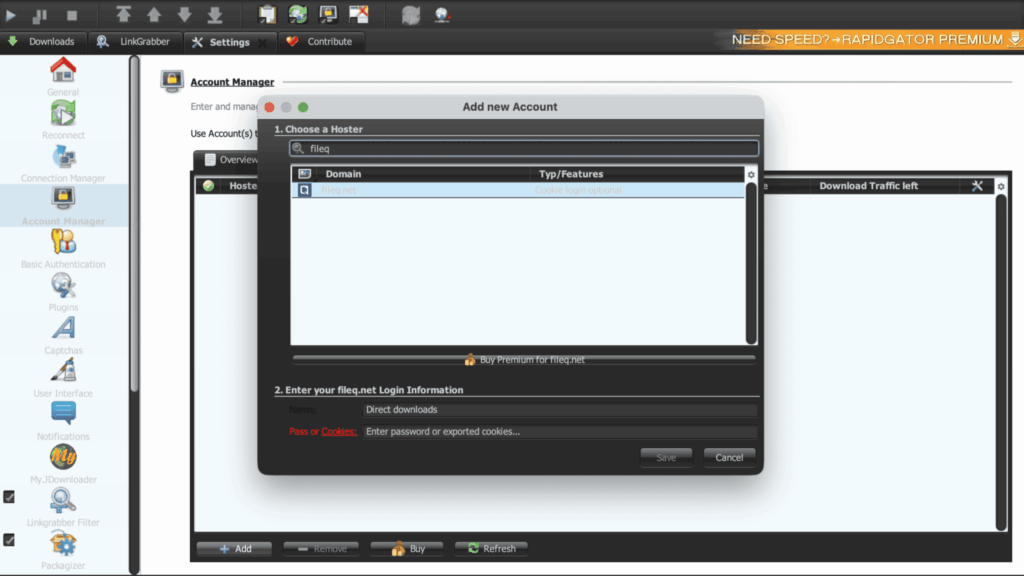
The login itself goes through without error — JD2 accepts the credentials and syncs the account profile.
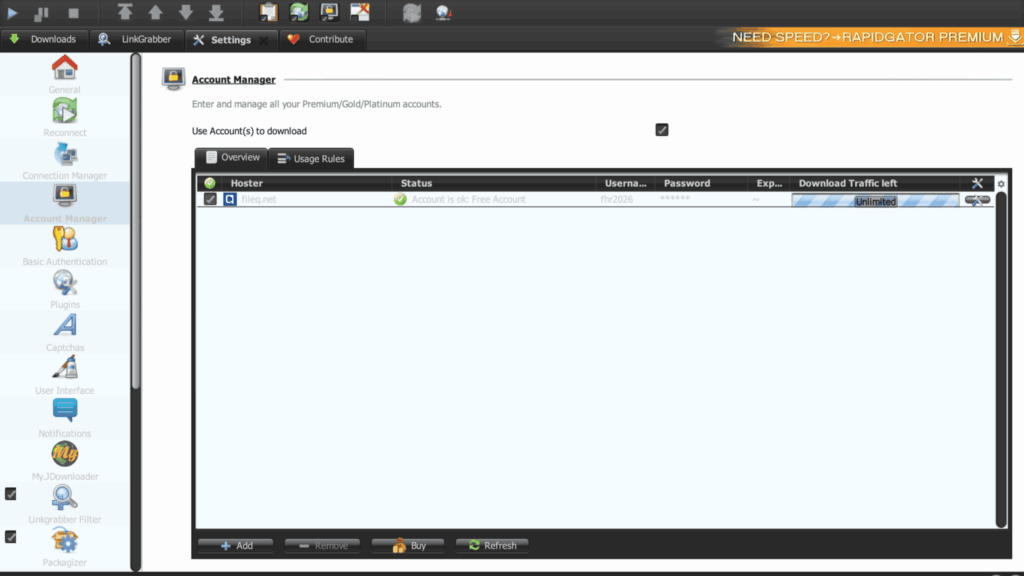
The problem only surfaces at the verification step, where JD2 labels the account “Free Account” rather than premium — which is exactly what drives the skipped-download behavior covered above.
Tip: don’t rely on JD2’s account status message alone to confirm premium activation on any host. On FileQ specifically, we now know this reading is accurate — it really is being treated as free — but it’s a good habit generally to cross-check with a manual browser login too.
Pricing
| Plan | Price | Daily bandwidth | |
|---|---|---|---|
| Premium User (tested) | $4.99/month | 977GB reported | Buy Premium User |
| Premium Plus | Listed separately, not tested | Not verified | Check Premium Plus → |
We only tested Premium User. Given that JD2 support is confirmed unavailable at any tier per FileQ’s own team, we wouldn’t assume Premium Plus fixes the automation gap — verify directly with FileQ support before paying for the higher tier if that’s your reason for upgrading.
Our recommendation: start with the shortest Premium User term available. This host is a fit for a specific workflow (manual Chrome downloads), and confirming that fit before committing longer makes more sense than betting on Premium Plus solving a problem FileQ has already told us it doesn’t solve.
Pros and cons
Pros
- Free-tier speed (~2.9 MB/s) faster than many older file hosts in our test
- Premium browser downloads reached a combined ~27.6 MB/s across three active files
- Multiple Chrome sessions produced consistent results in the 7–14 MB/s per-file range
- Premium User tier showed a large reported daily bandwidth allowance (977GB)
- FileQ support responded directly when we asked about JD2 compatibility
Cons
- JDownloader 2 does not recognize the premium account — confirmed unsupported by FileQ directly
- JD2 skipped all four test links on captcha because the account read as free
- Premium downloads still require a manual final “Download” click, even after verification clears
- Free tier includes popup ads and redirect friction
- We did not test Premium Plus, so its behavior and pricing are unverified
- File availability depends on uploader mirrors, same as other secondary hosts
Who should buy FileQ premium?
Buy it if:
- You download manually through Chrome and don’t need a queue to run unattended
- Your target files are specifically hosted on FileQ
- You’re fine clicking a final “Download” button per file, even on premium
- The reported 977GB daily allowance comfortably covers your usage
Skip it if:
- Your workflow depends on JDownloader 2 or any download-manager automation — FileQ has confirmed this isn’t supported
- You’re downloading many archive parts and want a queue you can walk away from
- You were hoping Premium Plus would add JD2 support — we have no evidence it does, and haven’t tested it
Verdict
Rating: 6/10
FileQ Premium is strongest for one specific type of user: someone downloading manually through Chrome who doesn’t mind an extra click per file. Judged only on that basis, it performs well — a combined 27.6 MB/s across three active browser downloads is a genuinely strong result, and the free tier’s 2.9 MB/s is faster than a lot of the competition in this category.
But the JD2 situation isn’t a minor caveat — it’s a hard limitation FileQ itself confirmed to us directly. JD2 detected our paid account as free, skipped every link in our test queue on captcha, and there’s no premium tier we tested that fixes it. If your downloading habit is built around queuing links and letting a download manager handle the rest, FileQ premium will not do that job right now.
Know which kind of downloader you are before you pay. If you’re comfortable clicking through Chrome manually and your files are on FileQ, the Premium User plan delivers on speed. If you need automation, this isn’t your host — look at something with confirmed JD2 support instead.
View FileQ Premium Options →Frequently asked questions
How fast is FileQ premium?
In our June 2026 test, Chrome premium downloads reached a combined ~27.6 MB/s across three active files, with individual files ranging from 5.7 to 13.7 MB/s. Free-tier speed measured around 2.9 MB/s.
Does FileQ work with JDownloader 2?
No. In our test, JD2 detected the premium account as a free account and skipped all links on captcha. FileQ’s own support team confirmed that JDownloader 2 support is not currently available.
Why does my FileQ premium download need a manual click?
FileQ’s automated verification step clears the captcha/security check automatically, but it does not auto-start the file afterward. You still need to click the final “Download” button yourself for each file — even on the paid tier.
Is the FileQ free tier usable?
Yes, more than most. We measured about 2.9 MB/s with a 10-second wait and some popup ads — usable for small files, though repeated large downloads still favor premium.
What’s the difference between FileQ Premium User and Premium Plus?
We only tested Premium User ($4.99/month, 977GB daily bandwidth reported at test time). Premium Plus is priced and listed separately on FileQ’s own pricing page, but we have not tested it — treat its features and any JD2 compatibility claims as unverified.
Is FileQ better than hosts with JD2 support?
Not for automation. If your workflow depends on a download manager, FileQ isn’t a fit — its own team confirmed JD2 isn’t supported. For manual Chrome downloads, FileQ’s speed is competitive with hosts that do support JD2.
Related: Best File Hosting Services · Fastest File Hosts Tested · JDownloader Compatible File Hosts · Cheapest Premium File Hosts