
Tested: May 2026 · Plans: $15.95 / month to $117.95 / year · Traffic: Reported as “Unlimited” in JD2, but third-party sources list a 50 GB/day cap
FileSpace is a mid-tier file host that shows up as a mirror alongside bigger names. We bought a premium account, ran the same multi-file archive set through Chrome and JDownloader 2, and measured the free tier on an identical file for comparison.
Short answer: FileSpace premium reached 17.64 MiB/s combined in JDownloader 2 across six active downloads, but single-file speed — in both Chrome and JD2 — never rose much above 3 MB/s. The reason is the same pattern we’ve now confirmed on multiple budget hosts: FileSpace allows only one connection (1 chunk) per file. Speed comes entirely from running many files at once, not from accelerating a single one.
Get FileSpace Premium →Affiliate link. See our disclosure.
Test results summary
| Free tier (guest) | Free tier (registered) | Premium | |
|---|---|---|---|
| Speed (single file) | ~54.4 – 60 KB/s | ~100 KB/s | 2.7 – 3.0 MB/s |
| Speed (combined, JD2, 4 files) | Not available | Not available | 11.66 – 11.85 MiB/s |
| Speed (combined, JD2, 6 files) | Not available | Not available | 17.49 – 17.64 MiB/s |
| Speed (combined, Chrome, 3 files) | Not available | Not available | ~9.0 MB/s |
| Wait before download | 57 seconds + hCaptcha | Same | Instant |
| Connections per file | 1 | 1 | 1 |
| Parallel downloads | ✘ | ✘ | ✔ Confirmed in JD2 and Chrome |
| Daily traffic | Not applicable | Not applicable | Shown as “Unlimited” in JD2; third-party sources report 50 GB/day |
| Ads | Heavy pop-ups | Heavy pop-ups | None seen in our test |
| JD2 support | Not usable | Not usable | ✔ Verified first try |
| Price | Free | Free | $15.95/month · $117.95/year |
Tested May 2026 across a set of four to six files (~4.7 GiB total queue). All figures are from our own downloads.
The 1-connection limit — a pattern we’re now seeing across budget hosts
This is the finding that decides who FileSpace is actually good for, and it’s the same restriction we flagged on both DDownload and Upstore.
Look at the Connection column in our JDownloader 2 screenshots. Every file, in both the four-file and six-file test, shows [1]. That’s the chunk count — the number of simultaneous connections JD2 is allowed to open per file.
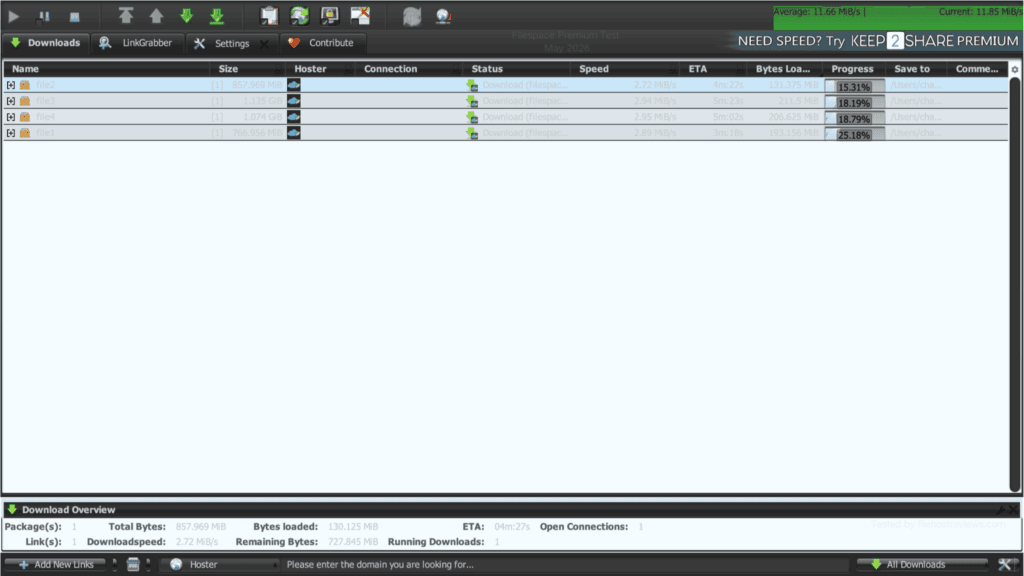
Most premium hosts let a download manager split one file across multiple connections. FileSpace does not permit this. Instead, the model rewards running many files in parallel, each on its own single connection — exactly the same behavior we measured on DDownload and Upstore.
What this means in practice:
| Your download looks like | FileSpace result |
|---|---|
| One large single file | Capped around 2.7–3.0 MB/s. Nothing in JD2’s settings changes this. |
| Multi-part archive or a queue of several files | Good — each file adds its own connection, and the combined total climbs steadily. |
In our four-file run, per-file speeds clustered tightly at 2.72–2.95 MiB/s, combining to 11.66 MiB/s. In the six-file run, per-file speeds were similarly tight at 2.86–3.03 MiB/s, combining to 17.64 MiB/s. Unlike DDownload’s more erratic per-file variance, FileSpace’s individual connections were remarkably consistent across both test runs — the aggregate scales almost linearly with the number of active files.
Tip: raising “max chunks” in JD2 will do nothing for FileSpace. Raise max simultaneous downloads instead — that’s the setting that actually affects your speed here.
Premium speed in JDownloader 2
Our first JD2 test queued four files (~3.8 GiB) simultaneously.
Result: 11.66 MiB/s combined, with the average settling at 11.85 MiB/s. Per-file speeds ranged 2.72–2.95 MiB/s, tightly clustered around the connection cap.
We then scaled up to a six-file queue to see how far the parallel-connection model would stretch.
Result: 17.64 MiB/s combined, with current throughput peaking at 17.49 MiB/s. Per-file speeds this time were 2.86, 2.94, 2.95, 2.72, 3.03, and 2.89 MiB/s — six files, six connections, almost perfectly even distribution.
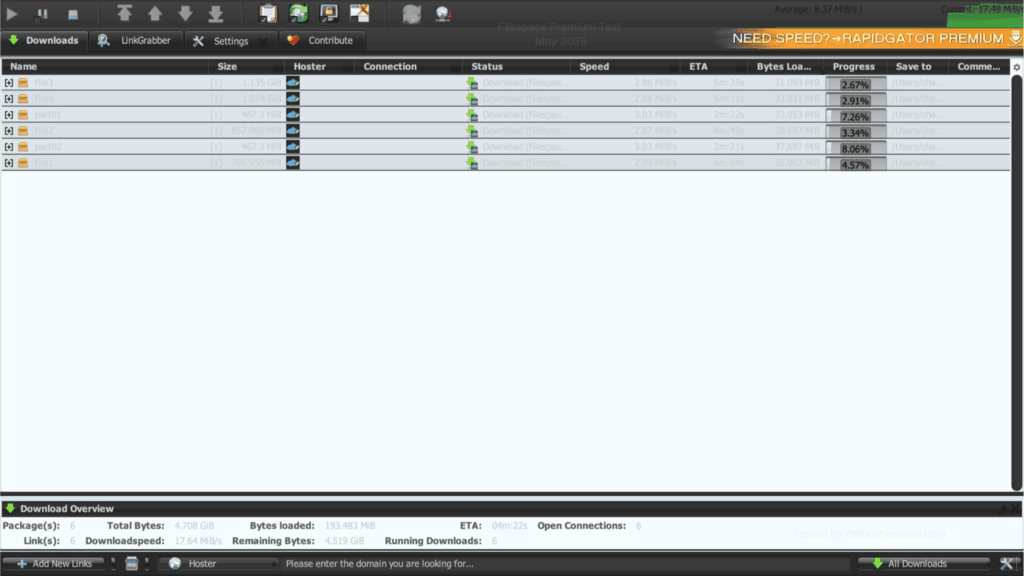
The scaling from four files (11.66 MiB/s) to six files (17.64 MiB/s) works out to almost exactly ~2.9 MiB/s per additional connection — a cleaner, more predictable ratio than we’ve seen on some other 1-chunk hosts. If this holds, adding more simultaneous downloads should continue to add roughly proportional throughput, up to whatever connection ceiling FileSpace enforces server-side (untested beyond six in our session).
Premium speed in the browser
FileSpace Premium removed the free-tier waiting steps in Chrome, but single-file speed stayed capped at the same level we saw in JD2.
A single premium download in Chrome held around 2.7 MB/s.
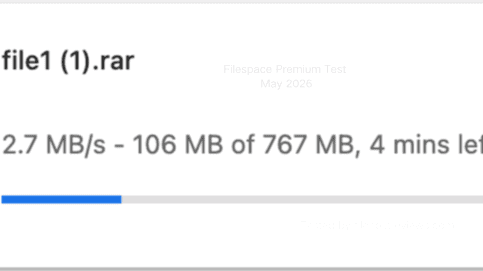
We then queued three files at once in Chrome. They ran at 2.8, 2.6, and 3.0 MB/s — a combined ~8.4 MB/s, close to the 9 MB/s ceiling we measured across repeated sessions.
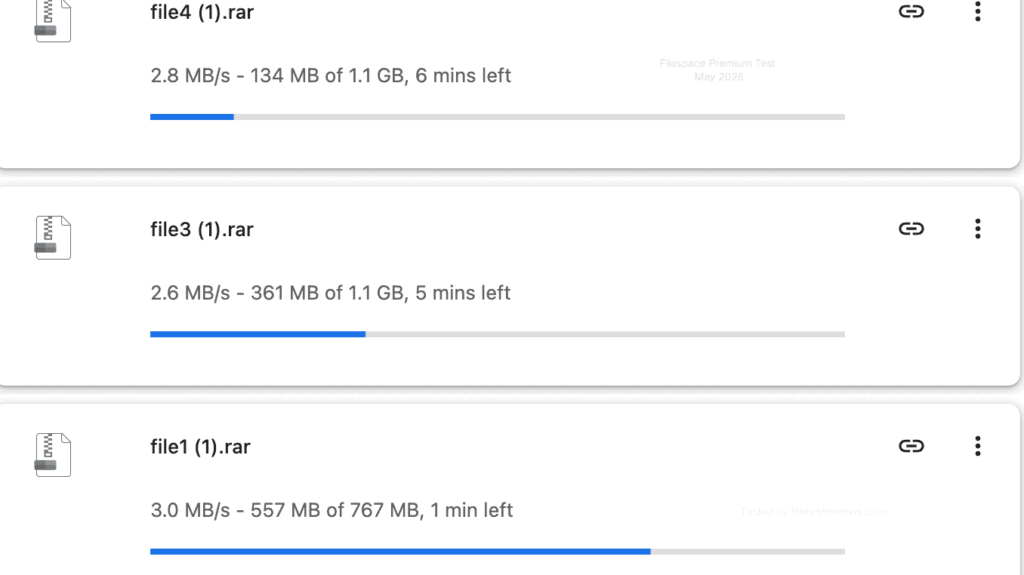
Browser vs JD2 verdict: JD2 pulled ahead once the queue grew past three files (17.64 MiB/s at six files vs ~9 MB/s at three browser tabs), simply because JD2 handles larger parallel queues more comfortably than juggling browser tabs. If you only ever run one or two downloads at a time, the gap between browser and JD2 barely matters here — both are capped by the same per-file ceiling.
Free membership: what you actually get
FileSpace’s free tier stacks several friction points on top of the slow speed.
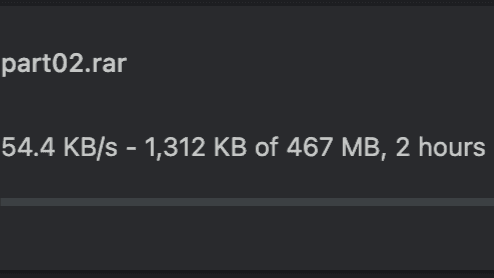
Unregistered guest downloads averaged around 54.4–60 KB/s in our test.
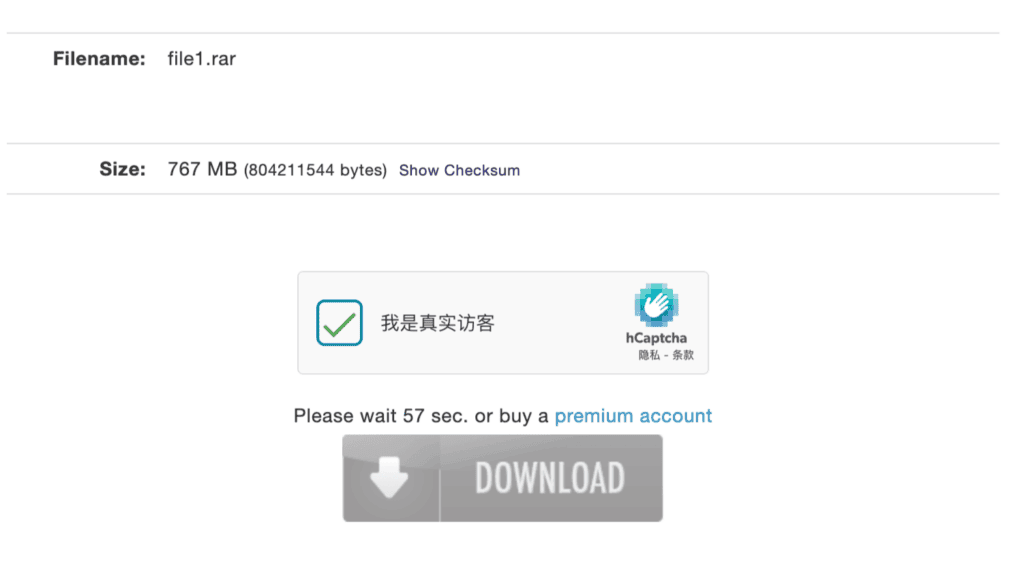
Before the download starts, free users face an hCaptcha and a wait timer. Our test measured 57 seconds.
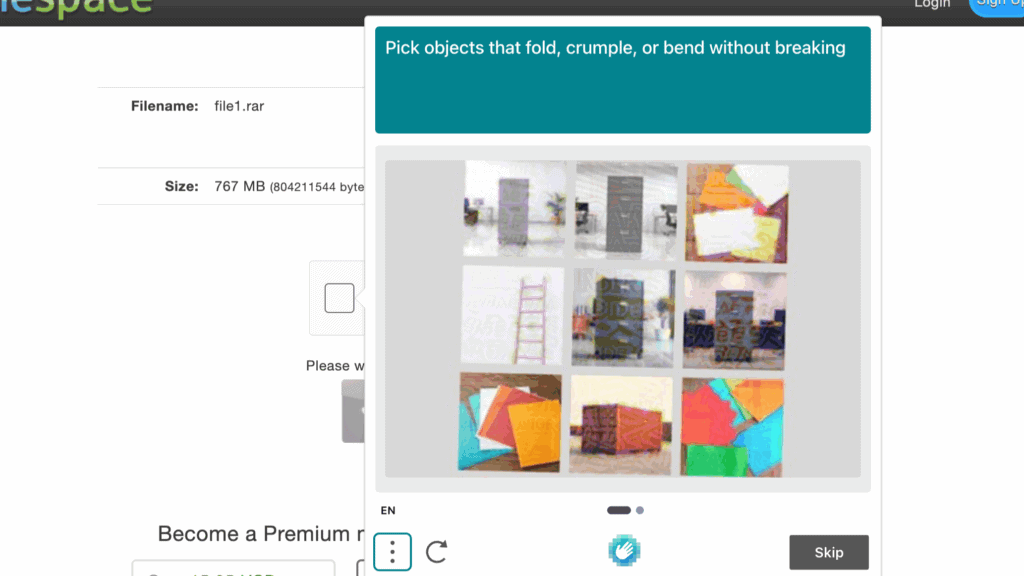
In one session, the hCaptcha step escalated into a secondary image-selection challenge — a more demanding verification than the single-click checkbox we saw on other hosts.
A registered free account improved the limit to roughly 100 KB/s, but that’s still impractical for anything beyond very small files.
Full free-tier restrictions:
- ~54–60 KB/s (guest) or ~100 KB/s (registered) measured download speed
- 57-second wait plus hCaptcha before each download
- Occasional escalation to a full image-selection captcha
- No parallel downloads — one file, one thread
- Heavy pop-up advertising throughout the download path
- No download resume confirmed
Verdict on the free tier: usable only to confirm a link is alive or grab a very small file. The stacked captcha steps make it more tedious than most hosts we’ve tested.
See Current FileSpace Plans →Setting up FileSpace in JDownloader 2
This part went smoothly and took only a few seconds.
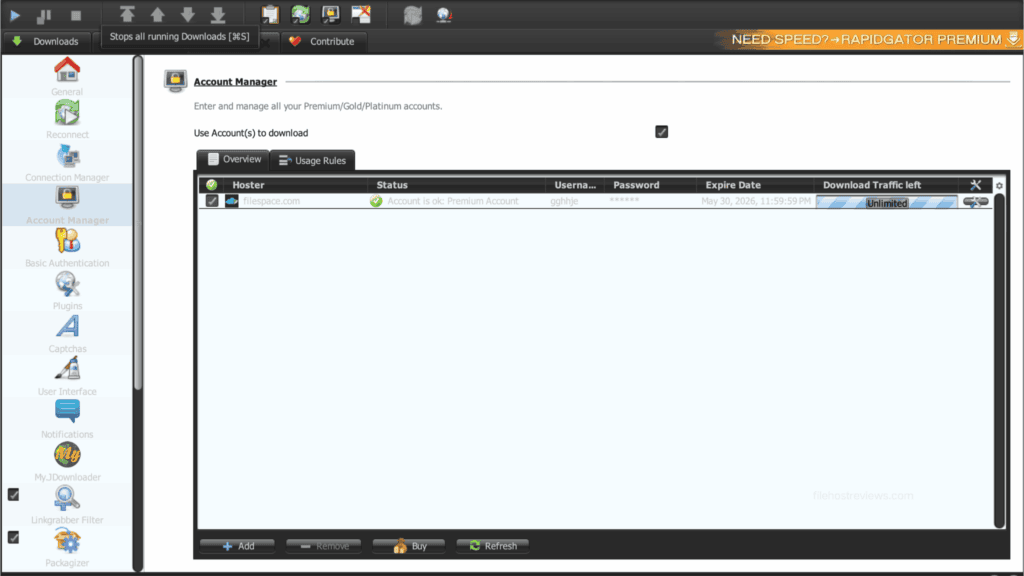
Step 1 — Open Settings → Account Manager → Add, then search “filespace.com”. It appears with “Cookie login optional” in the Typ/Features column — standard login works fine, cookies are only a fallback.
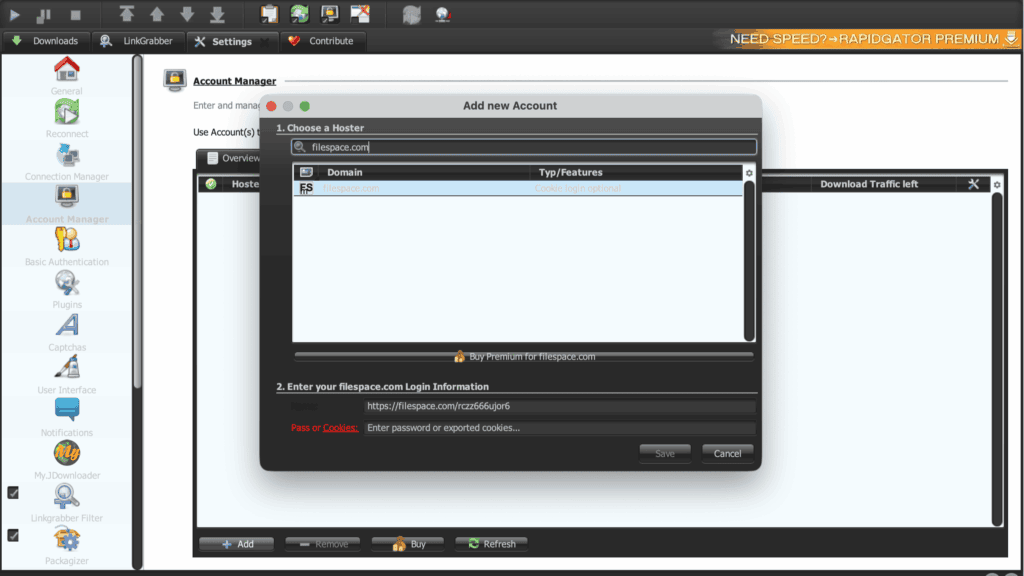
Step 2 — Enter your credentials and save. Our account was recognized on the first attempt.
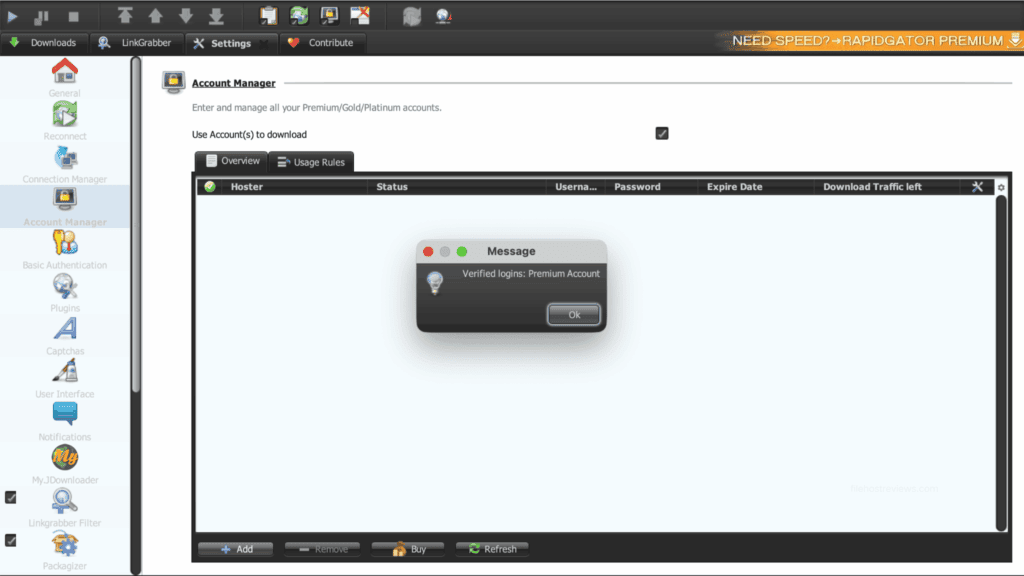
No extra manual verification step was needed here, which puts FileSpace ahead of some other budget hosts we’ve tested on setup friction, even though its per-file speed is lower.
Daily traffic: an unresolved discrepancy
This is worth flagging directly. In our JD2 Account Manager screenshot, the Download Traffic left field showed “Unlimited” for our premium account. However, independent third-party sources list FileSpace’s premium traffic cap at around 50 GB per day.
We could not fully reconcile this discrepancy in our test window — our download volume did not approach 50 GB in a single session, so we can’t confirm which figure reflects reality at higher usage. Treat “Unlimited” with caution and verify current traffic rules directly with FileSpace before running a very large queue, especially if you’re planning multi-day, high-volume downloading.
Pricing
| Plan | Price | Effective per day | |
|---|---|---|---|
| 30 days | $15.95 | ~$0.53/day | Buy 30 Days |
| 90 days | $39.95 | ~$0.44/day | Buy 90 Days |
| 330 days | $117.95 | ~$0.36/day | Buy 330 Days |
Pricing sits in the mid-range for budget hosts — more expensive per day than DDownload’s €3.33/month annual rate, but with a similar 1-connection-per-file model.
Our recommendation: start with the 30-day plan. Confirm the actual daily traffic cap with support before committing to a longer plan, given the “Unlimited” vs 50 GB/day discrepancy noted above.
Customer support
We found no live chat option for FileSpace during our test or in public reviews. Support appears to run through ticket/email channels only, with no published response-time guarantee.
If you see a review claiming instant or 24/7 live chat support for FileSpace, treat that claim with the same caution we’ve applied to similar unverified claims on other budget hosts.
Pros and cons
Pros
- 17.64 MiB/s combined in JDownloader 2 across six parallel files, with very consistent per-file speeds (2.72–3.03 MiB/s)
- Speed scaled almost linearly from four files (11.66 MiB/s) to six files (17.64 MiB/s)
- JD2 account verified on the first attempt, no extra captcha step
- Premium removed all free-tier waiting and captcha steps
- No ads seen on premium in our test
Cons
- 1 connection per file — single large files cap out around 2.7–3.0 MB/s regardless of plan
- Free tier is especially tedious: 54–100 KB/s, a 57-second wait, hCaptcha, and occasional image-selection captchas
- Daily traffic policy is unclear — JD2 shows “Unlimited” while third-party sources report a 50 GB/day cap
- No live chat support found; ticket/email only
- Pricing is higher per day than some comparable 1-chunk hosts like DDownload
Who should buy FileSpace premium?
Buy it if:
- Your downloads are multi-part archives or queues of several files at once — this is where the parallel-connection model pays off
- You already use JDownloader 2 and can keep a full queue running
- You need a secondary account to cover mirror links your primary host doesn’t carry
Skip it if:
- You mostly download single large files — the 1-connection limit caps you at roughly 3 MB/s, and no setting will fix it
- You need a confirmed, guaranteed daily traffic allowance — verify the “Unlimited” claim before relying on it for heavy use
- You want the lowest cost per day among 1-chunk hosts — DDownload’s allowance-to-price ratio is stronger
Verdict
Rating: 7/10
FileSpace is a workable secondary host for parallel downloaders, not a strong pick for single large files. In our test, six simultaneous JD2 downloads reached a combined 17.64 MiB/s, scaling in a clean, predictable way from our four-file result of 11.66 MiB/s.
But the same restriction that governs DDownload and Upstore applies here too: one connection per file. A single large archive tops out around 2.7–3.0 MB/s in both Chrome and JD2, no matter what plan you buy. The free tier is also more tedious than most, stacking an hCaptcha, a 57-second wait, and occasionally a full image-selection challenge on top of 54–100 KB/s speeds.
Test it with the shortest plan first, and get a direct answer on the daily traffic cap before running a large queue — our test surfaced an unresolved gap between what JD2 reports (“Unlimited”) and what third-party sources describe (50 GB/day).
Check FileSpace Premium Plans →Frequently asked questions
How fast is FileSpace premium?
In our May 2026 test, 17.64 MiB/s combined in JDownloader 2 across six parallel files, and 11.66 MiB/s across four parallel files. Single-file speed capped around 2.7–3.0 MB/s in both Chrome and JD2.
Why is my FileSpace premium download slow?
Most likely the 1-connection limit. FileSpace allows only one connection per file, so a single large file cannot be accelerated past roughly 3 MB/s. Queue several files simultaneously instead, and raise “max simultaneous downloads” in JD2 rather than “max chunks.”
Does FileSpace work with JDownloader 2?
Yes. Our premium account was verified on the first attempt using standard credentials, with cookie login available as an optional fallback.
What is FileSpace’s daily traffic limit?
Unclear. JD2’s Account Manager displayed “Unlimited” for our premium account, but third-party sources report a 50 GB/day cap. Verify directly with FileSpace before planning very large downloads.
Is the FileSpace free tier usable?
Only for very small files. We measured 54–60 KB/s for guests (up to ~100 KB/s registered), a 57-second wait, an hCaptcha step, and occasionally a secondary image-selection captcha.
How much does FileSpace premium cost?
$15.95 for 30 days, $39.95 for 90 days, or $117.95 for 330 days (about $0.36/day on the longest plan).
Is FileSpace better than DDownload?
Both share the same 1-connection-per-file model. DDownload offers a clearer, confirmed 200 GB/day allowance at a lower effective daily cost, while FileSpace’s traffic policy is harder to pin down. If your downloads are multi-file queues and cost-per-GB matters most, DDownload is the stronger pick. → Compare alternatives
Related: Best File Hosting Services · Fastest File Hosts Tested · JDownloader Compatible File Hosts · Cheapest Premium File Hosts