
Affiliate disclosure: we may earn a commission if you buy through links on this page. This does not affect our test results or scoring. See our editorial policy.
KatFile is a budget-tier file host that shows up frequently as a mirror on file-sharing and archive pages, often positioned as the cheaper alternative to Rapidgator. We bought a premium key to see whether the low pricing means a poor experience — and the results were mixed in a specific way.
Short version: premium browser downloads were genuinely strong (up to 10.6 MB/s), and the daily traffic allowance was generous (around 200GB). The problem was JDownloader 2. During our test, KatFile’s download links resolved through katfile.space — a different domain than expected — and JD2’s account integration behaved inconsistently as a result.
Our Real-World Setup:
- Internet: 1Gbps fiber line
- Gear: Mac running Google Chrome & JDownloader 2 (JD2)
- Testing Account: KatFile Premium (200GB Daily Traffic Tier)
Our KatFile review is based on browser download checks, JDownloader 2 compatibility testing, free-tier restrictions, premium account limits, payment experience, and real-world usability. Read our full testing methodology.
Skip the 120-minute free-tier lockout
Premium removes the Cloudflare gate, the popups, and the 2-hour wait between free downloads. Chrome reached up to 10.6 MB/s in our test.
Get KatFile PremiumSeptember 2026 warning: KatFile has temporarily blocked a large number of Lifetime Premium accounts while conducting a platform-wide review. Some legitimate users may need to contact support before access is restored. We do not currently recommend purchasing the Lifetime plan.
Quick Summary
| Test Area | Result in Our Test | Notes |
|---|---|---|
| Free speed | ~90–100 KB/s | Usable only for very small files |
| Free download restriction | 1 file per 120 minutes | Major bottleneck for repeat downloads |
| Free-tier extras | 30s countdown + Cloudflare check + popups | Multiple steps before the real link appears |
| Premium Chrome single file | Up to 10.6 MB/s | Consistent across our test files |
| Premium Chrome multi-file | 6.0–9.4 MB/s per active file (4 files at once) | Good aggregate throughput |
| JDownloader 2 reliability | Inconsistent | Domain seen as katfile.space, not .com |
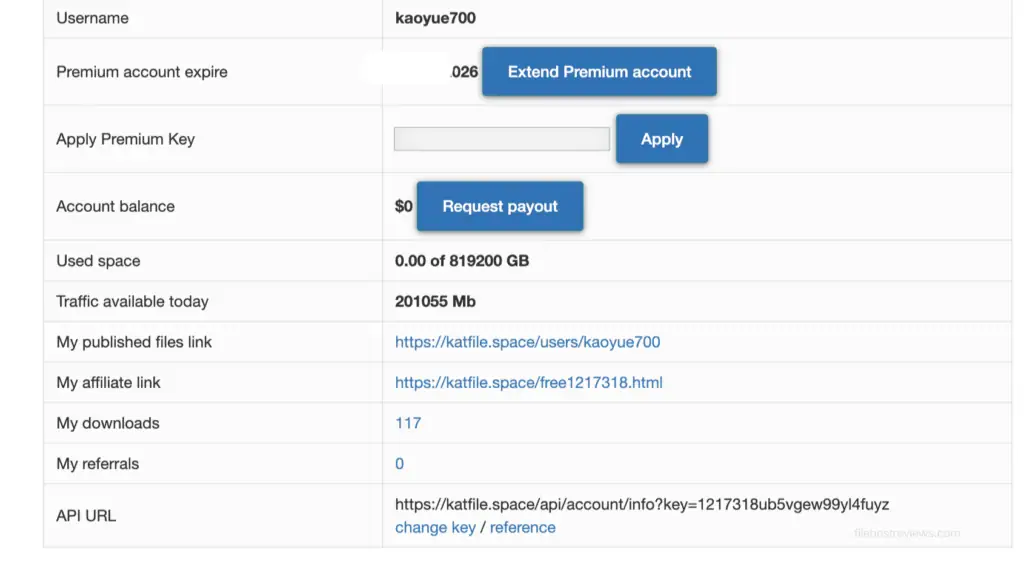
| Daily traffic allowance | ~200GB (201,055 MB shown in our dashboard) | Varies by plan — confirm before buying |
| Pricing tested | $7.99 / 2 days, $25.99 / 30 days, $199 / 365 days, $699 / Lifetime | See full pricing table below |
The Free Tier: 30 Seconds, Cloudflare, and a 2-Hour Lockout
Trying to use KatFile without paying is exactly what you’d expect from an older-school file host — a slow, multi-step process that’s hard to use for regular downloads.
The 30-second countdown. Click a link and you’re immediately forced to wait out a countdown while a green banner reminds you how much time you’re losing, with a message like “Download will start after 14 seconds.”

The Cloudflare gate. Once the timer hits zero, a Cloudflare success checkbox appears. You have to clear this security check before the platform will even generate a download token.

Popups and redirect loops. After confirming, be ready for a couple of extra tabs to open — typically a generic upsell and, in our test, a more aggressive ad we won’t screenshot here.
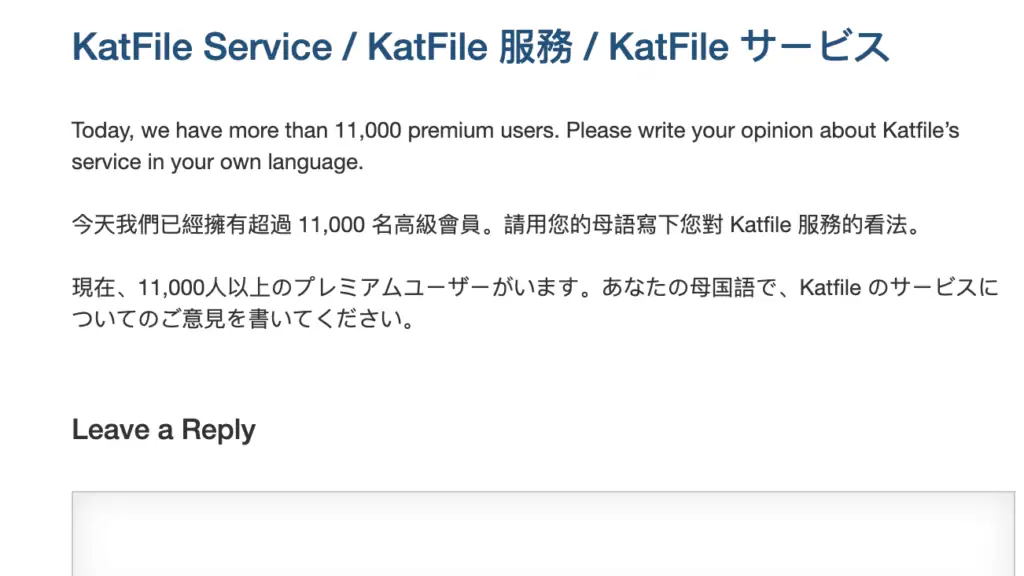
Decent speed, brutal lockout. Once the file actually starts in Chrome, free speed isn’t terrible — it held around 90–100 KB/s in our test. The real deal-breaker is what happens next: KatFile locks your IP for a 120-minute cooldown before you can start another file.
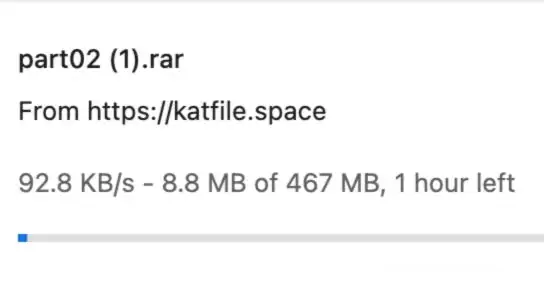
The 120-minute rule is the real cost of “free”
Even at a tolerable 90–100 KB/s, downloading a multi-part archive on the free tier means waiting two full hours between each part. For anything beyond a single small file, this makes the free tier impractical.
Why JDownloader 2 Was Not Reliable in Our Test
This is the section that matters most if your workflow depends on automation.
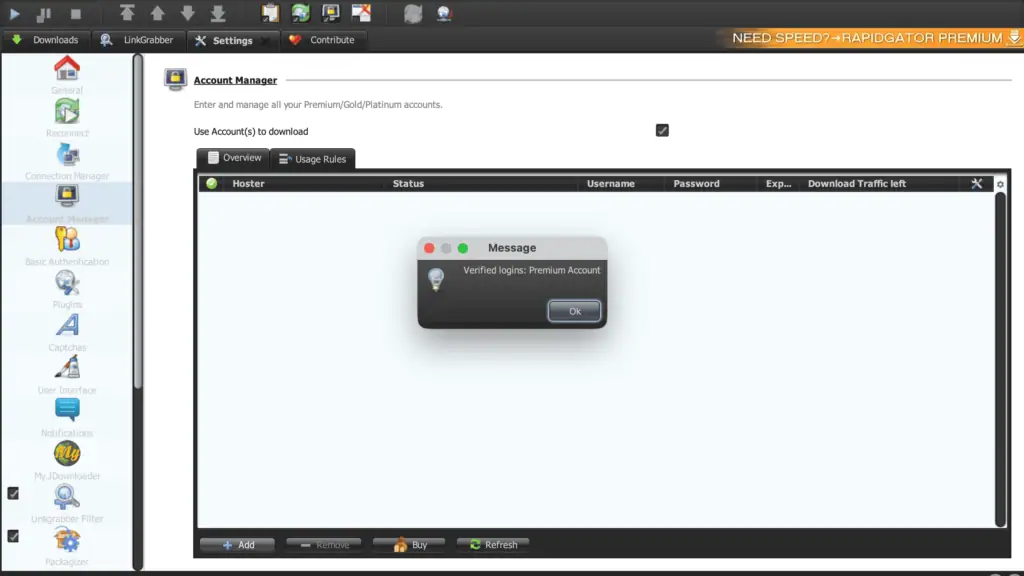
We added the KatFile account inside JD2’s Account Manager without trouble — the plugin found the host under the domain katfile.space, not katfile.com. That mismatch alone is a signal: KatFile has changed domains before, and it can change again with no warning.
Once added, downloads did not work reliably. Some links failed to parse correctly during our session. This lines up with a pattern reported elsewhere by JDownloader and Reddit users whenever KatFile’s live domain shifts: the plugin or the stored account can fall out of sync until an update or re-verification catches up.
Because of this, we switched back to direct browser downloads for our main premium speed test — and browser downloads worked every time, since they authenticate against whatever domain is currently live rather than a domain saved in JD2’s settings.
⚠️ Practical takeaway
This doesn’t mean KatFile will never work in JD2 — plugin behavior can change after updates on either side. But based on our test session, we would not rely on KatFile for unattended JD2 queues. Treat the browser as the primary method, not a fallback.
Don’t build your JD2 queue around KatFile alone
If your workflow depends on unattended downloading, pair KatFile with a more JD2-stable host — or plan to download it manually through Chrome.
See KatFile AlternativesPremium Browser Speed: Strong Results in Chrome
KatFile performed much better in Chrome than in JDownloader 2 during our test.
A single premium browser download reached about 10.6 MB/s. That’s already usable for large archive files on its own — but the more interesting result came from running several downloads at once.
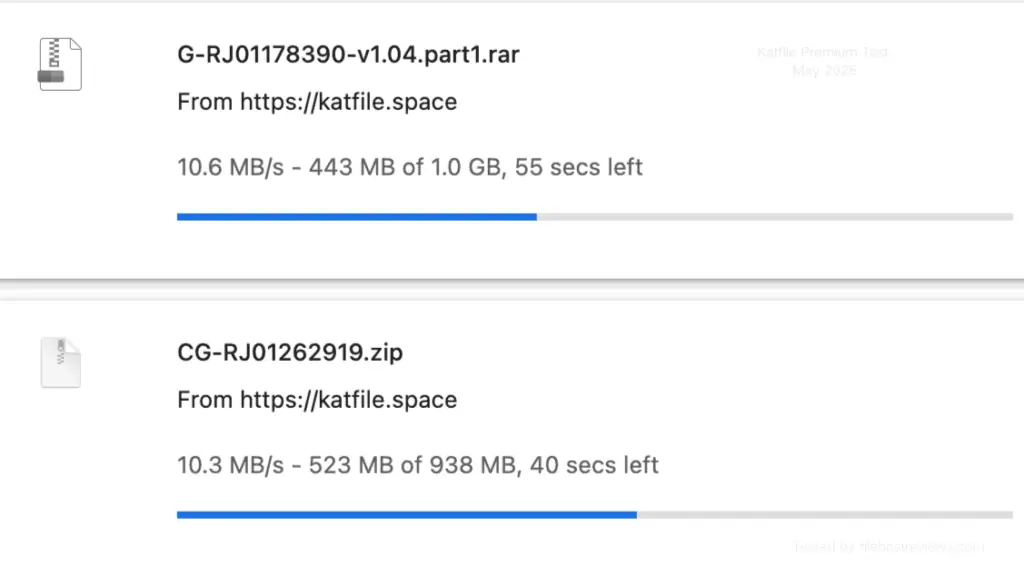
In our multi-file Chrome test, four active downloads ran simultaneously at 6.0, 9.4, 7.6, and 7.1 MB/s — a combined throughput well above what a single connection alone would suggest. A separate two-file session showed 10.6 and 10.3 MB/s side by side, both close to the single-file ceiling.
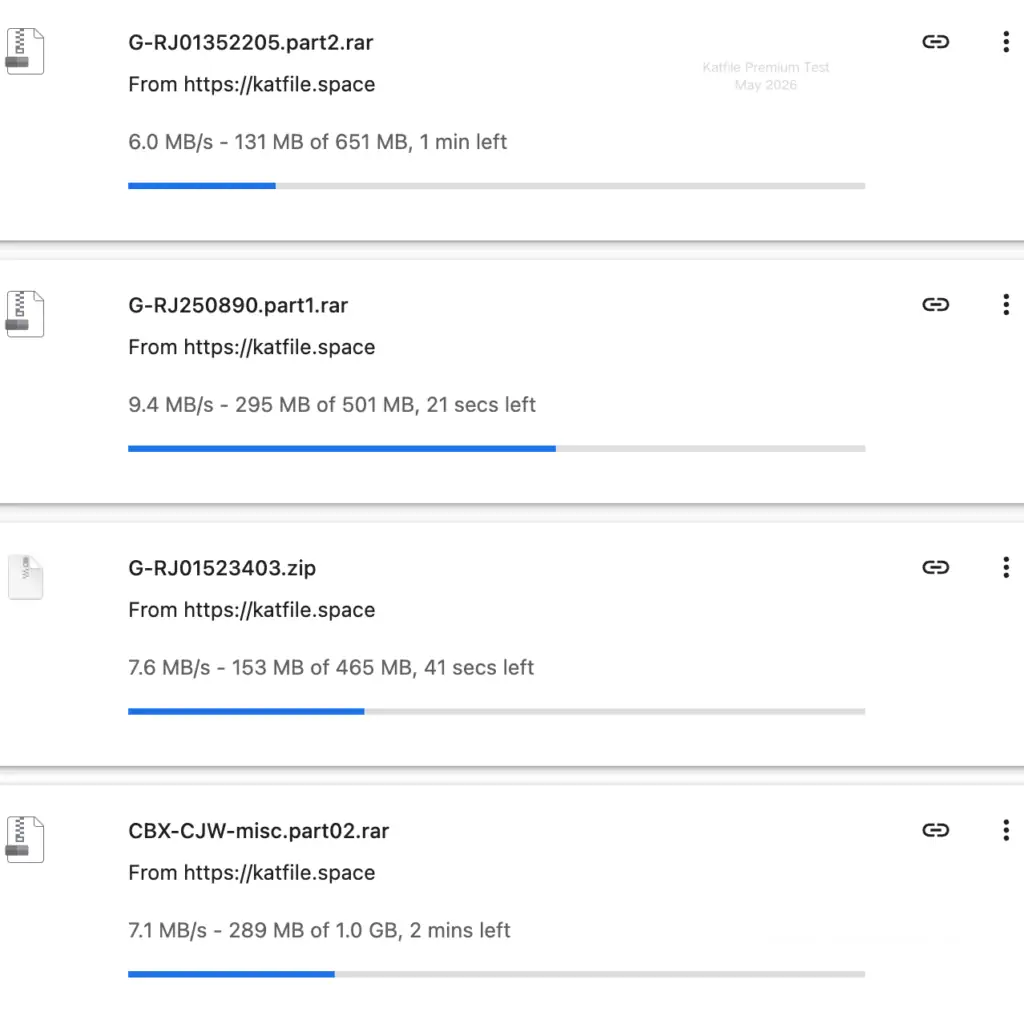
This made KatFile noticeably more practical for browser-based downloading than we initially expected, given its budget positioning.
Speeds can vary by region, ISP routing, server load, account tier, and the number of active downloads.
Daily Traffic Allowance: Around 200GB in Our Tested Tier
Our KatFile premium account dashboard showed 201,055 MB (about 196GB) of traffic available for the day, on a plan with an 819,200 GB total storage ceiling.
That’s a strong daily allowance for users downloading large archive sets — enough to pull several dozen gigabytes without hitting a wall, assuming your connection can use it. Traffic limits can vary by plan tier, reseller offer, or current pricing rules, so always confirm the current daily figure before buying.
Check the current daily traffic allowance
Traffic limits and plan terms can change — confirm the live numbers before committing to a longer plan.
View KatFile PlansKatFile Pricing (2026)
| Plan | Price | Best For |
|---|---|---|
| 2 Days | $7.99 | One-off downloads, testing browser speed before buying more |
| 30 Days | $25.99 | Short-term projects, first-time buyers |
| 365 Days | $199 | Regular users who mainly download via browser |
| Lifetime | $699 | Heavy long-term users who accept the domain-change risk |
Before buying Lifetime
A $699 Lifetime plan is only good value if the service stays reachable long-term. Given the domain shift we saw mid-test (`katfile.space`), we recommend starting with the $7.99 2-day plan to confirm the current domain, login flow, and browser speed before committing to 365-day or Lifetime pricing.
Who KatFile Premium Is For
A good fit if you:
- mainly download through Chrome or another browser, not JD2
- want a large daily traffic allowance (~200GB) at a budget price
- only need occasional access and can use the 2-day or 30-day plan
- are comfortable checking for the current official domain before each session
Probably not the right host if you:
- need a fully unattended JDownloader 2 queue running for days at a time
- want a “set and forget” long-term plan without occasionally checking for domain changes
- are downloading only one or two small files and would rather stay on the free tier — the 120-minute lockout makes even that painful
- want the most JD2-stable option available — other hosts we tested were more consistent in JD2
Pros and Cons
Pros
- Strong Chrome download speed in our test (up to 10.6 MB/s)
- Multi-file Chrome downloads scaled well (4 files at once)
- Around 200GB daily traffic in our tested tier
- Cheap short-term options ($7.99 for 2 days)
- Commonly seen as a mirror across file-sharing communities
Cons
- JDownloader 2 was not reliable in our test
- Domain changed to katfile.space during our own session
- Free tier includes a 120-minute lockout between files
- Popups and redirects during free download testing
- Daily traffic limits may vary by plan or account tier
Verdict
KatFile Premium is strongest when used through a browser, not JDownloader 2.
The free tier is difficult to recommend for regular downloads. In our test, free downloads stayed around 90–100 KB/s, and the site added a countdown, a Cloudflare check, popups, and — worst of all — a 120-minute lockout before another file could start.
Premium was a much better experience in Chrome. A single browser download reached about 10.6 MB/s, and running several files at once produced strong combined throughput without much per-file penalty.
The main weakness is JDownloader 2. We could add the KatFile account, but link parsing wasn’t reliable during our test — and the domain resolving to katfile.space rather than .com is a clear sign that this host’s URLs move around more than most. Users who depend on JD2 automation may prefer DDownload, Rapidgator, or Uploadgig instead.
KatFile is worth testing with the $7.99 2-day plan first if your target files are hosted there and you’re comfortable using Chrome for downloads. Before buying a longer plan, verify the current daily traffic allowance, the live domain, and payment options.
Our take: browser downloads, not JD2
In our test, Chrome was the reliable path — around 10.6 MB/s on a single file. JDownloader 2 struggled after KatFile’s domain changed mid-test. Start with the shortest plan first.
Get KatFile Premium →KatFile FAQ
Is KatFile Premium worth it in 2026?
Yes, if you download mainly through a browser and want a large daily traffic allowance at a low price. It’s a weaker choice if your workflow depends on unattended JDownloader 2 automation, since JD2 was unreliable in our test.
How fast is KatFile Premium?
A single Chrome download reached about 10.6 MB/s in our test. Running four files at once in Chrome produced individual speeds between 6.0 and 9.4 MB/s, with strong combined throughput.
Does KatFile work with JDownloader 2?
It can, but not reliably. In our test, the account’s domain resolved to katfile.space, and JD2 had trouble parsing some links consistently. We recommend browser downloads as the primary method.
Why does KatFile keep changing domains?
We can’t speak to KatFile’s internal reasons, but during our own test the service resolved through katfile.space rather than katfile.com. Always verify the current official domain before logging in or paying.
How much does KatFile Premium cost?
As tested: $7.99 for 2 days, $25.99 for 30 days, $199 for 365 days, and $699 for Lifetime. Prices and included traffic can change, so check the official pricing page before buying.
What is the free-tier download limit on KatFile?
Free users can start one download roughly every 120 minutes, at around 90–100 KB/s, after a countdown and a Cloudflare check. This makes the free tier workable only for very small, one-off files.
Does KatFile have a daily traffic limit on premium?
Our tested account showed about 201,055 MB (~196GB) available per day. Limits vary by plan and account tier, so confirm the current allowance before buying.
Compare KatFile With Other File Hosts
Looking for a more JD2-stable alternative? See our Best KatFile Alternatives guide.
Want to compare raw speed results? See our Fastest File Hosts Tested guide.
If you rely on download managers, see our JDownloader Compatible File Hosts guide.
For a broader buying comparison, see our Best File Hosting Services guide.
Related reviews: DDownload · Rapidgator · FileJoker · Keep2Share · Uploady