
Quick Verdict & Key Findings
Rapidgator Premium is a practical choice if the files you want are already hosted there. Browser speeds are usable. JDownloader 2 (JD2) is much faster. The 90-day / 4 TB plan is worth considering if that allowance matches your needs.
Here is what we verified:
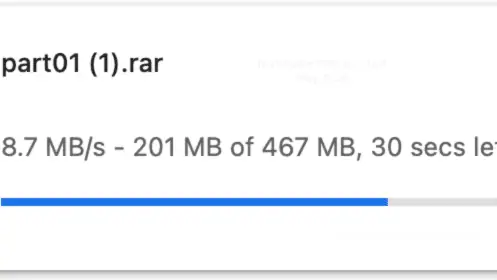
- Chrome: 8.7 MB/s for one file. Two files at once added up to 23.7 MB/s combined.
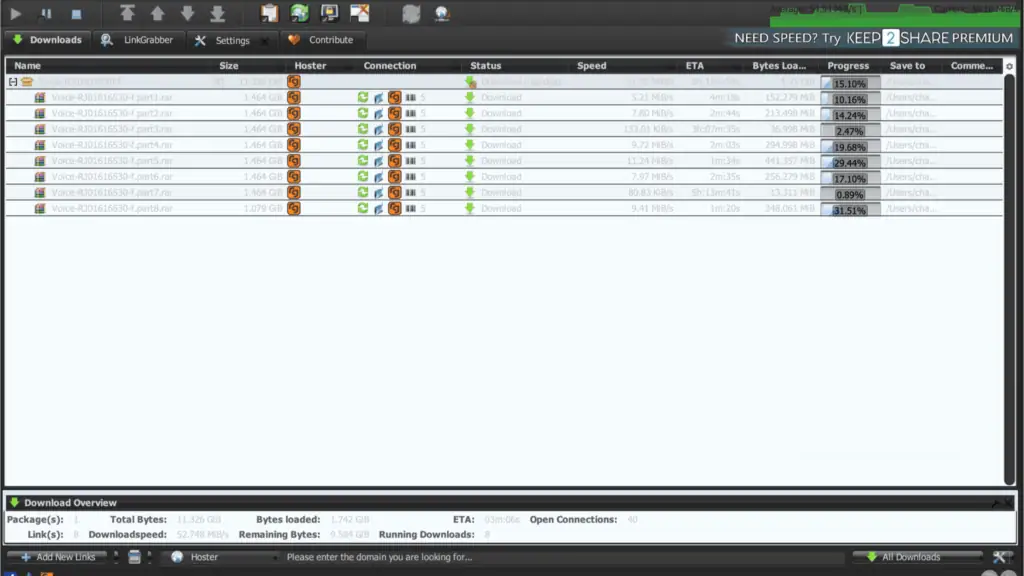
- JDownloader 2: Overview readings of 52.748 and 54.283 MiB/s across 8 files and 40 connections.
- Plan: 90 days, 4 TB bandwidth, 3 TB storage, $39.99 base price.
- Checkout: The tested screen showed $47.99 with "Fee 20% included."
| Item | Verified result |
|---|---|
| Test connection | 1 Gbps symmetric fiber, Mac, May 2026 |
| Chrome Premium, single file | 8.7 MB/s |
| Chrome Premium, two files | 10.8 + 12.9 = 23.7 MB/s combined |
| JD2 overview readings | 52.748 MiB/s and 54.283 MiB/s |
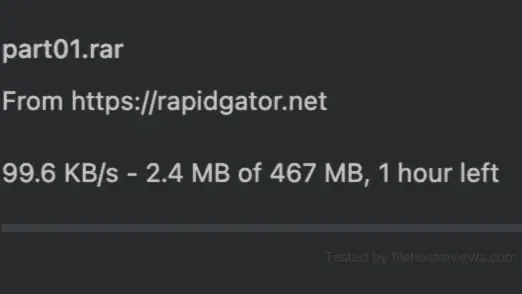
| Free tier at capture | 99.6 KB/s |
| 90-day / 4 TB plan | $39.99 base, $47.99 at checkout |
| Cost if 4 TB is fully used | About $10.00/TB base, $12.00/TB with fee |
Two cautions. The JD2 numbers are capture-time readings, not a full-run average. And the 20% fee shows up at checkout, so judge the plan by the final total.
Choosing a Plan: Duration, Bandwidth & Storage
Rapidgator prices plans by combining duration and bandwidth. Longer plans usually come with a bigger traffic allowance.
Our verified test plan was 90 days with 4 TB of bandwidth and 3 TB of storage, advertised at $39.99 USD. Those two terabyte figures measure different things:
- Bandwidth (4 TB) is your download allowance.
- Storage (3 TB) is upload and file-hosting space.
They do not add up to 7 TB of download traffic. Also, $39.99 is the whole 90-day base price, not a monthly price.
Public reference pricing
Only the 90-day tier below was confirmed by our own screenshot. The rest comes from third-party reference guides, not a live official audit:
| Duration | Bandwidth | Reference price |
|---|---|---|
| 30 days | 1 TB | $14.99 |
| 60 days | 2 TB | $29.99 |
| 90 days | 4 TB | $39.99 (confirmed) |
| 180 days | 6 TB | $49.99 |
| 365 days | 12 TB | $99.99 |
| 180 or 365 days, larger allowance | 24 TB | $199.99 |
These are examples, not the full catalogue. Reference sources: uploaderhub and the RapidQuick pricing guide. Both are third-party sources; RapidQuick also sells activation keys.
Exact storage allocations and options vary. Confirm everything at checkout.
Why 90 days / 4 TB is the sweet spot
The math is simple:
- Base $39.99: about $0.44 per day and about $10.00 per TB if fully used.
- With the fee, $47.99: about $0.53 per day and about $12.00 per TB if fully used.
Spread over 90 days, 4 TB works out to about 44.4 GB per day on average. Traffic is a pooled total, so you do not have to follow that pace. The 30-day tier is cheaper up front. But 4 TB is four times the traffic for less than three times the price. The 90-day plan also avoids the commitment of the 180-day and 365-day plans.
For other pricing comparisons, see our cheapest premium file hosts guide.
Payment Methods & The 20% Fee: $39.99 to $47.99
The plan selection screen listed nine payment options for the $39.99 (90-day / 4 TB) plan:
- Visa/Mastercard
- JCB/AMEX/Diners
- ApplePay
- Credit card/PP-Android
- Bitcoin (BTC)
- Litecoin
- USDT (TRC20)
- BitcoinCash
- Ethereum
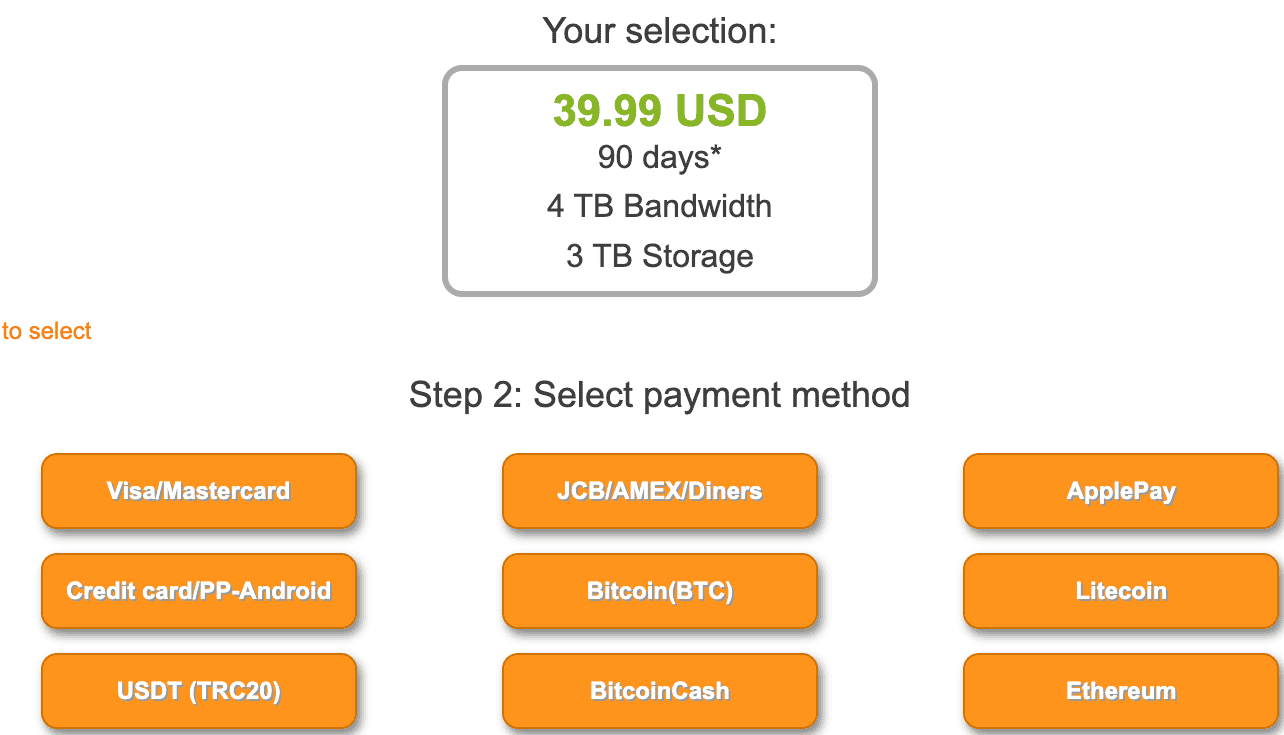
Two labels need care. "Credit card/PP-Android" is the exact wording on screen. We did not confirm a desktop PayPal route, so do not assume one. And Apple Pay is not Google Pay. We did not see Google Pay listed.
The $47.99 checkout screen
On the checkout summary, the total changed to 47.99 USD. The screen noted "Fee 20% included" and showed the processor label EditLane (A).
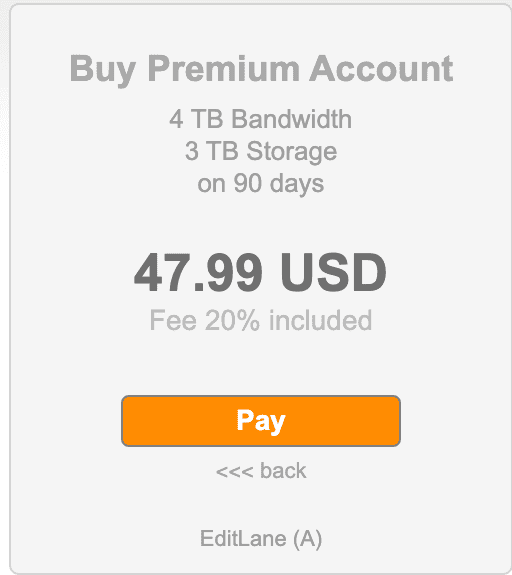
The math checks out: $39.99 × 1.20 = $47.988, rounded to $47.99. That is a surcharge of $8.00.
$47.99 already includes the fee. Do not multiply it by 1.20 again.
A 20% fee was displayed on most of the payment routes we checked. A checkout screen proves the displayed total. It does not prove what your bank finally settles. Check the summary before you pay, and compare the total with other hosts in our best file hosting services roundup.
Bandwidth Quota: Thinking in Total Allowance Rather Than Daily Caps
The 4 TB bandwidth applies across the 90-day period. It is not 4 TB per day.
Treat it as a budget for the whole period. You can plan larger batches on some days and none on others, while watching both the remaining allowance and expiry date. This does not establish a guaranteed maximum for any single day.
TB versus TiB
Keep two units apart:
- TB (decimal): 1 TB = 1,000 GB. Plans are advertised this way.
- TiB (binary): 1 TiB ≈ 1.0995 TB. JDownloader 2 reports sizes this way.
The historical 1 TiB screenshot
The JD2 capture below shows 1 TiB of 1 TiB left. It comes from an older account state. It is a historical capture, not a 1 TiB limit on the current 4 TB plan.
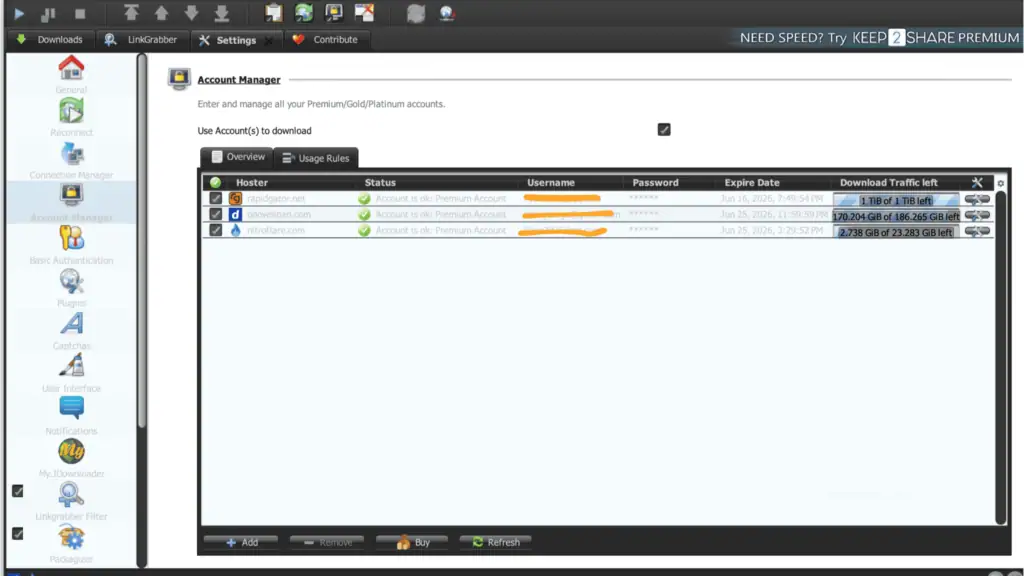
We have not seen a daily reset on any of our screens. Rely on the pooled total for the plan period, and confirm refresh behavior with Rapidgator support if it matters to you.
Free Tier Experience: Countdown, Cloudflare & 99.6 KB/s
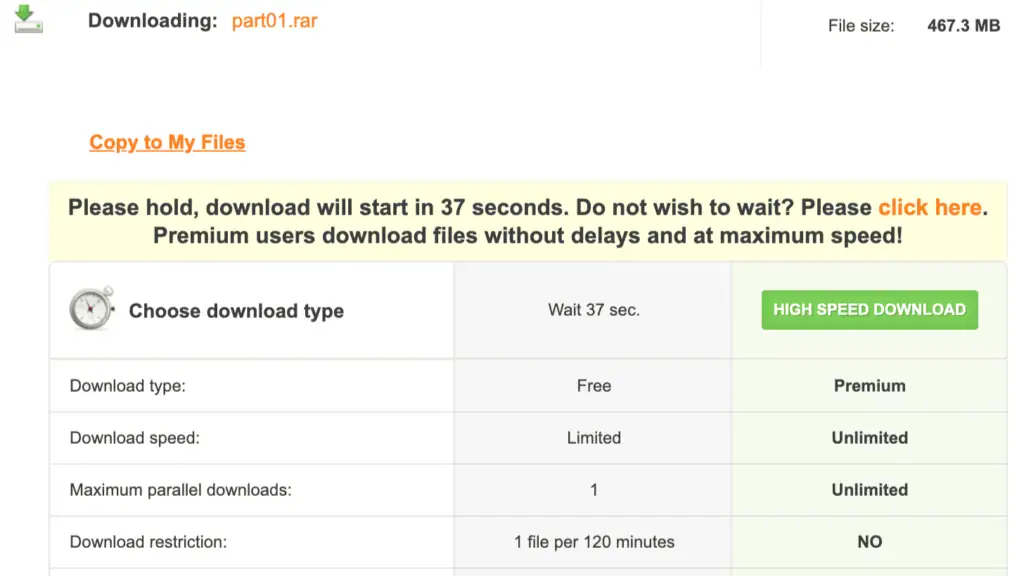
The free tier is a trial, not a workflow. We tested part01.rar (467.3 MB) in May 2026.
Step 1: the countdown. The page showed a timer. The capture caught it at 37 seconds remaining. That is a moment in the countdown, not the total wait.
Step 2: verification. The page used a Cloudflare widget, which showed "Success!", followed by a Send button. It was not hCaptcha.
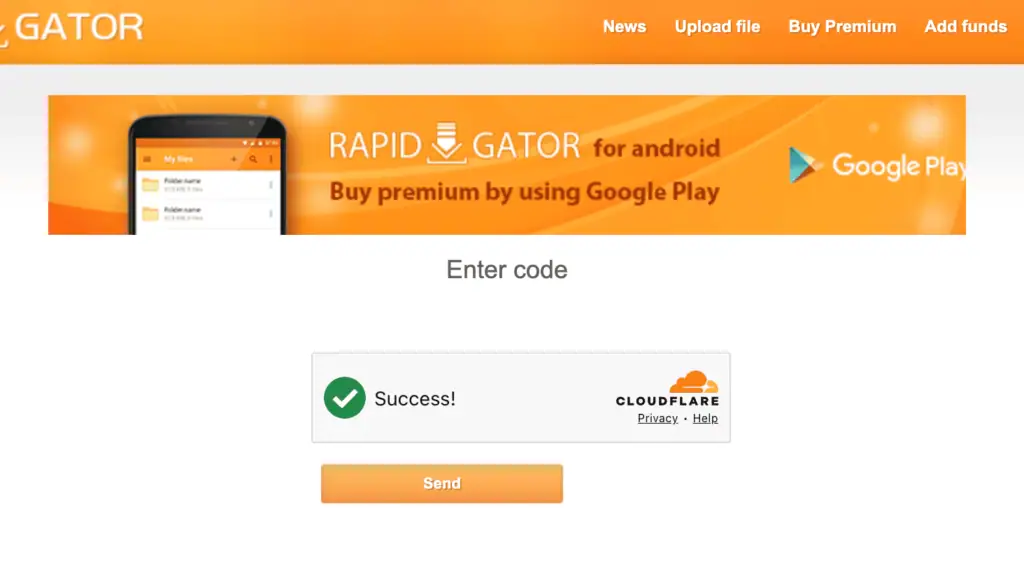
Step 3: the download. Speed was 99.6 KB/s. Chrome showed 2.4 MB of 467 MB loaded and estimated about an hour remaining.
Free-tier limits: two sources
The May download screen's comparison table listed 1 parallel download and 1 file per 120 minutes. The newer Account Setting text, seen in November, says Free accounts are limited to 3 files per day and a speed label of “up to 100kb/sec”.
The screens show different limits, and we did not test how they interact. Check the current download page before relying on free access. The measured speed remains 99.6 KB/s; the settings label is quoted as written.
Speed Benchmarks: Chrome vs. JDownloader 2
All speed tests were run in May 2026 on a Mac with 1 Gbps symmetric fiber. For wider context, see our fastest file hosts tested guide.
Chrome Premium: One File, Then Two
A single file (part01 (1).rar, about 467 MB) ran at 8.7 MB/s.
With two files at once, Chrome showed 10.8 MB/s and 12.9 MB/s, for 23.7 MB/s combined (about 189.6 Mbps).
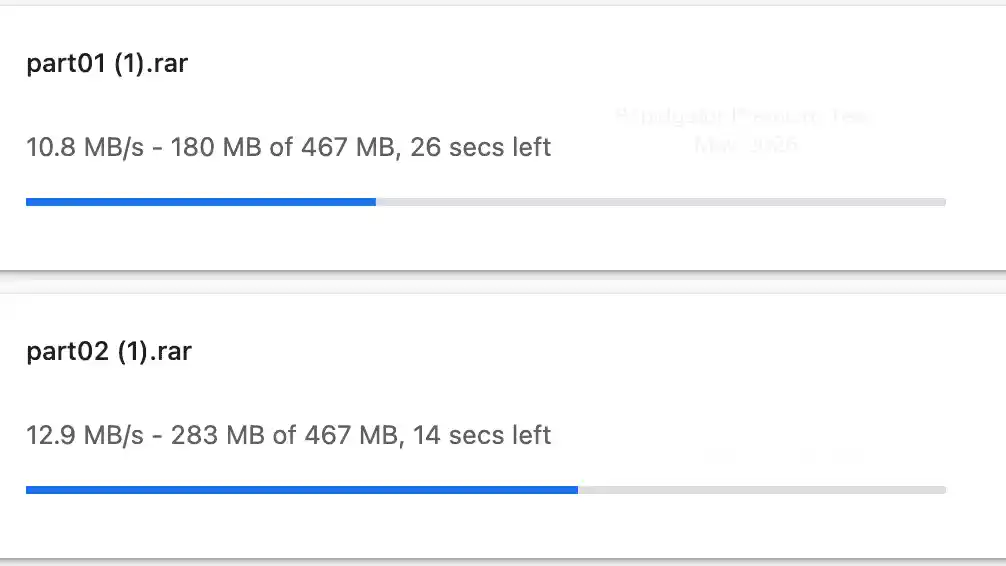
Do not read 10.8 or 12.9 as isolated single-file results. They are the two halves of one concurrent test. The takeaway is that the browser is fine for occasional use, and a second file adds a lot of throughput.
JDownloader 2: 8 Files, 40 Connections
We queued an 8-part RAR set of about 11.326 GiB in total. JD2 opened 5 connections per file, or 40 open connections.
Capture A showed a bottom-bar overview of 52.748 MiB/s (about 55.3 MB/s).
Capture B showed 54.283 MiB/s (about 56.9 MB/s). The top graph in that capture showed an Average of 34.95 MiB/s and a Current reading near 73.48 MiB/s.
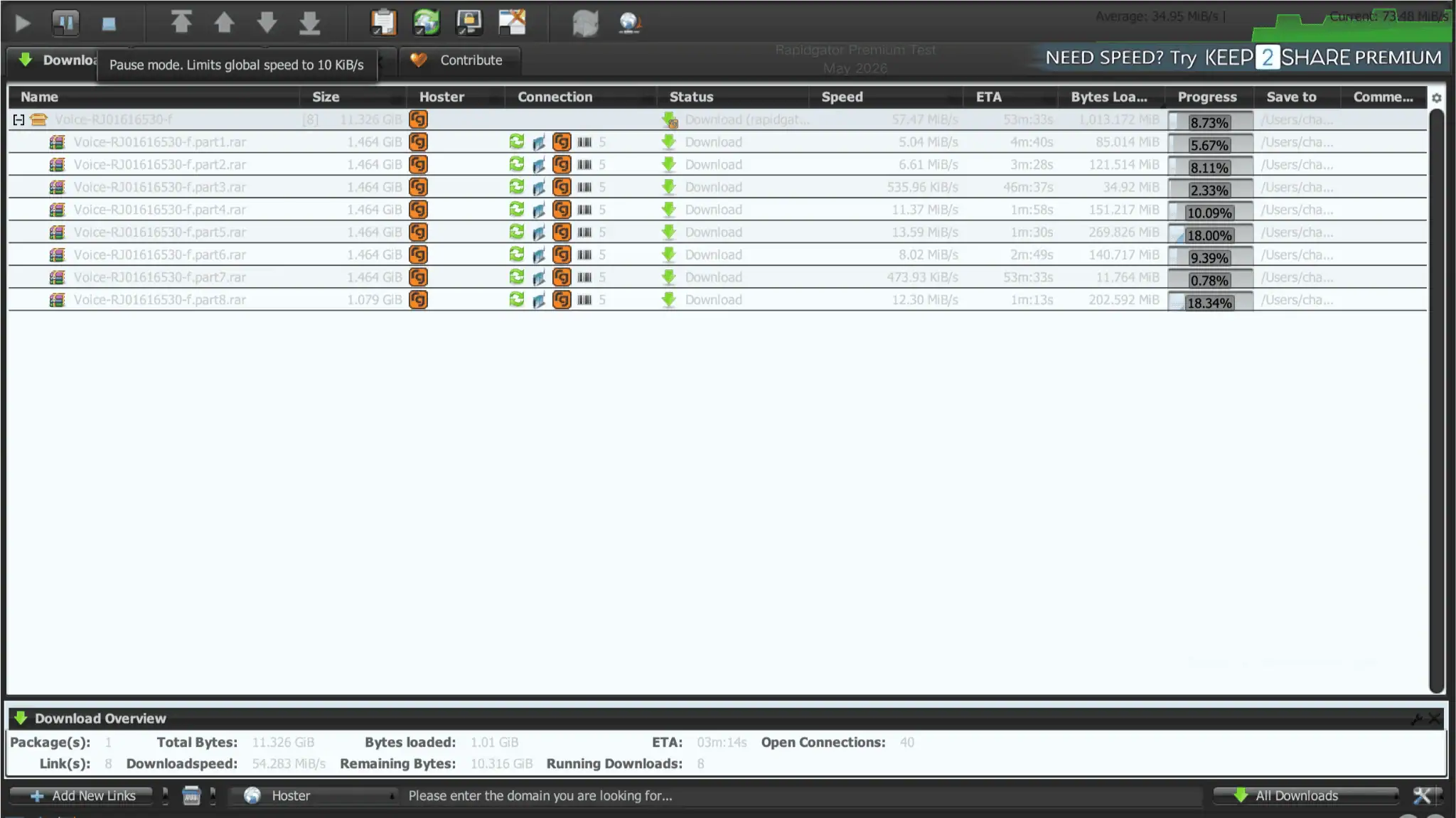
Read these carefully. The 52.748 and 54.283 MiB/s figures are capture-time overview readings across 8 parallel files, each with 5 chunks. They are not a full-run average and not a single-file speed. The 34.95 MiB/s average in Capture B is a reminder that speed moves during a run.
The browser and JD2 queues differed in file size, file count, and connections. This shows the throughput of the tested setups, not the gain from changing software alone. The screenshots do not establish a single-file JD2 speed. If you plan to download in bulk, check our list of JDownloader-compatible file hosts.
Post-Purchase Setup: JD2, Direct Download & Stopping Auto-Renewal
Add Your Account to JD2
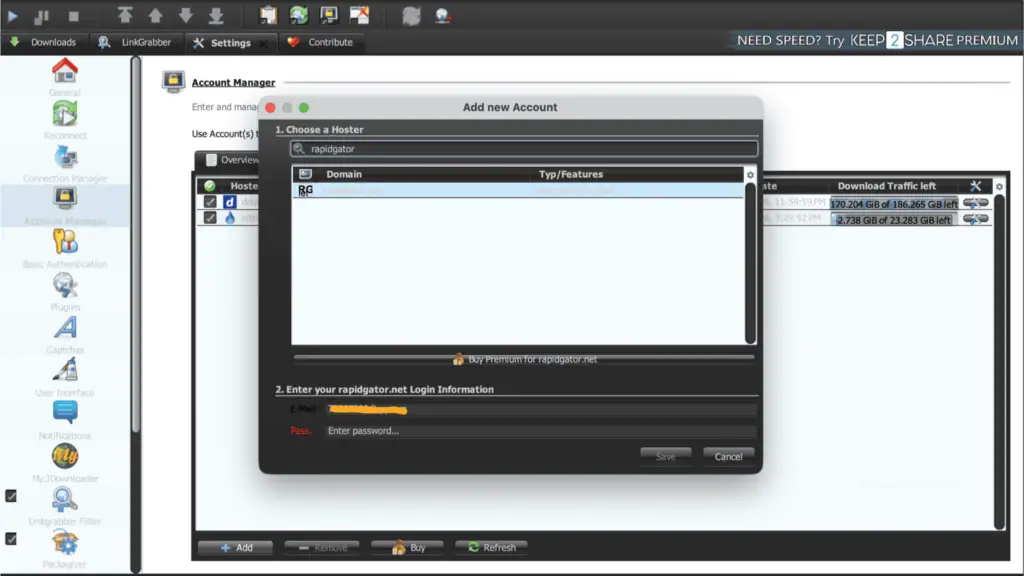
- Open Settings → Account Manager → Add.
- Choose rapidgator.net.
- Enter your email and password.
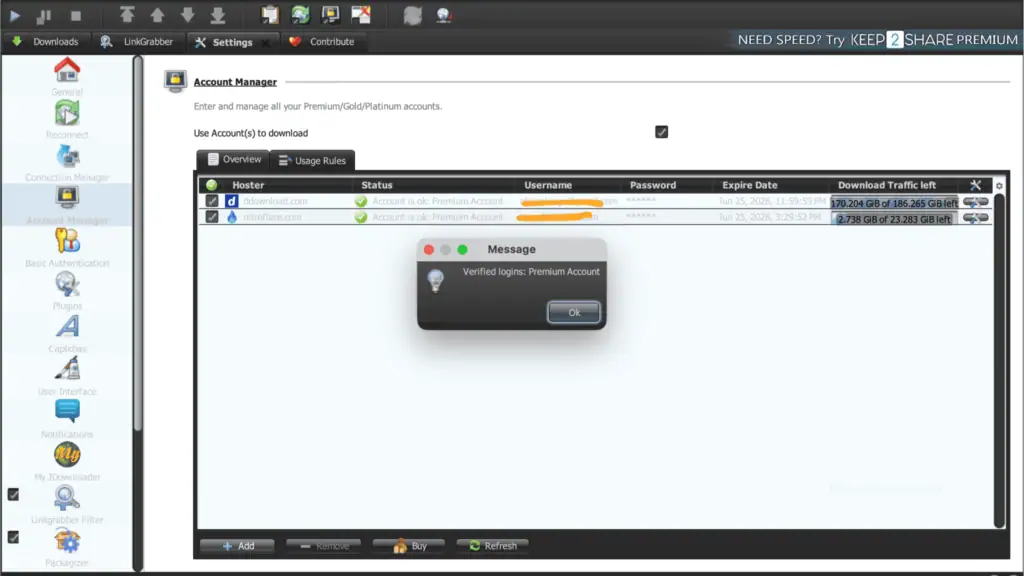
A successful login shows Verified logins: Premium Account.
Enable Direct Download
- Go to Profile → Download options.
- Check Direct download.
- Click Save.
This option is intended to skip intermediate download pages while you are logged in with the required access. We did not test its effect on speed, and it does not add download allowance.

The same panel shows a Delay timer of 45 seconds and a Maximum file size for free users of 2048 MB. Those are uploader and account settings. They do not control your own premium download speed.
Cancel Auto-Renewal
- Go to Account Setting (or Settings).
- Check Cancel current subscription.
- Click Save.
- Check the returned subscription status and any confirmation from the payment channel.
You can also look for Manage Subscription at the top of the page.
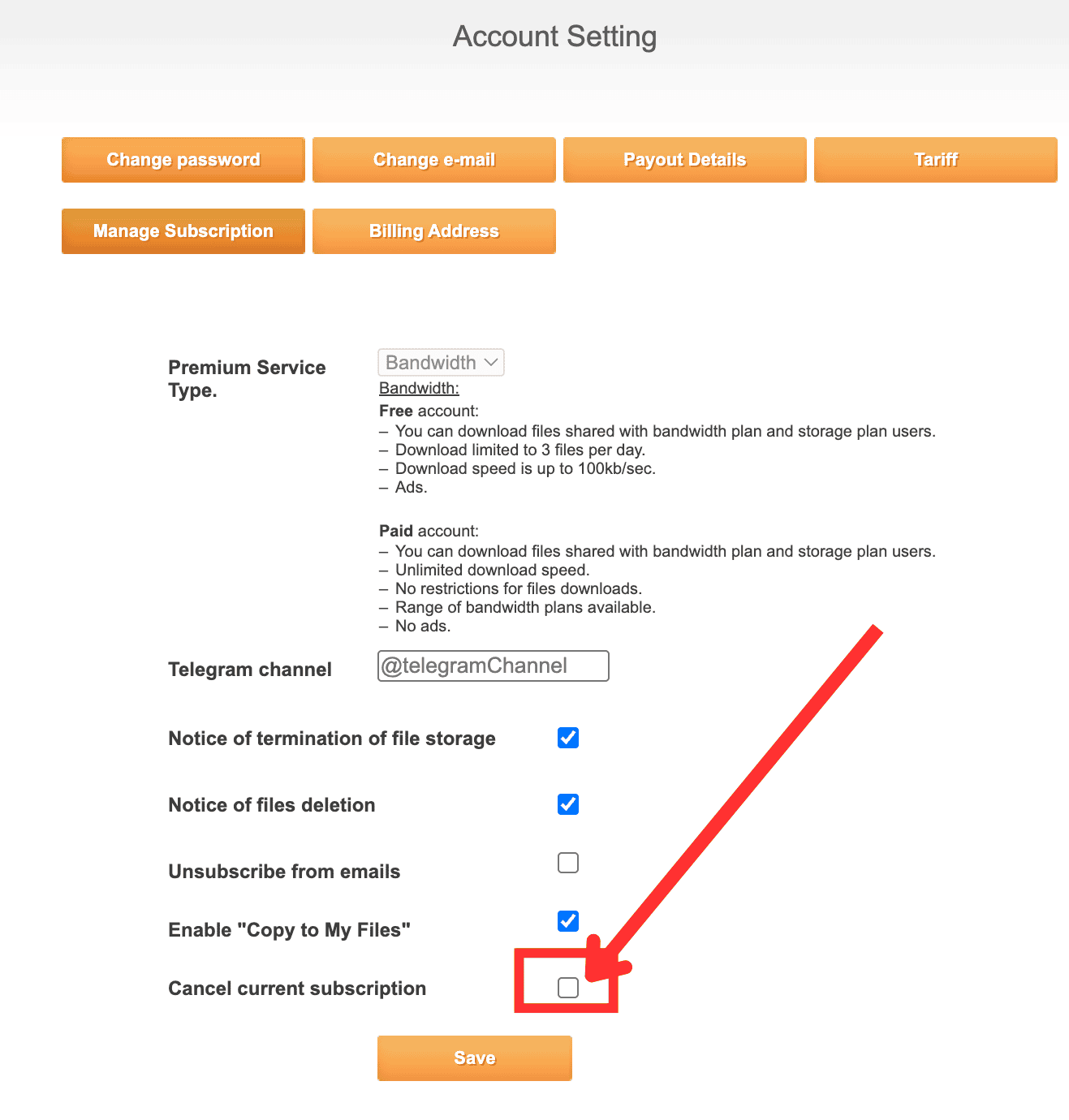
This is the control for canceling the current subscription and stopping its renewal. It is separate from deleting your account, email preferences, or requesting a refund. The screenshot shows the box unchecked; it does not show a completed cancellation. If you want one period only, check the renewal terms and confirm the canceled status after saving. Management can depend on the payment channel.
Buyer FAQ
Why are there multiple prices for the same duration, and which plan suits downloaders?
Rapidgator prices plans by combining duration and bandwidth, so the same duration can come with different traffic and storage options. Downloaders should compare bandwidth first, since that is the download allowance. The 90-day / 4 TB plan at $39.99 base is a useful option if that allowance fits your needs. Confirm the exact options at checkout.
Does "90 days / 4 TB" mean 4 TB per day, and when does traffic refresh?
No, 4 TB is the total download allowance across the 90-day period. It is a pooled balance, not a daily cap. We did not observe a daily refresh on our screens. Ask Rapidgator support if you need exact reset rules.
Why does $39.99 become $47.99 at checkout, and is another 20% added later?
The checkout adds a 20% fee: $39.99 × 1.20 = $47.988, rounded to $47.99. That is an $8.00 surcharge. The screen says "Fee 20% included," so no second 20% is added on top of the displayed total. Your bank's final settlement may still differ, since we only verified the displayed total.
What payment methods does Rapidgator accept, and what does "Credit card/PP-Android" mean?
The tested screen listed nine options: Visa/Mastercard, JCB/AMEX/Diners, ApplePay, Credit card/PP-Android, Bitcoin (BTC), Litecoin, USDT (TRC20), BitcoinCash, and Ethereum. "Credit card/PP-Android" is the exact label shown, and we did not confirm what it routes to. Do not assume it means desktop PayPal. It also does not mean Google Pay.
How fast are Chrome and JDownloader 2, and is 54 MiB/s a single-file or sustained average speed?
Chrome reached 8.7 MB/s for one file and 23.7 MB/s combined for two files. JD2 showed 52.748 and 54.283 MiB/s on its overview. Those 54 MiB/s readings are not single-file speeds and not a full-run average. They are capture-time readings across 8 files with 40 connections.
How long is the free-tier wait, and how many free files can I download?
Our May capture showed a countdown at 37 seconds remaining, which is not the full wait. That screen listed 1 file per 120 minutes. The November Account Setting text says Free accounts get 3 files per day and uses the speed label “up to 100kb/sec”. We report both and do not reconcile them.
How do I enable Direct Download in Profile, and does it increase speed or traffic?
Go to Profile → Download options, check Direct download, and click Save. It bypasses intermediate download pages. We did not measure any speed change, and nothing on the panel suggests it adds bandwidth.
How do I use "Cancel current subscription," and does it trigger a refund?
Open Account Setting, check Cancel current subscription, and click Save. Then confirm the subscription status, using Manage Subscription or the payment channel if needed. The screenshot shows the available control, not a completed cancellation. Canceling renewal is separate from deleting the account, email preferences, or requesting a refund.
Final Verdict & Recommendation
If your files are on Rapidgator, the 90-day / 4 TB plan is a sensible buy. Chrome showed a usable 8.7 MB/s for one file and 23.7 MB/s combined for two. JD2 can push past 50 MiB/s on an 8-file queue over a fast line. The free tier is too slow and restrictive for anything beyond a test.
Judge value by the final total. At $47.99, you pay about $0.53 per day and about $12.00 per TB if you use the full 4 TB. That is a fair price for people who download in bursts and do not want a long commitment. Casual users who need a few files should consider whether the 30-day tier covers them.
Before you pay:
- Confirm duration, bandwidth, and storage on the plan screen.
- Check the final checkout total, including the fee.
- If you want one period, use Cancel current subscription and confirm the canceled status.
- Add the account to JD2 for the best speeds.
If your files are spread across several hosts, compare options first in our Rapidgator alternatives guide.