
Disclosure: FileHostReviews.com may earn a commission if you buy through links on this page. This does not influence our test results. See our testing methodology.
Verdict at a Glance
Upstore Premium is fast enough to be useful, but the checkout total and the daily quota need to be part of your decision.
- Speed: In JDownloader 2 over a 1 Gbps symmetric fiber line, the bottom overview for a four-file queue displayed 47.906 MiB/s (about 50.2 MB/s) across 40 open connections. In Chrome, a single premium file ran at 8.3 MB/s, and three parallel files totaled 22.1 MB/s.
- Checkout cost: In our November 2026 check, the advertised €33 3-month plan showed Total: 44.55 EUR at card checkout, an unitemized increase of €11.55 (+35.0%). The "PayPal" button led to a Bitcoin transfer instruction screen, not a standard PayPal checkout.
- Transfer allowance: JD2 displayed “16.2 GiB of 20 GiB left.” Our May 2026 review reported a Premium policy of 20,000 MB per 24 hours. These are different quantities, and the policy and reset mechanism were not reverified for this update.
If you need specific files hosted on Upstore, can work within its transfer allowance, and are comfortable with the payment route, it is a workable choice. If you want a large daily volume or a predictable checkout price, compare it against alternatives in our best file hosting services roundup first.
How the data is organized: Download speed benchmarks were recorded in May 2026 on a 1 Gbps symmetric fiber connection. Checkout observations are newly captured for this November 2026 update. The two are reported separately.
Key Benchmarks & Specifications
Download performance (recorded May 2026, 1 Gbps symmetric fiber)
| Test | Client | Result | Unit note |
|---|---|---|---|
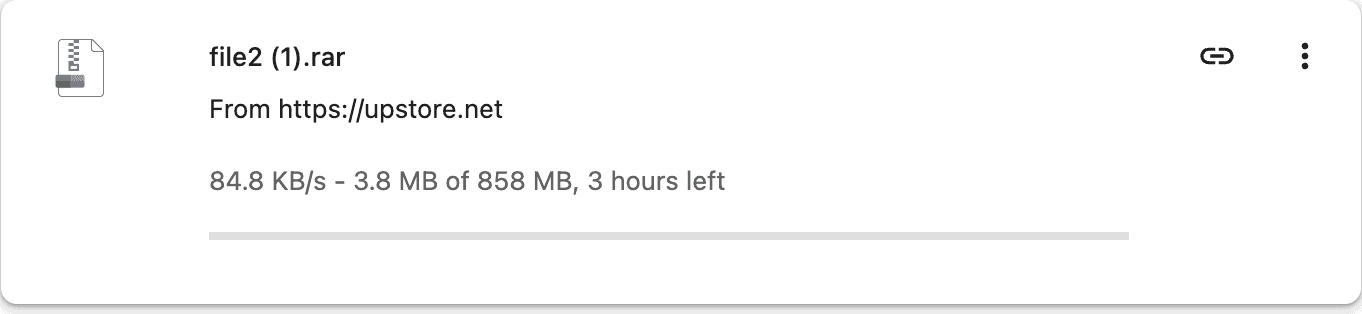
| Free tier, ~858 MB file | Chrome | 84.8 KB/s (Chrome projected ~3 hours; an estimate, not a timed completion) | KB/s |
| Premium, single file (1.1 GB) | Chrome | 8.3 MB/s | MB/s |
| Premium, three parallel files | Chrome | 8.8 + 6.7 + 6.6 = 22.1 MB/s aggregate | MB/s |
| Premium, four-file RAR queue (~3.796 GiB), 40 open connections, Stage 1 | JDownloader 2 | Graph avg 30.83, current 44.88, overview 43.997 MiB/s | MiB/s, multi-file aggregate |
| Same queue, Stage 2 | JDownloader 2 | Graph avg 41.66, current 47.12, overview 47.906 MiB/s | MiB/s, multi-file aggregate |
Checkout and account observations
| Item | Observation |
|---|---|
| 3-month plan, advertised | €33 |
| 3-month plan, credit card checkout | Total: 44.55 EUR (+€11.55, +35.0%), agent shown: r-global-inc.com (R Global Inc) |
| 3-month plan, "PayPal" route | "How to transfer crypto from PayPal": 0.000515 BTC to an external address (reviewer estimate of about €41 at test-time exchange rates) |
| Registration | Email only; password generated by Upstore and emailed |
| JDownloader 2 account verification | Interactive image text CAPTCHA, then "Verified logins: Premium Account" |
| Quota display | "16.2 GiB of 20 GiB left" |
| Policy reported in our May 2026 review | Premium: 20,000 MB per 24 h; free/guest: 6,000 MB per 24 h. Not reverified for this update. |
Unit note: Chrome reports MB/s (decimal). JDownloader 2 reports MiB/s (binary). 1 MiB/s ≈ 1.049 MB/s, so 47.906 MiB/s is roughly 50.2 MB/s. We keep the units as displayed throughout.
Pricing & Checkout Reality
Advertised plans
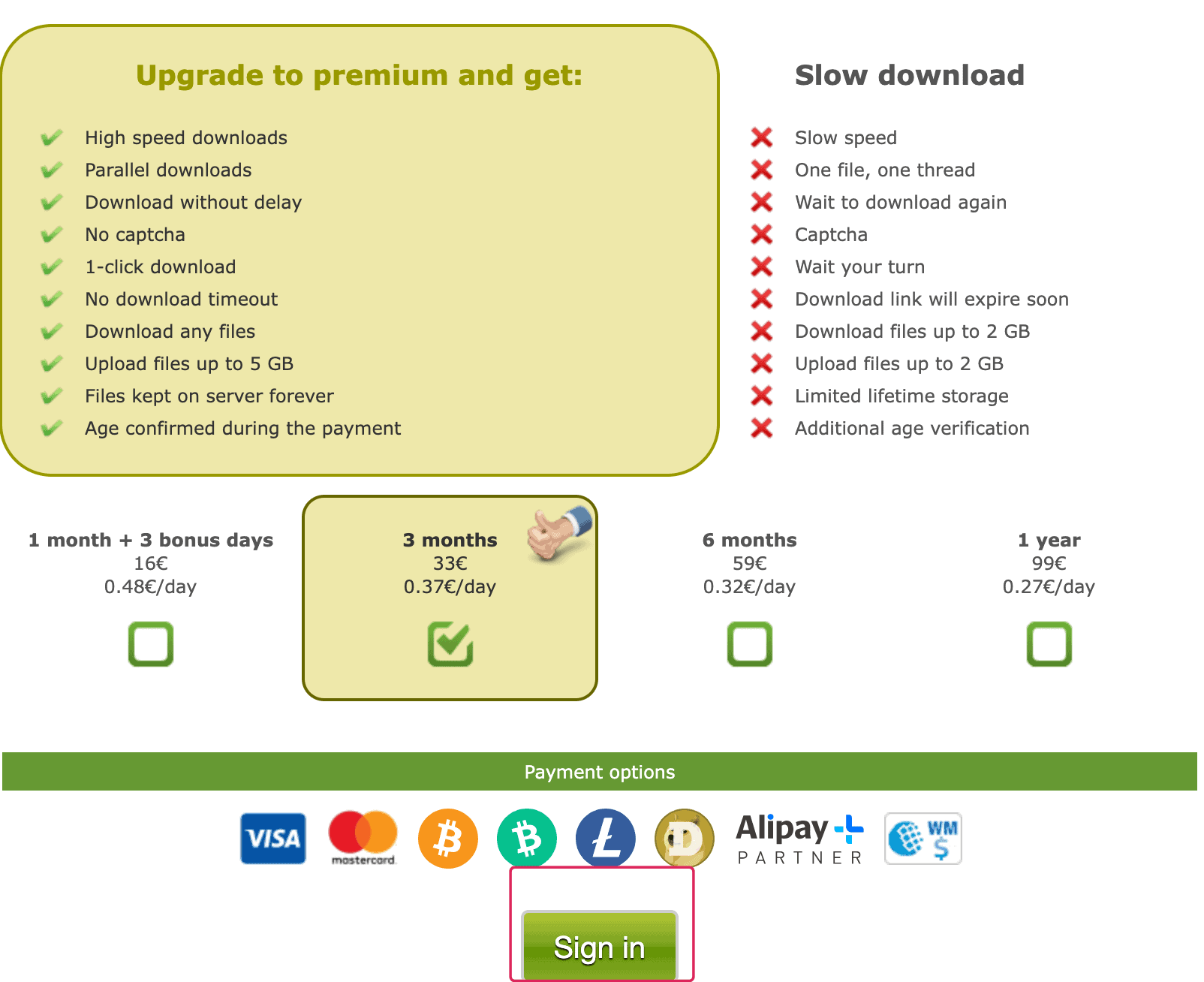
| Plan (as labeled by Upstore) | Advertised price | Advertised per-day rate |
|---|---|---|
| 1 month + 3 bonus days | €16 | €0.48/day |
| 3 months | €33 | €0.37/day |
| 6 months | €59 | €0.32/day |
| 1 year | €99 | €0.27/day |
The plan durations and per-day prices above are those advertised in the supplied pricing capture. These are base prices; the tested card checkout was higher.
Credit card checkout: €33 becomes €44.55
We took the 3-month plan to the credit card payment screen. This is what it showed:
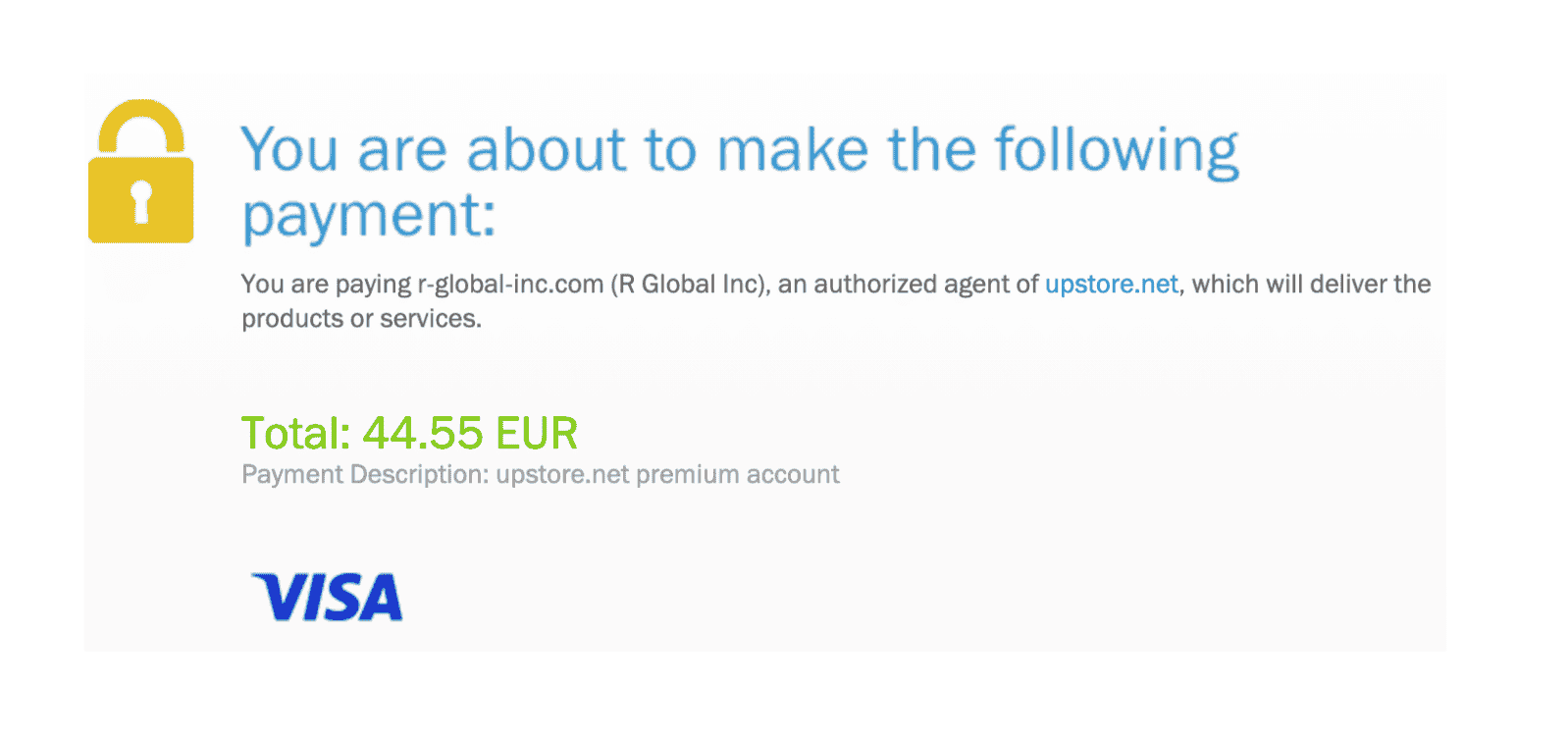
r-global-inc.com (R Global Inc) as an authorized agent of upstore.net.| Item | Amount |
|---|---|
| Advertised 3-month price | €33.00 |
| Total shown at card checkout | €44.55 |
| Difference | €11.55 (+35.0%) |
What the screen does and does not tell us:
- The total is higher than the advertised price by exactly 35.0%.
- The increase is not itemized. The screen does not say whether it is a processing fee, tax, a currency adjustment, or something else, so we do not attribute it.
- The payment page describes R Global Inc (
r-global-inc.com) as an authorized agent ofupstore.net; we report that wording as displayed. - The screenshot records the checkout total. It does not show the final card statement.
- We only inspected the 3-month plan. We cannot say whether the same percentage applies to the other plans.
Practical advice: Treat the advertised price as a starting point and read the final "Total" line before entering card details. For a €33 plan, budget closer to €44.55.
See Current Upstore Checkout Options →
The PayPal option is a Bitcoin transfer
In the tested route, selecting the PayPal option on the same plan opened Bitcoin transfer instructions. It opened a page titled "How to transfer crypto from PayPal".
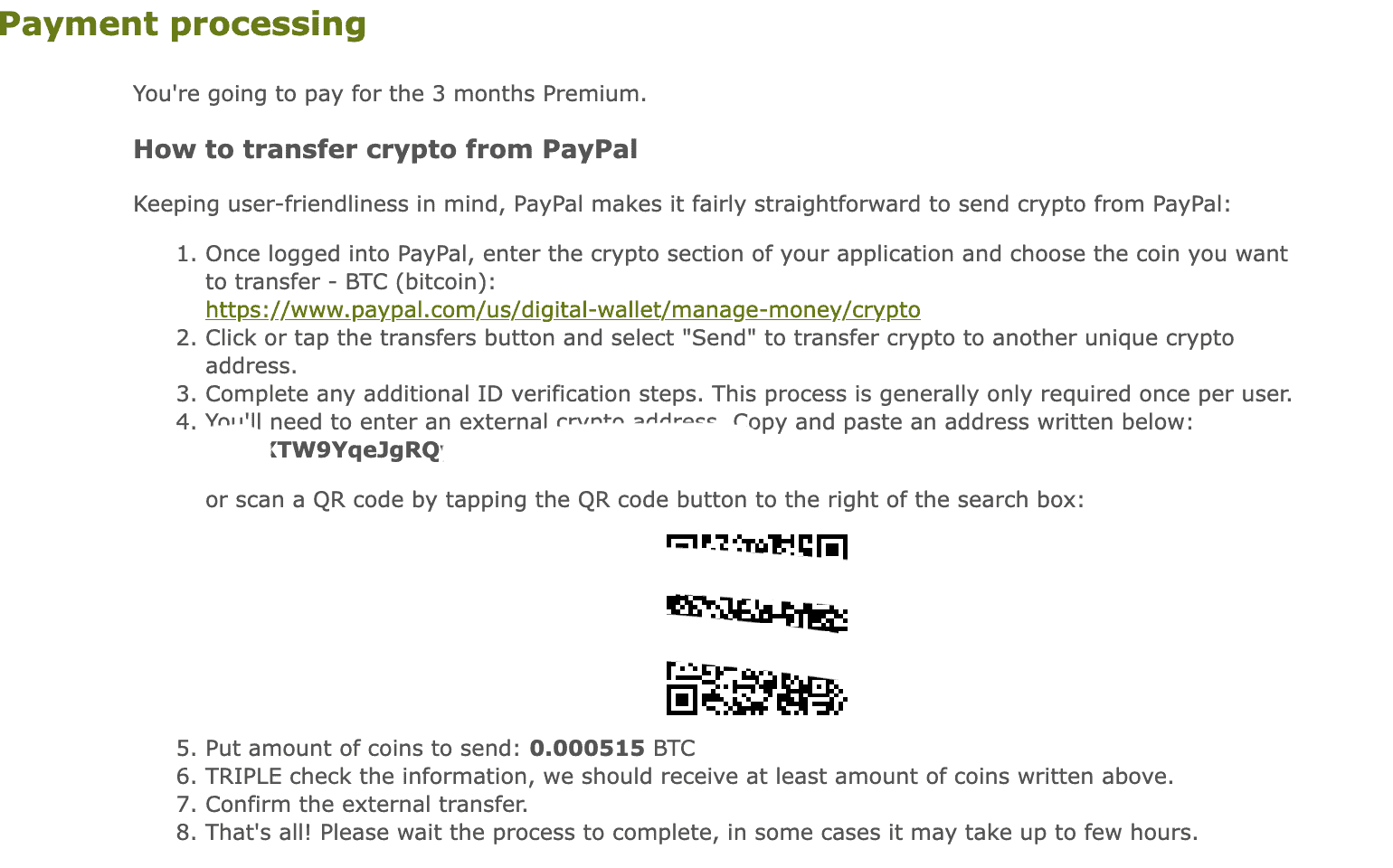
- The page asks you to send 0.000515 BTC to an external address.
- The screen describes a Bitcoin transfer, rather than a standard PayPal merchant checkout. We did not test whether the transfer could be completed through any particular PayPal account or region.
- Using the exchange rate at the time of our check, we estimate 0.000515 BTC at about €41. This is a dated estimate. The euro value will change with the BTC rate and with any network or conversion fees on your side.
- We do not publish the wallet address or QR code. The address belongs to a specific historical payment request and should not be reused.
The approximately €41 value is a historical conversion estimate, not a verified all-in payment total. Additional acquisition, conversion or network costs were not measured.
Transfer Limits: Reported Policy and the JD2 Display
JDownloader 2 showed “16.2 GiB of 20 GiB left” for the Premium account. That is the balance displayed by the client; the screenshot alone does not establish when the allowance resets.
Our May 2026 review reported 20,000 MB per 24 hours for Premium and 6,000 MB per 24 hours for free/guest downloads, based on the FAQ/support material used at that time. We have not reverified those policy figures or reset mechanics for this update.
These quantities are not interchangeable: 20,000 decimal MB is about 18.6 GiB, whereas JD2 displayed 20 GiB. We did not resolve the discrepancy. Check the current allowance and reset terms before planning a large download session. The captured speeds do not establish sustained throughput or the time needed to exhaust the allowance.
Free vs. Premium: Practical Experience
Free tier
The free flow is a three-step process: wait, solve a CAPTCHA, then start the download.
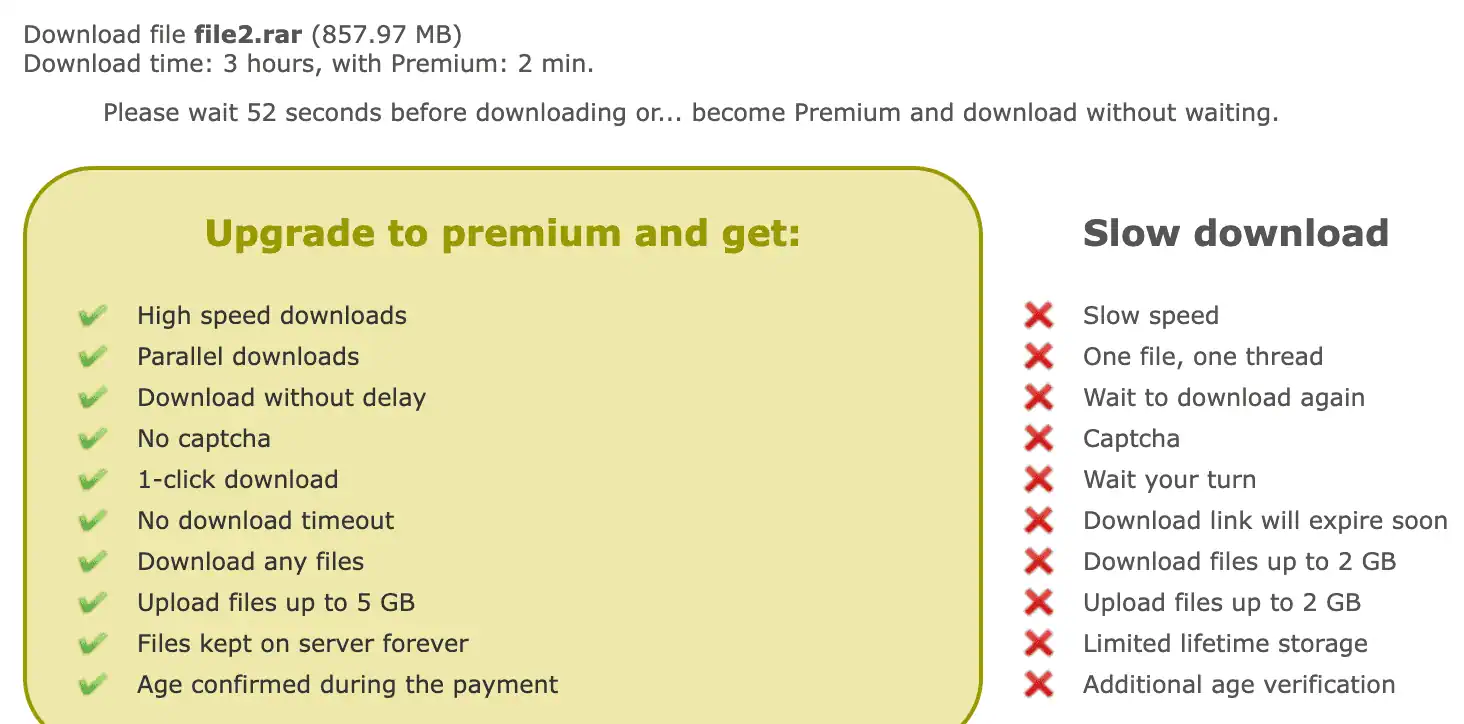
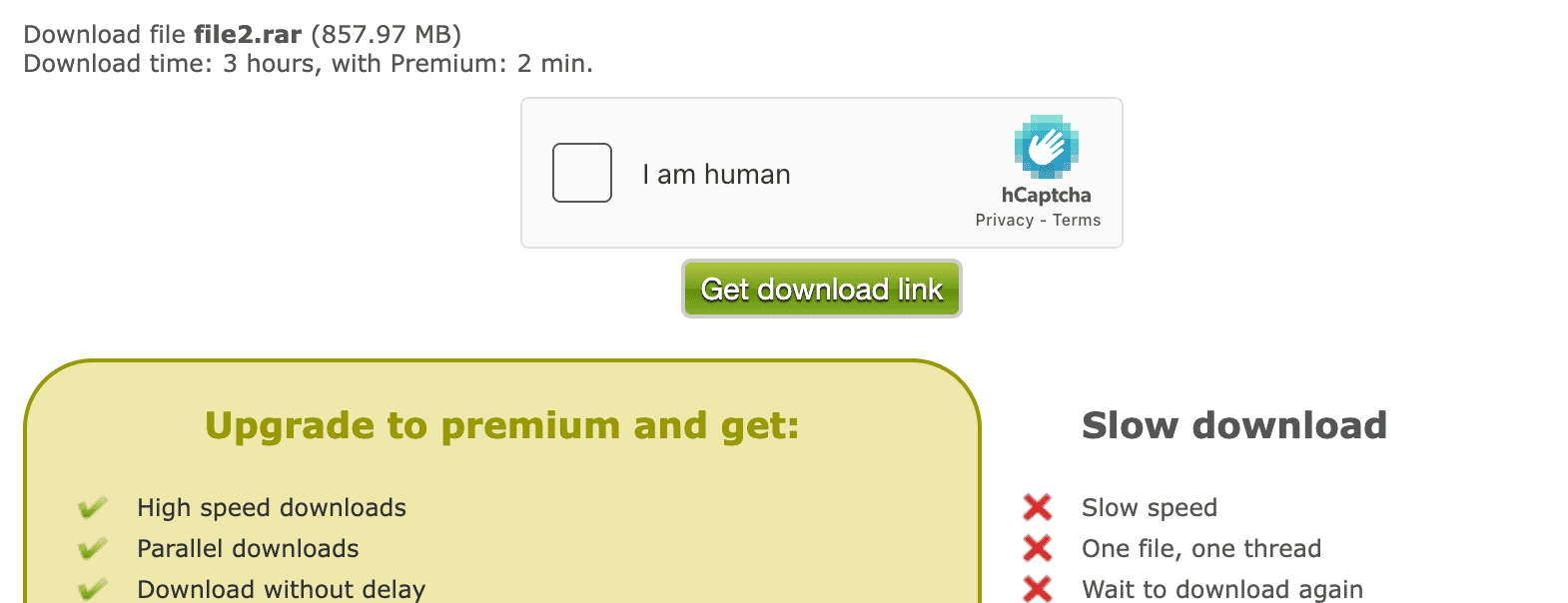
- Advertised free limits are 1 file at a time, 1 thread, and a 2 GB file limit.
- We observed no aggressive popups or fake download buttons in this test session. The page was clean, though a session is not a guarantee of what you will see elsewhere.
- At 84.8 KB/s, an ~858 MB file is a multi-hour job. That is a practical ceiling for anything beyond small files.
Premium
In Chrome, the Premium single-file capture showed 8.3 MB/s, roughly 98 times the captured free rate. With JD2 and several files, the aggregate was higher again. The pricing page advertises no waiting or download CAPTCHA for Premium; the free flow and the JD2 login check are separate observations.
Speed Benchmarks (Recorded May 2026)
All speed tests ran on a 1 Gbps symmetric fiber connection. For scale, a 1 Gbps link has a theoretical ceiling of about 125 MB/s (~119 MiB/s). None of these results approached it. We did not isolate the cause, and the host's per-connection or per-account policies are one possible factor.
Chrome, single premium file

Chrome, three parallel files
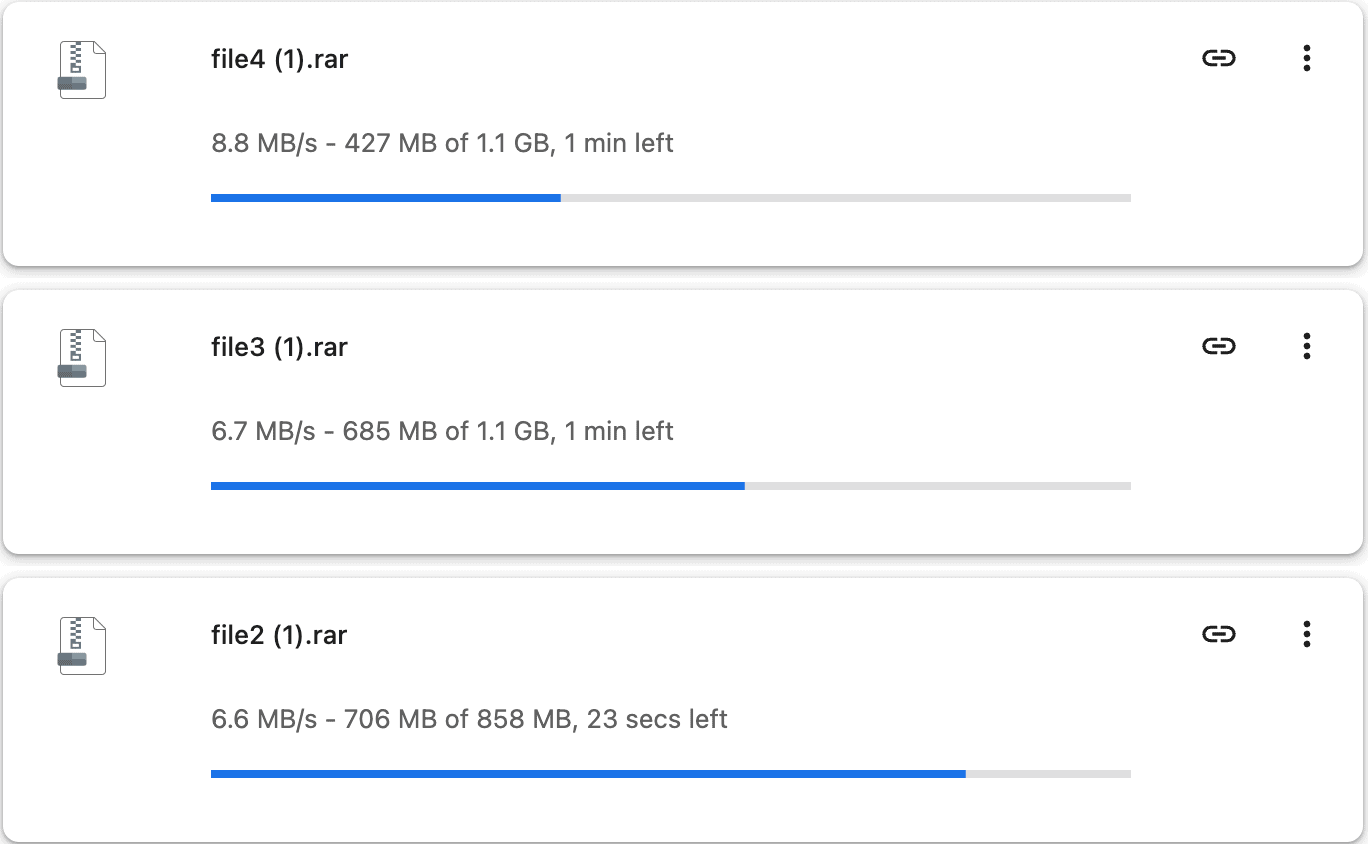
Running three files in parallel gave about 2.7 times the single-file figure. Each file ran a little slower than the 8.3 MB/s single-file result in two of three cases, but the total scaled well.
JDownloader 2, four-file queue, 40 open connections
The JDownloader 2 test used a ~3.796 GiB queue of four RAR files with 40 open connections. We captured two stages of the same queue.
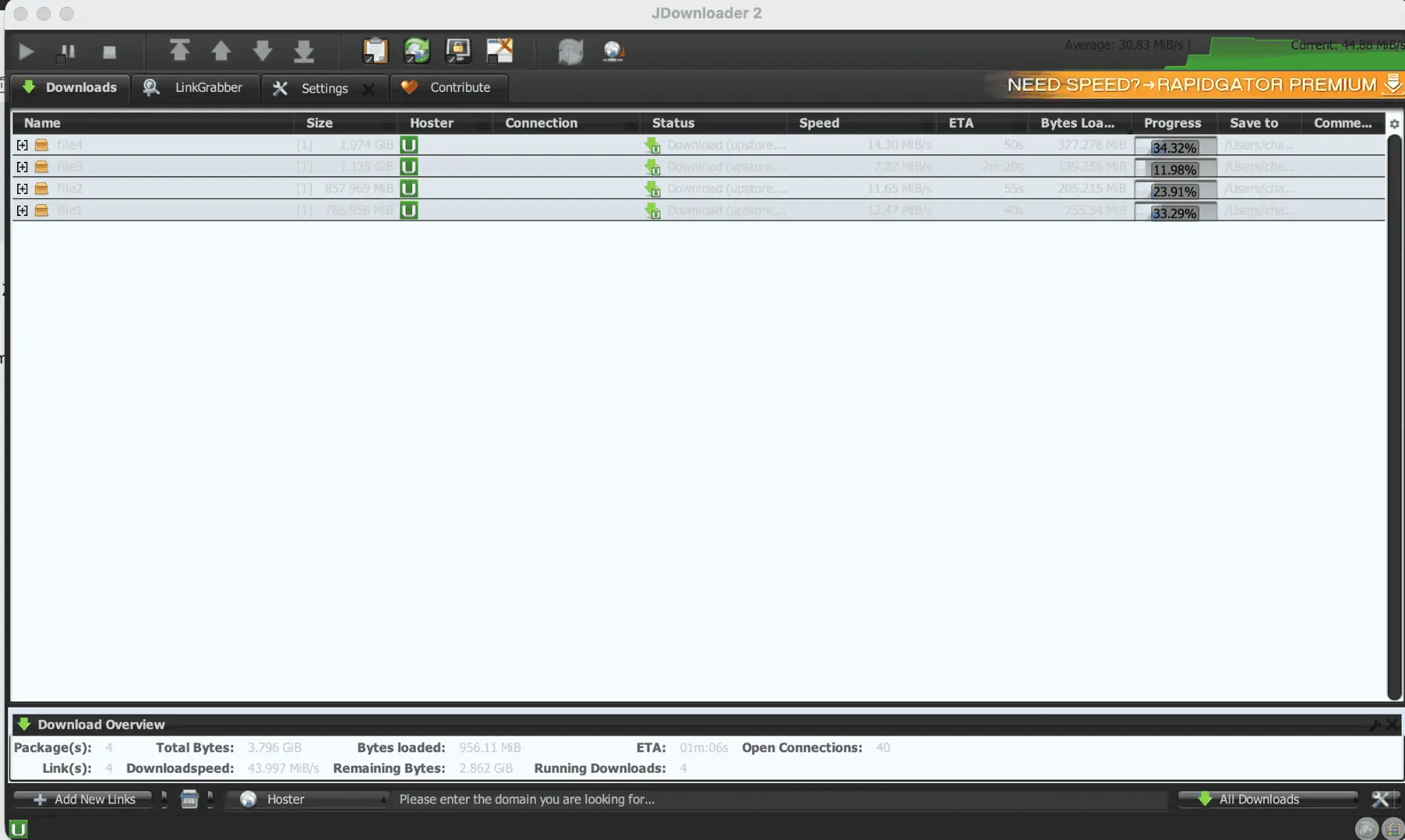
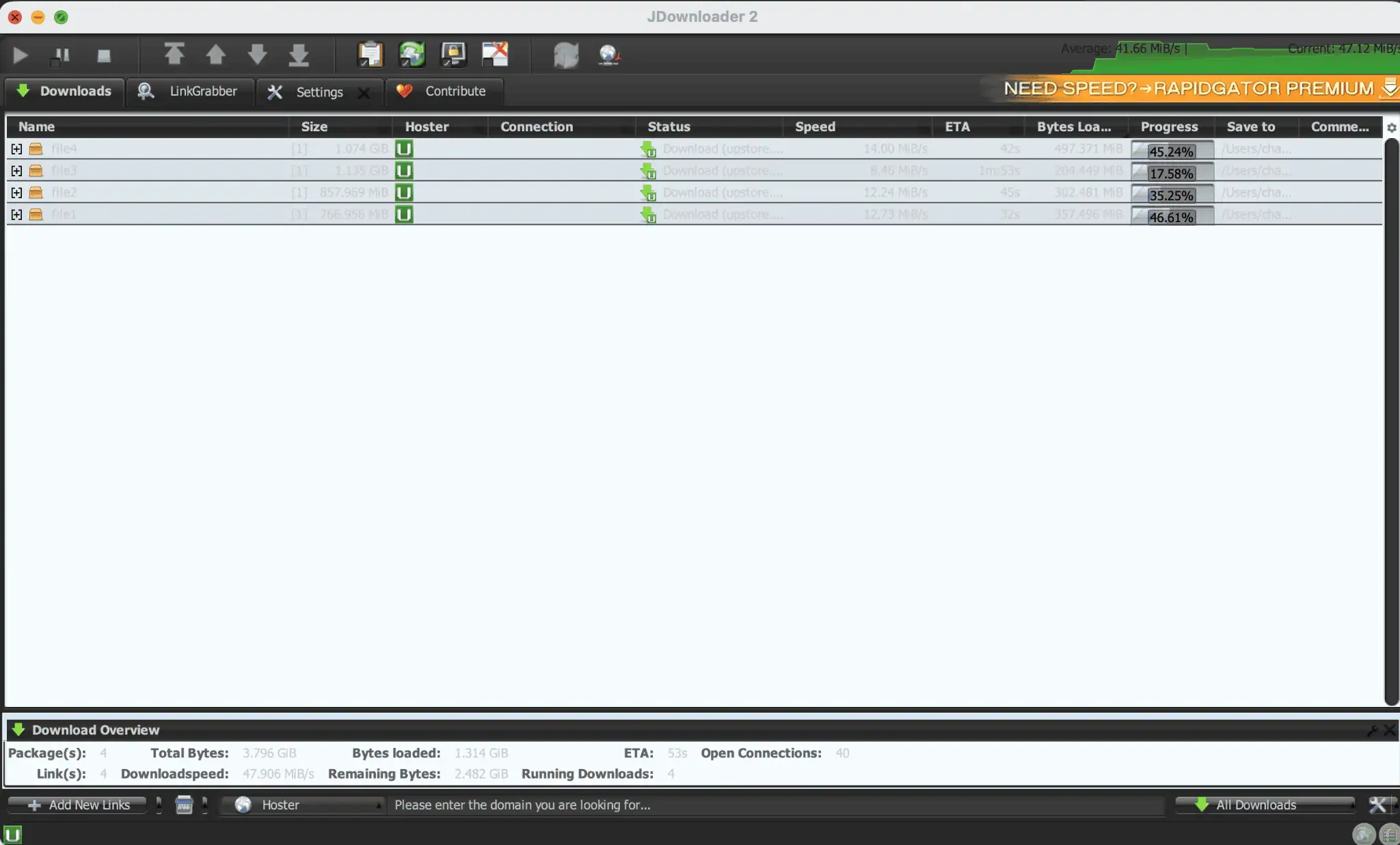
| Stage | Graph average | Current | Bottom overview |
|---|---|---|---|
| 1 | 30.83 MiB/s | 44.88 MiB/s | 43.997 MiB/s |
| 2 | 41.66 MiB/s | 47.12 MiB/s | 47.906 MiB/s |
How to read these numbers:
- They are multi-file combined aggregates, not single-file speeds. Four files were downloading at once, with 40 connections open in total.
- Units are MiB/s, not MB/s. The Chrome results above are in MB/s.
- The 40 open connections are the total shown for the queue. We do not infer a per-file connection count or ceiling from the package view.
- Graph average, graph current and the bottom overview are separate displayed readings. Their averaging windows and refresh times were not verified. A screenshot does not establish a sustained rate.
The JD2 overview capture was roughly 2.3 times the aggregate of the three-file Chrome test (47.906 MiB/s ≈ 50.2 MB/s versus 22.1 MB/s). The file and connection counts differed, so this does not isolate the effect of the client. Our JDownloader-compatible file hosts guide covers how Upstore compares with other hosts that support the tool.
Registration & JDownloader 2 Setup Walkthrough
Step 1: Create an account (email only)
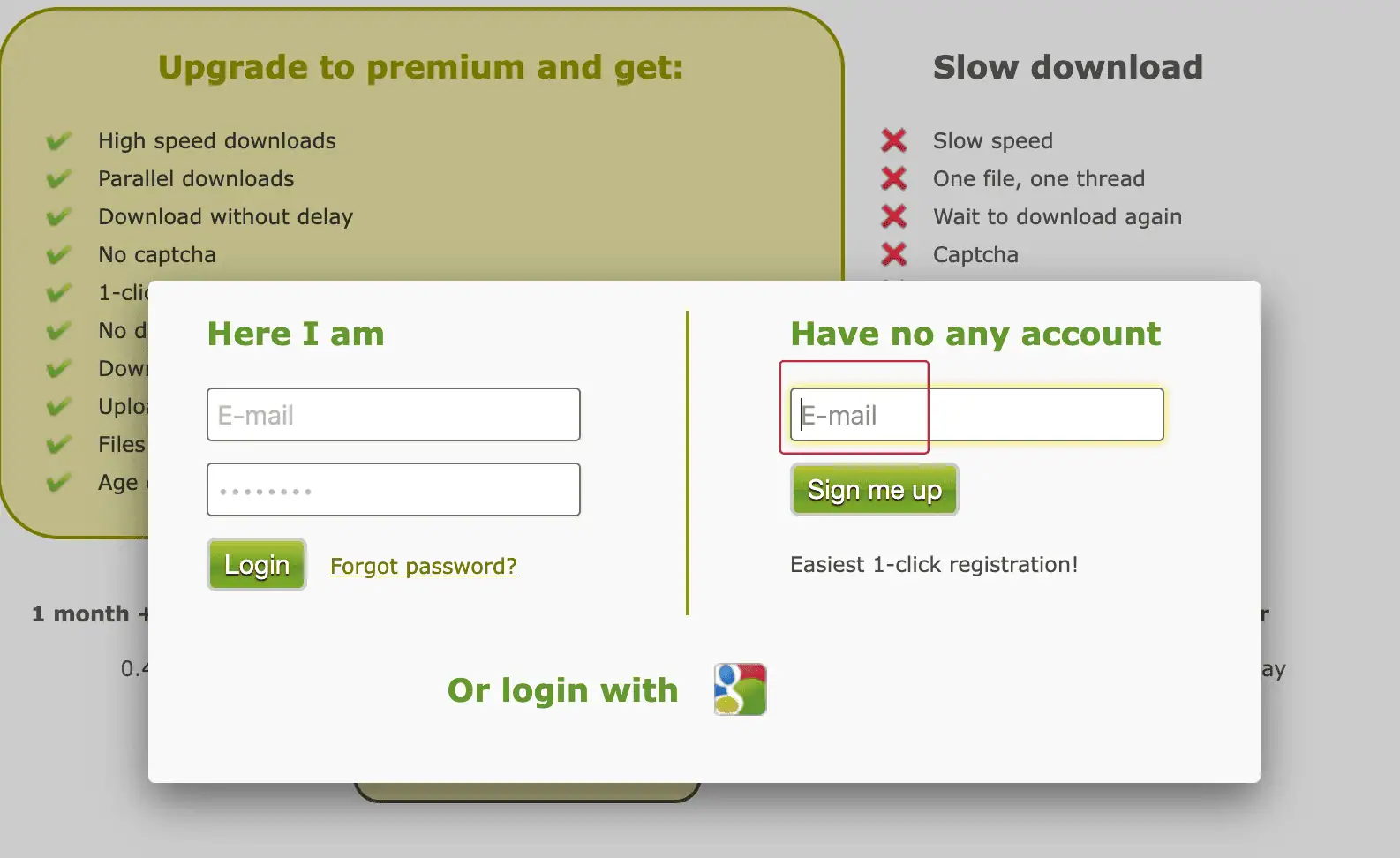
- Open the Upstore login dialog.
- In the "Have no any account" panel on the right, enter your email address.
- Submit. That completes sign-up, with no password field and no separate form.
Step 2: Retrieve the generated password

Upstore generates a password automatically and sends it to the address you provided. You then log in with your email plus the emailed password. Check your spam folder if it does not arrive, and store the password securely.
Step 3: Add the account to JDownloader 2
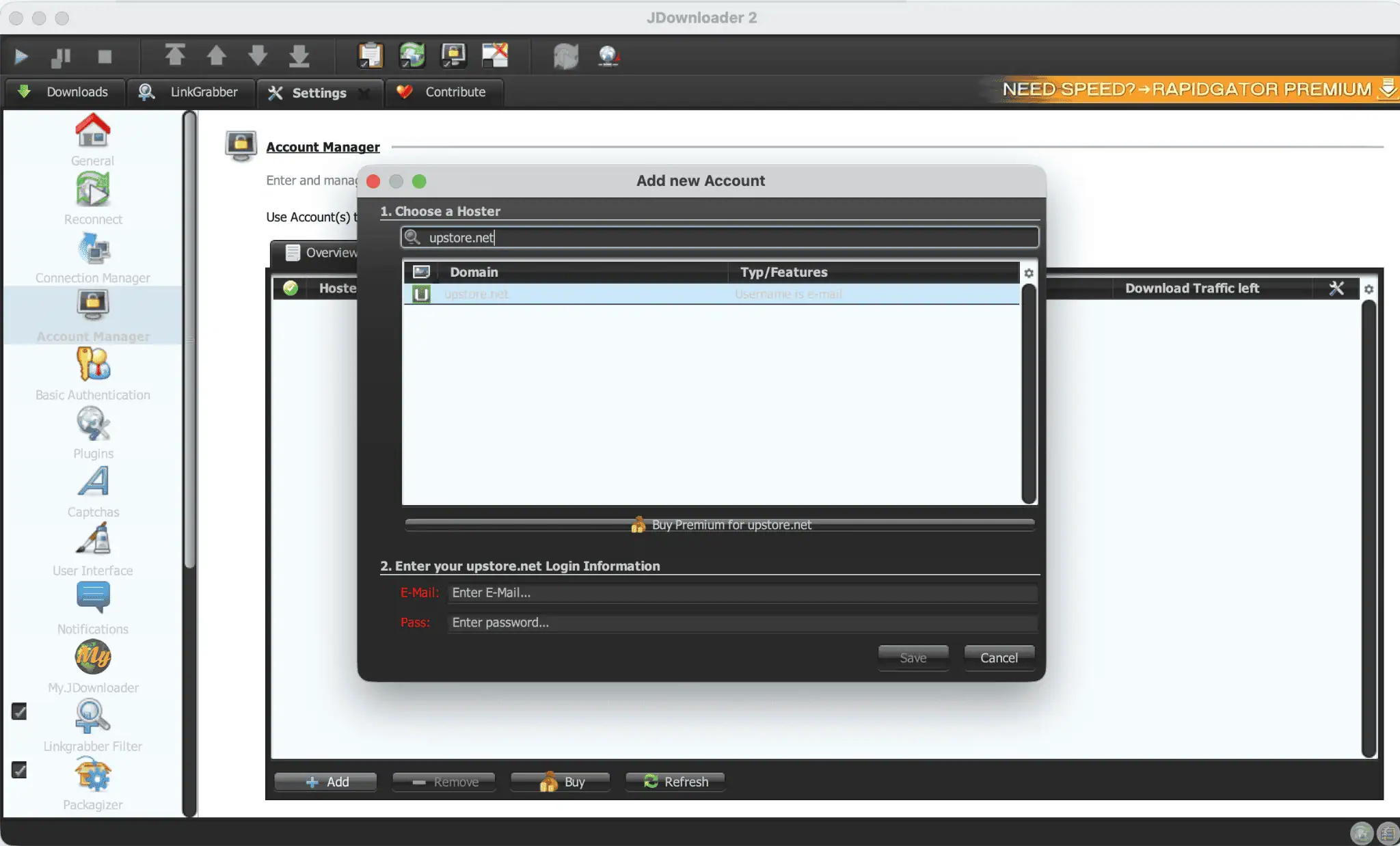
upstore.net, username is the account email.- In JDownloader 2, open Settings → Account Manager and add a new account.
- Choose
upstore.netas the host. - Enter your email address as the username and the emailed password.
Step 4: Solve the verification CAPTCHA
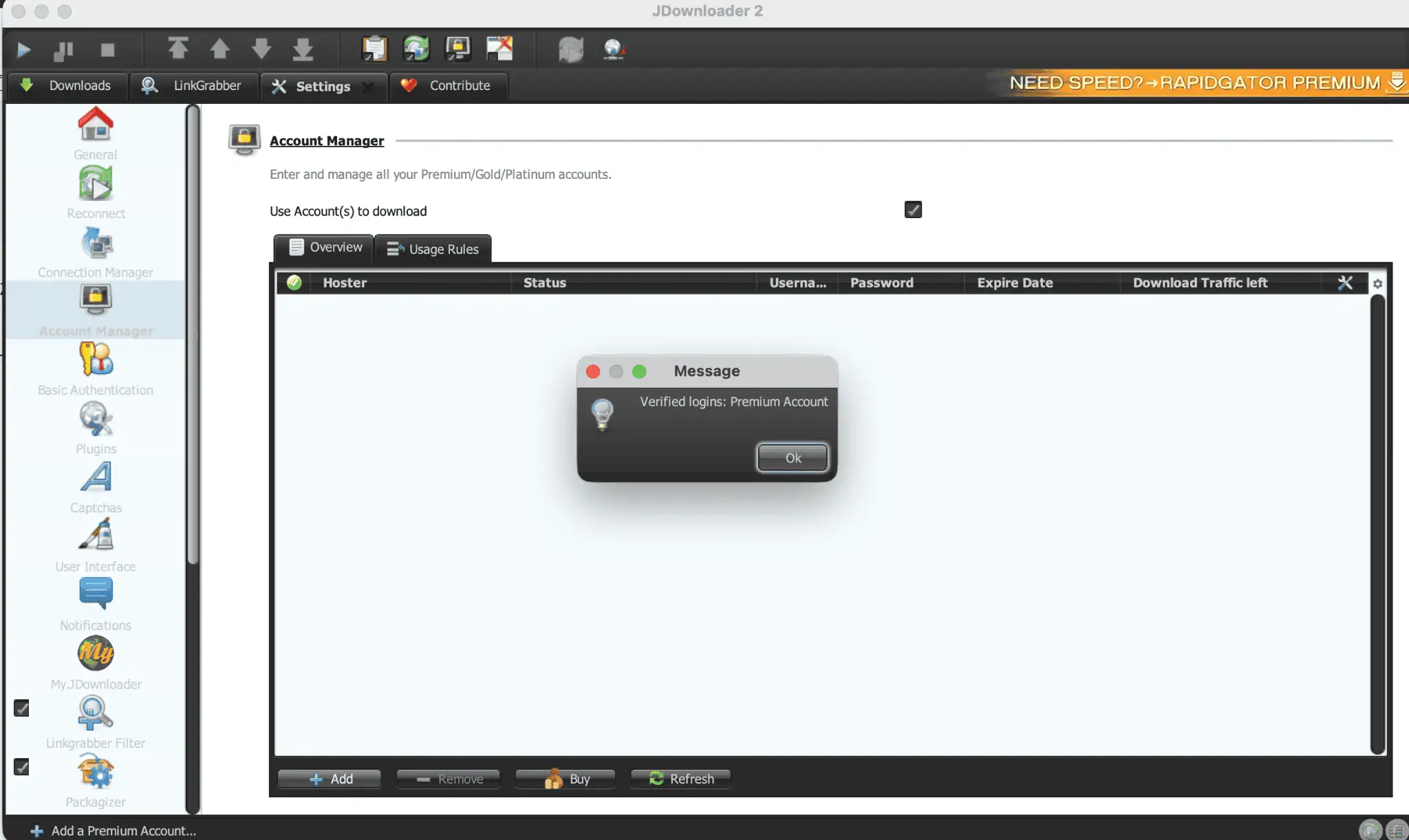
We encountered an image text CAPTCHA during this account check. After it was solved, JD2 reported a verified Premium account. This does not establish how often other sessions or accounts will be challenged.
Buyer FAQ
What is the real cost of Upstore Premium?
The advertised price for the 3-month plan is €33, but the credit card checkout we observed displayed Total: 44.55 EUR, a €11.55 (+35.0%) increase that the screen does not itemize. The other advertised prices are €16 (1 month + 3 bonus days), €59 (6 months) and €99 (1 year). We only inspected the 3-month plan, so check the final total for any plan before paying.
Is PayPal accepted as a standard payment method?
No. In our check, the PayPal option led to a screen titled "How to transfer crypto from PayPal" that requests 0.000515 BTC (about €41 at test-time exchange rates, by our estimate) sent to an external crypto address. That is a Bitcoin transfer route, not a standard PayPal fiat merchant checkout.
How does Upstore deliver your account password?
Upstore generates the password automatically and emails it to you in a message titled "Your password on Upstore." Registration needs only an email address, and you log in with that email plus the emailed password.
What is the daily download limit on Upstore Premium?
Our May 2026 review reported Premium at 20,000 MB per 24 hours, and free/guest downloads at 6,000 MB per 24 hours. The account capture separately shows “16.2 GiB of 20 GiB left” in JD2. We have not reverified the policy or reset mechanics, and the screenshot does not establish them.
Does Upstore require a CAPTCHA when downloading or using JDownloader?
It depends on the tier and the tool. Free browser downloads showed a countdown with 52 seconds remaining in the capture, followed by hCaptcha before the "Get download link" button. Adding the tested Premium account in JDownloader 2 triggered an image text CAPTCHA prompt, after which the account showed "Verified logins: Premium Account."
Final Verdict & Recommendation
Upstore Premium delivers strong throughput for people who use a download manager, but its real-world value depends on three things: the final checkout total, the payment route, and how much you move per day.
In its favor:
- A JD2 overview reading of 47.906 MiB/s in JDownloader 2 and 22.1 MB/s across three Chrome downloads, a very large step up from the 84.8 KB/s free tier.
- Frictionless, email-only registration, and a clean free-tier page in our session.
- Longer plans carry lower advertised per-day rates (down to €0.27/day on the 1-year plan).
To weigh carefully:
- The 3-month plan showed €44.55 against an advertised €33 (+35.0%) at card checkout, with no itemization.
- The "PayPal" option is a Bitcoin transfer, not a fiat PayPal payment.
- The transfer allowance needs checking separately from speed. The historical policy figure and the JD2 balance use different quantities, and reset mechanics were not reverified.
Who it suits: users who need specific files hosted on Upstore, who can work within the current transfer allowance, and who are fine paying by card or crypto.
Who should look elsewhere: users who want standard PayPal checkout, a price that matches the advertised figure, or a much larger daily allowance.
Our suggestion: If you do buy, start with the shortest plan that covers your need and read the final total before you pay. Our best file hosting services guide covers alternatives, and our testing methodology explains how we run these benchmarks.
Review Upstore Premium Plans →
Benchmarks were recorded in May 2026 on a 1 Gbps symmetric fiber connection. Checkout observations were captured for the November 2026 update. Prices, fees, quotas and payment routes can change, so confirm current terms on Upstore's checkout page before purchasing.