
Tested: May 2026 · Plans: $14.99 (30 days) to $69.99+ (180 days) · Traffic: Pooled balance (1 TiB of 1 TiB shown in our test)
Rapidgator is the host every other budget-tier review on this site points to when someone asks “what if I mostly download single large files?” We bought a premium account, ran the same 8-part archive through Chrome and JDownloader 2 that we’ve used across our other host tests, and confirmed exactly why that recommendation holds up.
Short answer: unlike every 1-chunk budget host we’ve tested — DDownload, Upstore, FileSpace, Alfafile — Rapidgator supports multi-chunk downloads on premium accounts. Our JD2 screenshots show 5 connections per file, confirmed by the math: 8 files × 5 chunks = 40 open connections, matching JD2’s own connection counter exactly. Combined speed reached 52.75–54.28 MiB/s across two test runs, and — critically — this comes from chunking a single archive, not just from running many files at once.
Get Rapidgator Premium →Affiliate link. See our disclosure.
Test results summary
| Free tier | Premium | |
|---|---|---|
| Speed (single file) | 99.6 KB/s | 8.7 – 12.9 MB/s |
| Speed (combined, JD2, 8-part archive, 5 chunks/file) | Not available | 52.75 – 54.28 MiB/s (two runs) |
| Chunks per file | 1 | 5 (confirmed via connection count) |
| Wait before download | 37 seconds + Cloudflare check | Instant |
| Maximum parallel downloads | 1 | Unlimited (per host’s own table) |
| Download restriction | 1 file per 120 minutes | None |
| Traffic model | N/A | Pooled balance — our account showed 1 TiB of 1 TiB left |
| JD2 support | Not usable | ✔ Verified first try |
| Price | Free | $14.99 (30 days) to $69.99+ (180 days) |
Tested May 2026 on an 8-part RAR archive (11.326 GiB total, ~1.464 GiB per part). All figures are from our own downloads.
The 5-chunk difference — why Rapidgator behaves differently from budget hosts
This is the finding that separates Rapidgator from every other host in our budget-tier comparisons so far.
Look at the Connection column in our JD2 screenshots: each file shows 5 active connections, not the [1] we documented on DDownload, Upstore, FileSpace, and Alfafile. This isn’t a guess — it’s confirmed by simple arithmetic. Our test queued 8 files simultaneously, and the Download Overview panel reported Open Connections: 40 in both test runs. 8 files × 5 chunks = 40. The math checks out exactly.
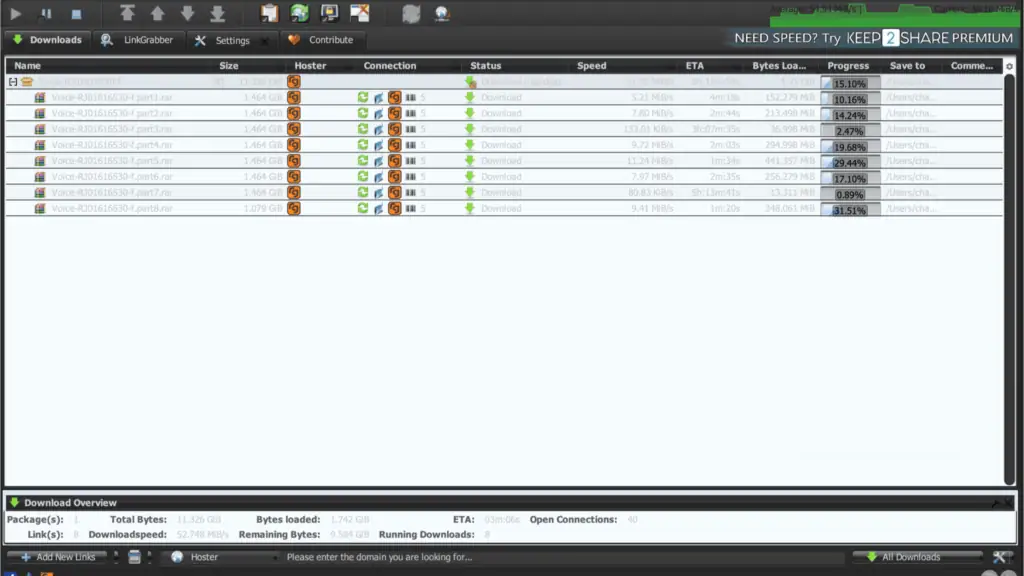
This matters because chunking lets JD2 accelerate a single file, not just a queue of files. On the budget hosts we’ve reviewed, a single large file is stuck on one connection no matter what plan you buy. On Rapidgator, JD2 can split one file across up to 5 simultaneous streams — which is also confirmed independently on the official JDownloader support forum, where staff note that multi-chunk downloading is a premium-only feature on Rapidgator.
Even with 5 chunks working, per-file speeds in our queue weren’t perfectly even — some parts spiked past 11 MiB/s while others briefly dropped to the 100–500 KiB/s range before recovering. That’s expected chunk-level variance, not a sign of a broken connection; the combined total is what to judge the host by.
Premium speed in JDownloader 2
We ran the same 8-file queue twice to check consistency.
First run: 52.748 MiB/s combined. Per-file speeds: 5.21, 7.80, 0.133 (133.01 KiB/s), 9.72, 11.24, 7.97, 0.081 (80.83 KiB/s), and 9.41 MiB/s.
Second run: 54.283 MiB/s combined, with current throughput briefly touching 73+ MiB/s. Per-file speeds: 5.04, 6.61, 0.536 (535.96 KiB/s), 11.37, 13.59, 8.02, 0.474 (473.93 KiB/s), and 12.30 MiB/s.
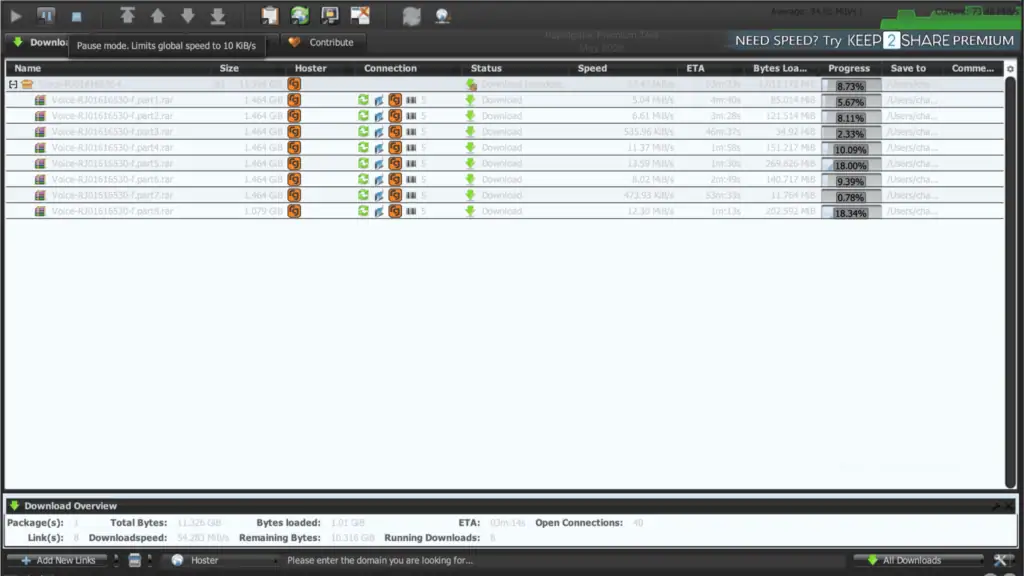
Caption: Second run: 54.283 MiB/s combined, current speed briefly spiking to 73.46 MiB/s. Open Connections again shows 40 — 8 files × 5 chunks, consistent with the first run.
Both runs landed in the ~53–54 MiB/s range, a tight, repeatable result. This is the strongest combined JD2 figure we’ve recorded on the site to date, and it comes with the added benefit that a single one of these files, downloaded alone, would still benefit from chunk acceleration — something none of the budget hosts in our other reviews can offer.
Premium speed in the browser
Chrome downloads also benefited from Rapidgator’s account tier, without needing JD2 at all.
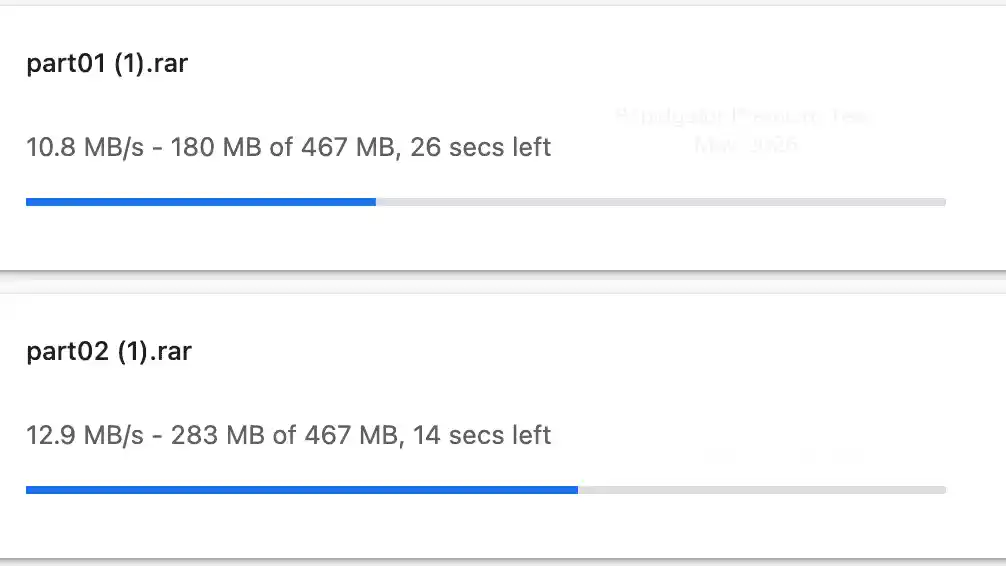
Two parts downloaded simultaneously reached 10.8 MB/s and 12.9 MB/s.
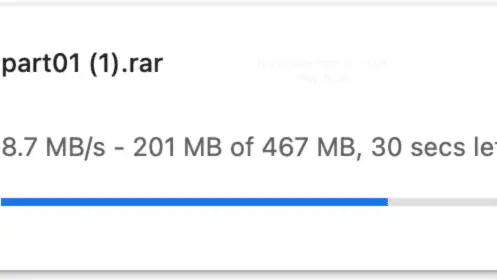
A separate single-file test reached 8.7 MB/s.
Browser vs JD2 verdict: JD2’s chunk support gives it a clear edge for large single files, but Chrome alone is still comfortably usable if you don’t want to install a download manager.
Free membership: what you actually get
Rapidgator’s free tier uses the same restriction structure we’ve now seen on Alfafile — a wait timer, a Cloudflare check, and a hard cap on how often you can download.
The countdown in our test ran 37 seconds, with the free-vs-premium comparison table displayed directly alongside it.
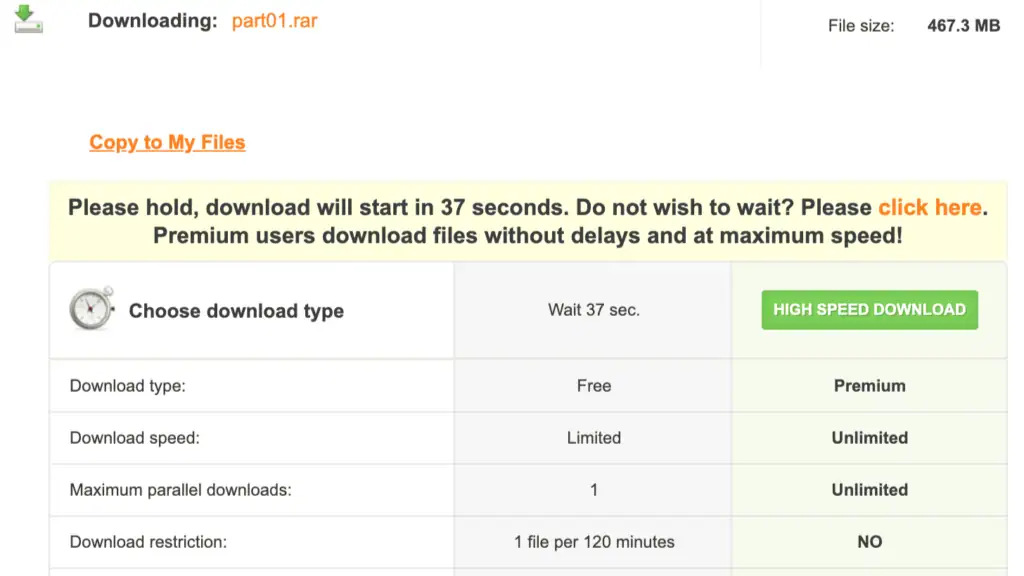
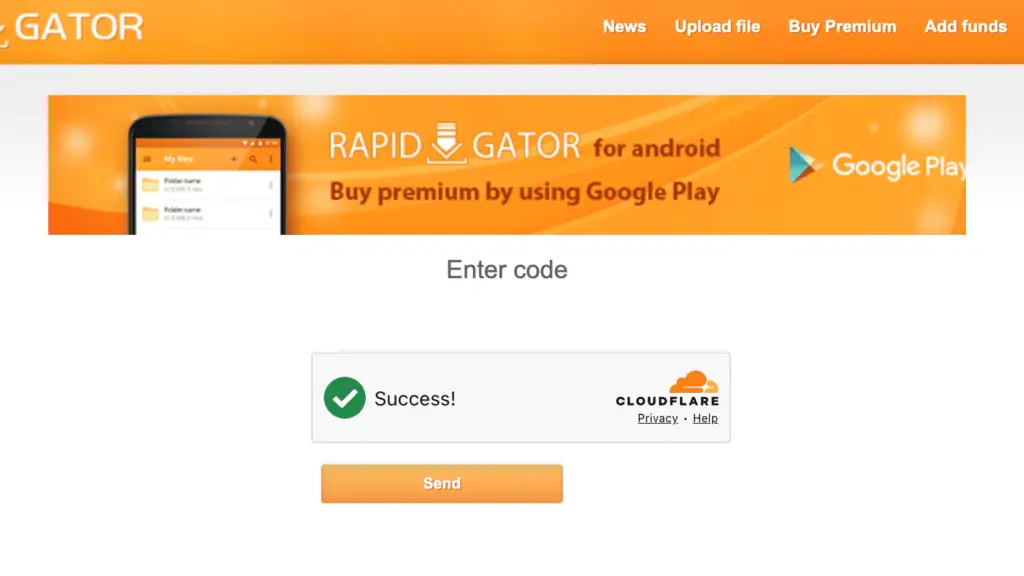
Immediately after, a Cloudflare “Enter code” verification appears — the same style of check we documented on Alfafile.
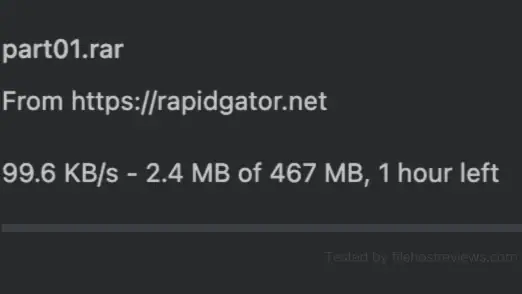
Once both steps cleared, the actual download crawled at 99.6 KB/s — an estimated 1 hour for a 467 MB file.
Full free-tier restrictions, confirmed on Rapidgator’s own comparison table:
- ~99.6 KB/s measured download speed
- 37-second wait plus a separate Cloudflare verification step
- Maximum 1 parallel download
- 1 file per 120 minutes — the same restriction we found on Alfafile’s free tier
- No download acceleration of any kind
Verdict on the free tier: functionally identical in structure to Alfafile’s free restrictions. Fine for confirming a link works, impractical for anything beyond a small file.
See Current Rapidgator Plans →Setting up Rapidgator in JDownloader 2
Setup was fast, and our test session happened to run alongside two other active premium accounts (DDownload and Nitroflare), which is useful context — this is the same JD2 environment we use across our host reviews.
Step 1 — Open Settings → Account Manager → Add, then search “rapidgator”. It appears as rapidgator.net with “Username is e-mail” noted in the Typ/Features column.
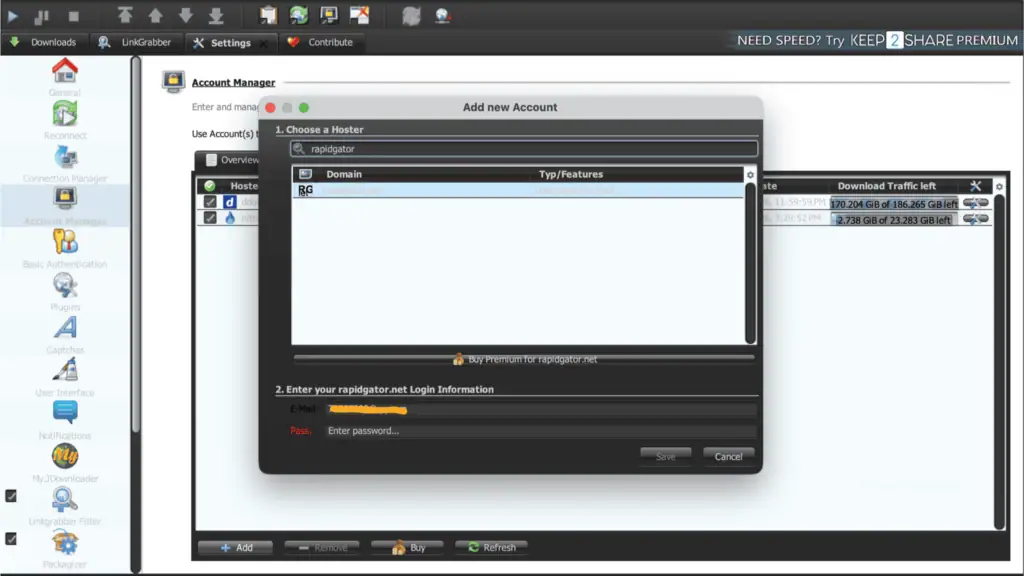
Step 2 — Enter credentials and save. JD2 verified the account immediately.
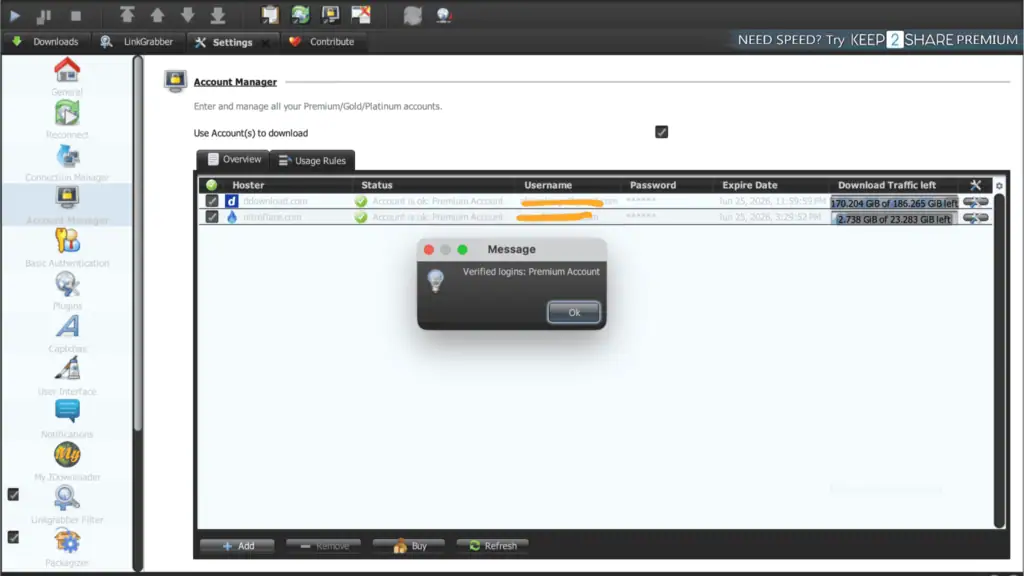
Step 3 — Check the Download Traffic left column. Our account showed 1 TiB of 1 TiB left, expiring June 16, 2026 — alongside our DDownload account (170.204 GiB of 186.265 GiB left) and Nitroflare account (2.738 GiB of 23.283 GiB left).
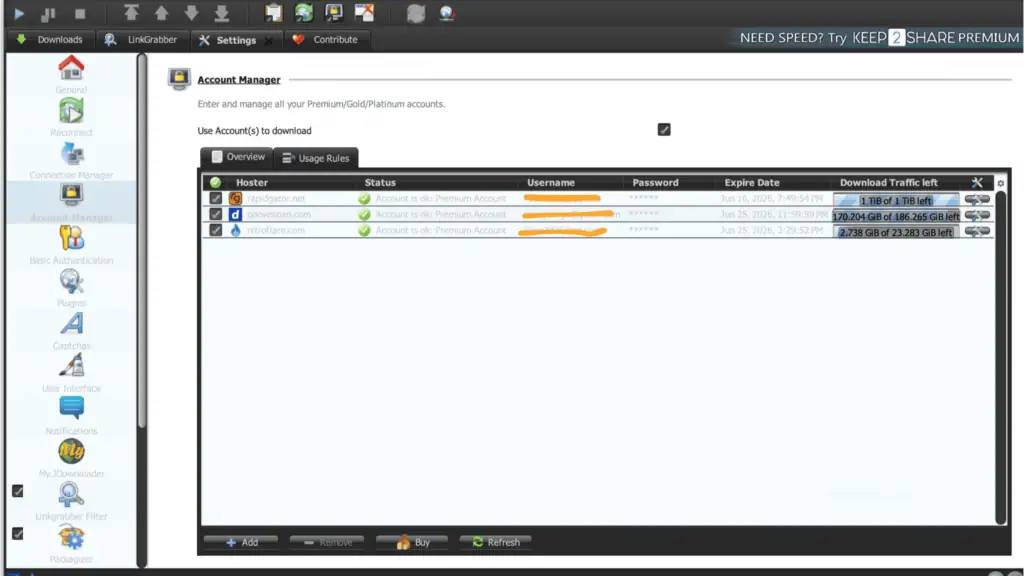
Traffic model: a pooled balance, not necessarily a daily reset
Our JD2 screenshot shows Rapidgator’s traffic as a fixed pool — 1 TiB of 1 TiB left — tied to a specific expiry date (June 16, 2026), the same structural pattern we documented on Alfafile. This differs from hosts like DDownload, which resets a fixed daily amount (200 GB) every 24 hours regardless of usage.
Independent pricing sources describe Rapidgator’s plans in terms of total storage and bandwidth tiers (e.g., 1 TB, 3 TB, 12 TB), which lines up with what we saw in JD2. However, Rapidgator has changed its traffic policy more than once over the years, and some third-party sources still describe it in daily terms. Treat our screenshot as the most reliable current data point, but verify the specific terms of your plan at checkout — this is a detail worth confirming directly with Rapidgator before committing to a long-term plan.
Pricing
| Plan | Price | |
|---|---|---|
| 30 days | $14.99 | Buy 30 Days |
| 90 days | $39.99 | Buy 90 Days |
| 180 days | $69.99 | Buy 180 Days |
| 365 days | Higher tier, check current pricing | Buy 365 Days |
Rapidgator also sells higher-capacity tiers with larger storage/bandwidth allowances at higher prices, similar in structure to Alfafile’s tiered model. Confirm the exact traffic figure attached to your chosen plan before buying, since this is priced by tier as well as duration.
Our recommendation: start with the 30-day plan to confirm your target links are actually mirrored on Rapidgator and that JD2’s multi-chunk acceleration performs as expected on your connection before committing to a longer term.
Customer support
Rapidgator offers a ticket-based help center (help.rapidgator.net) plus a listed sales email (sales@rapidgator.net). Trustpilot reviewers report email responses arriving within about a week — slower than same-day, but a working channel. We found no confirmed live chat option during our test.
If a review claims instant live chat support for Rapidgator, treat that claim with the same caution we’ve applied to similar unverified claims on other hosts in this series.
Pros and cons
Pros
- Multi-chunk downloading on premium — 5 connections per file confirmed in JD2, unlike every 1-chunk budget host we’ve tested
- 52.75–54.28 MiB/s combined across two separate 8-file test runs, with 40 open connections matching the math exactly
- Strong single-file Chrome speed (8.7–12.9 MB/s) with no download manager required
- JD2 account verified on the first attempt
- Large pooled traffic tiers available for heavy or long-term use
Cons
- Free tier restricted to 1 file per 120 minutes, on top of ~99.6 KB/s speeds
- Free tier requires clearing both a wait timer and a separate Cloudflare check
- Traffic model is pooled/tiered rather than a simple daily reset — verify current terms before buying
- Support response times reported around a week via email; no confirmed live chat
- Per-file speeds inside a chunked download can dip noticeably before recovering
Who should buy Rapidgator premium?
Buy it if:
- You regularly download single large files — the 5-chunk support is the exact feature the 1-chunk budget hosts in this series lack
- You want a host that performs well in both JD2 and Chrome without extra configuration
- Your files are commonly mirrored on Rapidgator, which is one of the most widely available premium hosts
Skip it if:
- You only need a cheap secondary account for occasional multi-part archive queues — a 1-chunk budget host like DDownload may be more cost-effective for that specific use case
- You need guaranteed fast support response times
- You want a simple, clearly daily-reset traffic allowance rather than a pooled tier
Verdict
Rating: 9/10
Rapidgator is the host to buy when your downloads don’t fit the “many small files at once” pattern that budget hosts like DDownload, Upstore, FileSpace, and Alfafile are built around. The 5-chunk-per-file support we confirmed in JD2 — backed up by the exact 40-connection math across two separate test runs — is the concrete technical reason a single large file performs so much better here than on any 1-chunk host we’ve reviewed.
Combined speeds of 52.75–54.28 MiB/s held consistent across repeated testing, and Chrome alone delivered a very usable 8.7–12.9 MB/s without any extra setup. The free tier carries the same restrictive structure we found on Alfafile — a 120-minute-per-file cap — so don’t expect to use it for anything beyond confirming a link is alive.
If your downloads are typically single large files, or you want one account that reliably handles both patterns, Rapidgator earns its reputation as the default recommendation across this site’s other reviews.
Get Rapidgator Premium Here →Frequently asked questions
How fast is Rapidgator premium?
In our May 2026 test, JDownloader 2 reached 52.748 MiB/s combined in one run and 54.283 MiB/s in a repeat run, both across an 8-part archive with 5 chunks per file (40 total connections). Chrome reached 10.8–12.9 MB/s across two simultaneous parts, and 8.7 MB/s on a single file.
Does Rapidgator support multiple connections per file?
Yes. Our JD2 screenshots show 5 chunks per file on premium accounts, confirmed by the connection math (8 files × 5 chunks = 40 open connections, matching JD2’s own counter exactly). This is a premium-only feature, also confirmed on the official JDownloader support forum. None of the budget hosts we’ve tested (DDownload, Upstore, FileSpace, Alfafile) offer this.
Does Rapidgator work with JDownloader 2?
Yes. Our premium account was verified on the first attempt using standard email login, alongside two other active premium accounts (DDownload, Nitroflare) in the same session.
What is Rapidgator’s traffic limit?
Our test account showed a pooled balance of 1 TiB of 1 TiB, tied to a specific expiry date rather than a daily reset. Rapidgator also sells larger tiered plans (multi-TB). Confirm the exact terms of your plan before buying, as policies have changed over time.
Is the Rapidgator free tier usable?
Only for very small files or confirming a link is alive. We measured 99.6 KB/s, a 37-second wait plus a Cloudflare check, and a 1-file-per-120-minutes restriction — the same restriction structure we found on Alfafile’s free tier.
How much does Rapidgator premium cost?
$14.99 for 30 days, $39.99 for 90 days, $69.99 for 180 days, with higher-traffic tiers available at higher prices.
Is Rapidgator better than DDownload?
For single large files, yes — Rapidgator’s 5-chunk support accelerates one file at a time, which DDownload’s 1-chunk limit cannot do. For cheap, high-volume daily downloading of many small files, DDownload’s confirmed 200 GB/day reset may work out cheaper. Many users keep both: Rapidgator as the primary account, DDownload as a cheap secondary. → Compare alternatives
Related: Best File Hosting Services · Fastest File Hosts Tested · JDownloader Compatible File Hosts · Cheapest Premium File Hosts