
Tested: May 2026 · Plan: Premium Pro · Traffic: 47.199 GiB / day · Plans from ~$16.95
FileBoom (fileboom.me / fboom.me) is part of the Keep2Share family and turns up constantly on adult and game-archive link pages. We bought a Premium Pro account, ran a four-file, 18.6 GiB queue through JDownloader 2, tested the same account in Chrome, and downloaded a 467 MB part on a free account for comparison.
Short answer: FileBoom premium reached 51.31 MiB/s peak in JDownloader 2 (50.49 MiB/s average) but only 9.7 MB/s in Chrome — a 5× gap, the widest we’ve measured on any host. The reason matters: FileBoom is one of the few hosts that opens multiple connections per file, and a browser can’t use them. There’s a second catch: our Premium Pro quota was 47.199 GiB per day, which at full JD2 speed you can burn in under 16 minutes.
Get FileBoom Premium — Instant Access →Affiliate link. See our affiliate disclosure.
Test results summary
| Free tier | Premium Pro | |
|---|---|---|
| Speed (single file, Chrome) | 23.3 KB/s | 9.7 MB/s |
| Speed (combined, JD2) | Not available | 50.49 MiB/s avg · 51.31 MiB/s peak |
| Connections per file | 1 | ~2–3 (10 across 4 files) |
| Parallel downloads | 1 file per hour | 4+ confirmed in JD2 |
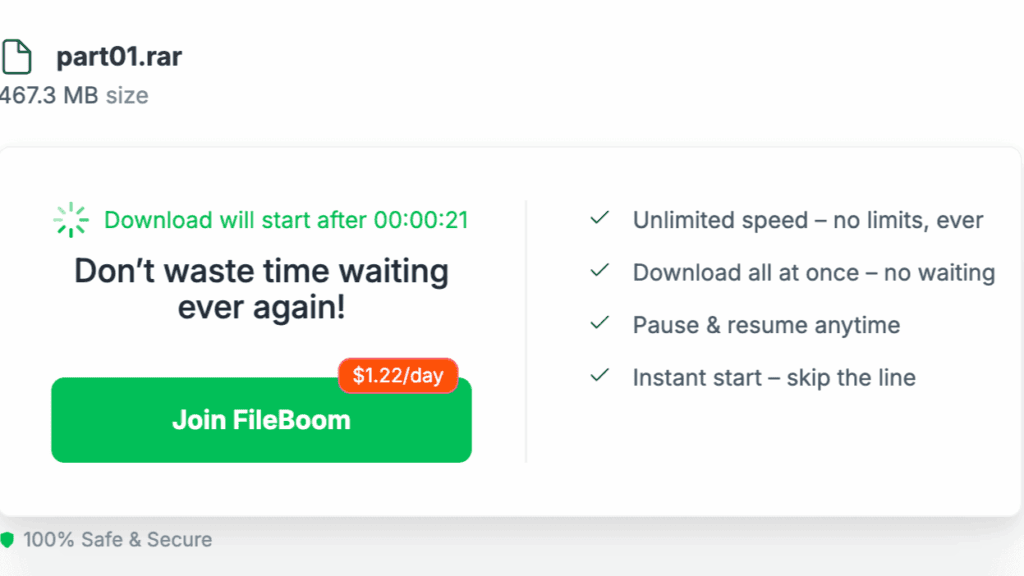
| Wait before download | ~30s countdown + reCAPTCHA | Instant |
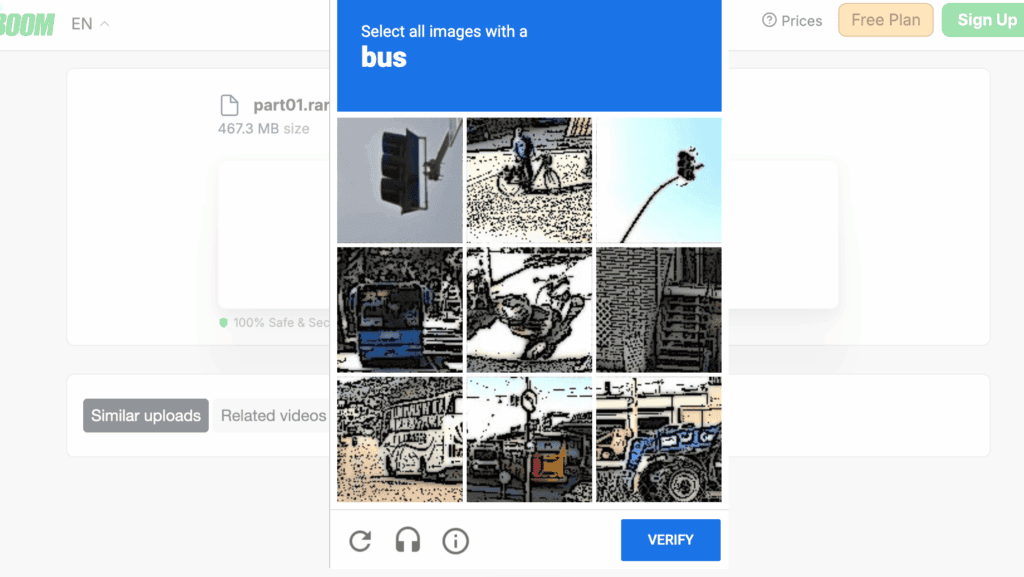
| Captcha | ✔ Image grid, every file | ✘ None |
| Daily traffic | ~20 GB total file size | 47.199 GiB (~50 GB) |
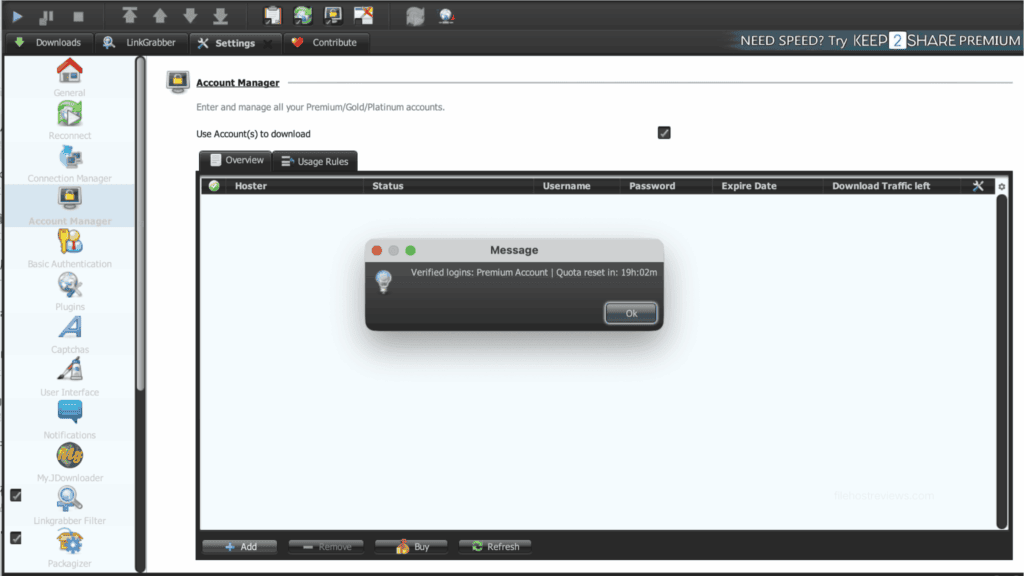
| Quota reset | — | Rolling, 19h:02m shown in JD2 |
| Download resume | ✘ | ✔ |
| Time to download 467 MB | ~6 hours | ~48 seconds |
| JD2 support | Not usable | ✔ Verified first try |
| Login method in JD2 | — | Username + password (no cookie option) |
| Price | Free | From ~$16.95 (Premium) / ~$35.94 (Premium Pro) |
Tested May 2026. Free tier on a 467.3 MB part; premium on a four-file queue totalling 18.637 GiB (5.223 / 5.806 / 4.764 / 2.844 GiB).
Finding #1: FileBoom is multi-chunk — which is why the browser loses badly
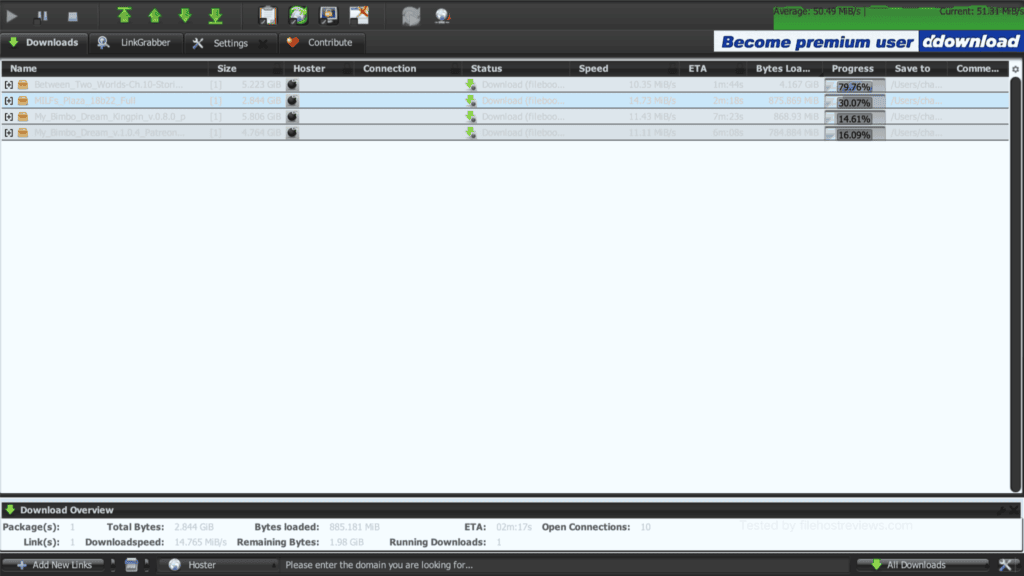
Look at the Download Overview bar in our JD2 screenshots: Running Downloads: 4 · Open Connections: 10.
Ten connections across four files. That is roughly 2–3 chunks per file — FileBoom is splitting individual downloads across multiple simultaneous connections.
This is the opposite of hosts like DDownload and Uploady, which hard-limit you to one connection per file. On those hosts a browser loses almost nothing, because there’s nothing to parallelise. On FileBoom, a browser loses everything:
| Download method | Result | Why |
|---|---|---|
| Chrome, one file | 9.7 MB/s | One connection. Browsers can’t chunk. |
| JDownloader 2, four files | 50.49–51.31 MiB/s | 10 connections. Chunking + parallelism stack. |
That’s a 5.3× difference on the same account, on the same day. If you buy FileBoom and download in a browser, you are leaving roughly 80% of what you paid for on the table.
Get the Account That Actually Hits 51 MB/s →Bottom line: JDownloader 2 (or an equivalent download manager) is not optional on FileBoom. It is the product. Budget the 10 minutes to set it up — the section below walks through it.
Finding #2: The 47 GiB quota is smaller than it sounds
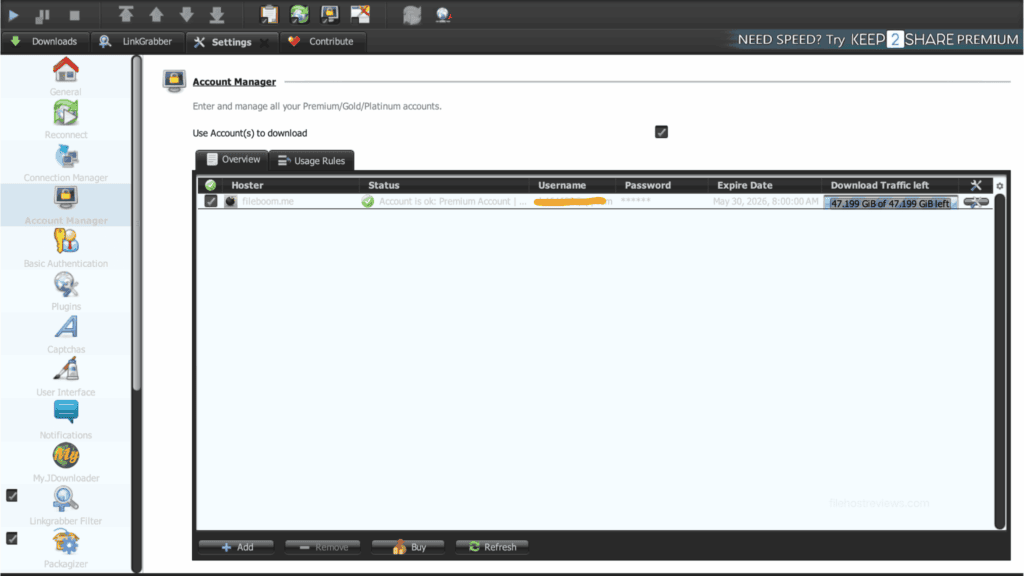
JD2 reported our Premium Pro account’s Download Traffic left as 47.199 GiB of 47.199 GiB — a fresh, untouched daily allowance, matching FileBoom’s advertised 50 GB-class Premium Pro tier.
Now run the arithmetic against the speed we just measured:
| Daily allowance | 47.199 GiB = 48,332 MiB |
| Sustained JD2 speed | 51.31 MiB/s |
| Time to exhaust the entire daily quota | ≈ 15 minutes 42 seconds |
Our single test queue — four files, 18.637 GiB — consumed roughly 40% of a full day’s allowance in one sitting, and those weren’t unusually large files by modern standards (a 5.8 GiB game build, a 5.2 GiB video archive).
Worse for the impatient: the quota is rolling, not calendar-based.
You cannot plan around a fixed reset hour, and you cannot bank unused traffic. FileBoom’s speed and FileBoom’s quota are in direct tension: the faster you go, the sooner you stop.
Tier check before you buy. FileBoom sells three levels, and the daily cap is the only thing that meaningfully separates them:
| Tier | Typical daily traffic | Notes |
|---|---|---|
| Premium | ~10–20 GB/day | Cheapest, but you’ll hit the wall on a single large archive |
| Premium Pro | ~50 GB/day (47.199 GiB measured) | What we tested — the sensible minimum |
| Premium MAX | ~100 GB/day | Only worth it if you’re pulling multiple archives daily |
One recurring complaint we found in third-party reviews is buyers signing up for a 90-day plan and discovering a 20 GB/day cap they didn’t expect. Confirm the daily bandwidth on the checkout page before paying — the tier names are not self-explanatory and the plan pages differ between FileBoom’s own site and resellers.
Premium speed in JDownloader 2
Our test queue was four unrelated packages totalling 18.637 GiB — a realistic mixed workload rather than a clean single archive.
Result: 50.49 MiB/s average, 51.31 MiB/s current, with all four links downloading simultaneously across 10 open connections. Per-file speeds sat at 14.73, 11.43, 11.11 and 10.35 MiB/s.
We captured a second reading later in the same session to check stability:
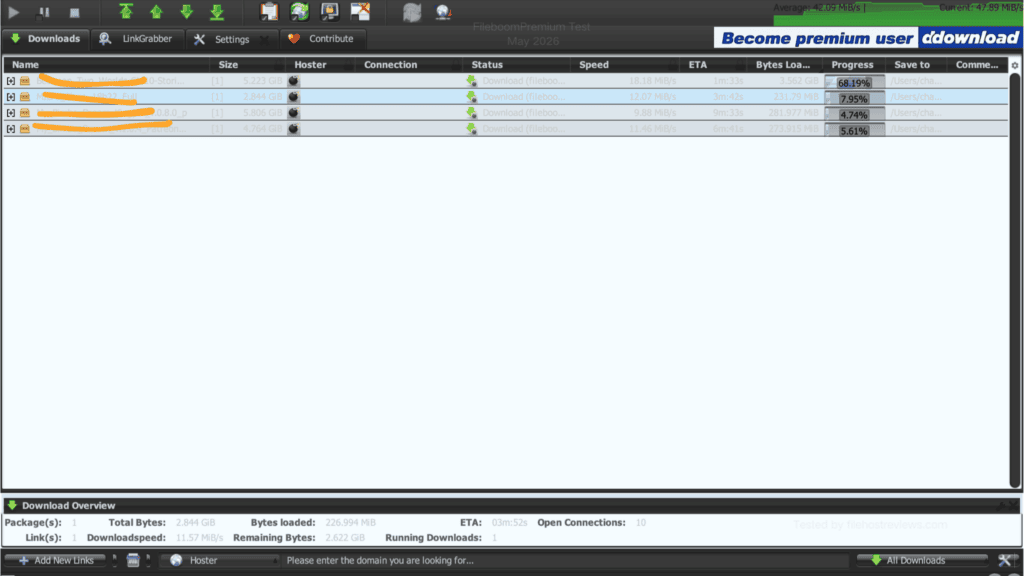
Across both readings the combined rate stayed in a 42–51 MiB/s band, which is genuinely strong — comparable to what we measured on Rapidgator and above DDownload’s 51.19 MiB/s only on peaks.
The variance is worth noting though: individual files swung between 9.88 and 18.18 MiB/s minute to minute. The aggregate is what’s reliable, not any single connection.
Premium speed in the browser
This is where FileBoom disappoints, and it’s structural rather than a bad-luck result.
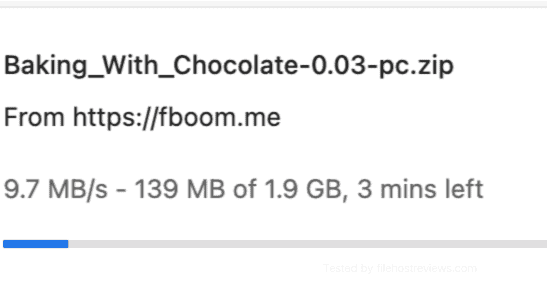
9.7 MB/s is a perfectly usable number in isolation — 400× faster than the free tier, and fine for a one-off 500 MB grab. But set against what the same account produced in JD2 on the same day, it’s a poor return on a Premium Pro subscription.
Browser vs JD2 verdict: JD2 was 5.3× faster (51.31 vs 9.7 MB/s). This is the largest browser-to-manager gap in our entire test set. On DDownload the gap was 1.2×; on Uploady, 1.4×. If you will not install a download manager, do not buy FileBoom — buy a one-connection-per-file host instead, where the browser penalty is negligible.
Free membership: what you actually get
FileBoom’s free tier is one of the more restrictive we’ve documented, and the restrictions stack.
Step 1 — A reCAPTCHA image grid
Step 2 — A ~30-second countdown, wrapped in an upsell
Step 3 — 23.3 KB/s
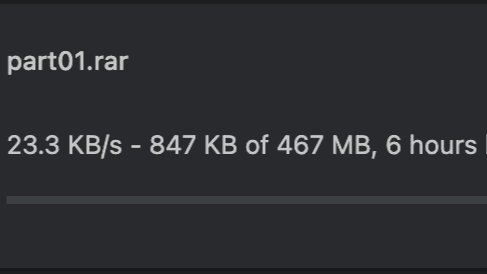
23.3 KB/s puts FileBoom near the bottom of every free tier we’ve measured, alongside DDownload’s 28.4 KB/s and far below Uploady’s 474 KB/s.
Step 4 — One file per hour
Even if you’re willing to wait 6 hours, FileBoom limits free users to roughly one file per hour with a total daily file-size ceiling around 20 GB. A four-part archive means four captchas, four countdowns, four hourly waits, and roughly a full day of wall-clock time — assuming nothing drops, because free accounts get no resume support. FileBoom and its Keep2Share siblings specifically removed free-tier resume; a dropped connection at hour five means starting from zero.
Full free-tier restrictions
- 23.3 KB/s measured download speed
- reCAPTCHA image grid before every download
- ~30-second countdown after the captcha
- One file per hour rate limit
- ~20 GB/day total file size ceiling
- No parallel downloads
- No resume. Deliberately disabled.
Verdict on the free tier: use it to confirm a link is alive. Nothing else is realistic.
Skip the Captcha, the Countdown and the 6-Hour Wait →Setting up FileBoom in JDownloader 2
Given the 5× browser penalty, this is the most important section on the page. It took us under two minutes.
Step 1 — Add the hoster. Open Settings → Account Manager → Add, then type fileboom in the hoster search. fileboom.me appears as the single match.
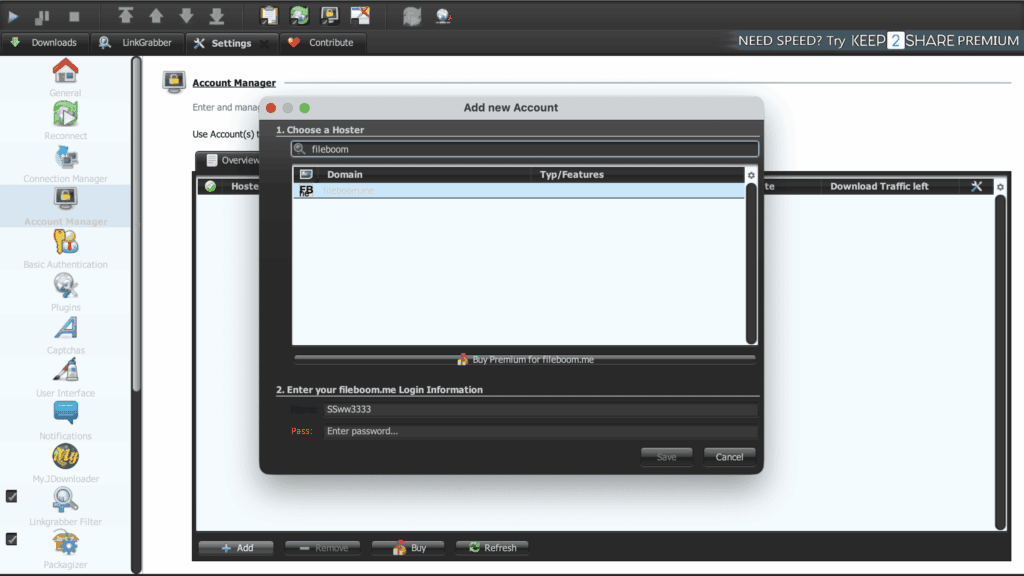
Use fileboom.me, not fboom.me. Your download links may point at fboom.me (ours did), but the JD2 account entry is filed under fileboom.me. Same service, one hoster entry.
Step 2 — Enter credentials and save. Ours verified on the first attempt, and the confirmation dialog immediately surfaced the quota timer:
Step 3 — Check the traffic column before every large queue. The Account Manager shows Download Traffic left as a live counter (47.199 GiB of 47.199 GiB when fresh). Given that a single 18 GiB queue eats 40% of it, glance at this field before you start.
Step 4 — Tune for chunking, not just parallelism. Unlike one-connection hosts, FileBoom does respond to chunk settings. Leave max chunks per file at 2–4 and set max simultaneous downloads to 3–4. Our 10-connection / 51 MiB/s result came from exactly that combination. Pushing both higher risks connection errors without adding throughput.
Pricing
FileBoom prices in USD across three tiers and four durations. Figures below reflect what we observed at test time; FileBoom runs frequent promotions.
| Tier | 30 days | 90 days | 365 days | Daily traffic | |
|---|---|---|---|---|---|
| Premium | ~$16.95 | ~$41.95 | ~$113.95 | ~10–20 GB/day | Buy Premium |
| Premium Pro (tested) | ~$35.94 | ~$83.94 | ~$215.94 | ~50 GB/day | Buy Premium Pro |
| Premium MAX | ~$46.94 | ~$109.94 | ~$280.94 | ~100 GB/day | Buy Premium MAX |
Prices observed at time of testing and subject to change. Short 3-day trials (~$6.90) appear on some plan pages. Verify tier limits at checkout.
Our recommendation: buy the 3-day or 30-day Premium Pro plan first. Three reasons:
- Tier confusion is the #1 complaint. Buyers report signing up for long plans and finding a 20 GB/day cap. A short plan lets you verify the actual number in JD2’s Account Manager before committing.
- The quota may not fit you. 47 GiB/day sounds generous until you watch it disappear in 16 minutes. Measure your real weekly usage against it.
- Availability is uploader-dependent. FileBoom is strong in specific niches and absent elsewhere. Confirm your sources actually mirror there.
If a month goes as expected, the 365-day Premium Pro plan drops the effective cost to roughly $18/month — reasonable for a 50 GB/day allowance at these speeds.
Pros and cons
Pros
- 50.49 MiB/s average, 51.31 MiB/s peak in JDownloader 2 — top-tier speed
- Multi-chunk downloads — 10 connections across 4 files, so single files can be accelerated
- Individual files hit 18.18 MiB/s on their own inside JD2
- JD2 verified on the first attempt, no cookie workaround needed
- JD2 displays both remaining traffic and an exact quota reset countdown
- Download resume supported on premium
- Three tiers let you match the daily cap to your actual usage
- Short 3-day trial plans available for testing
Cons
- 9.7 MB/s in Chrome vs 51 MB/s in JD2 — a 5.3× penalty for browser users
- 47.199 GiB/day quota is exhausted in ~16 minutes at full speed
- Quota reset is rolling (19h:02m), not a predictable daily hour
- Tier naming is confusing; buyers report unexpected 20 GB/day caps
- Free tier is punishing: 23.3 KB/s, captcha, countdown, one file per hour
- No free-tier resume — deliberately disabled
- Per-file speeds vary widely (9.88 – 18.18 MiB/s in one session)
- File availability is niche-dependent
Who should buy FileBoom premium?
Buy it if:
- You use JDownloader 2 or another chunking download manager — this is non-negotiable on FileBoom
- Your realistic usage sits under ~45 GB/day, and you’re happy with bursts rather than continuous transfer
- You want genuine single-file acceleration — unlike DDownload or Uploady, one big ISO will run fast here
- Your uploaders mirror to FileBoom or its Keep2Share siblings, so one account covers several domains
Skip it if:
- You download in a browser — you’ll get 9.7 MB/s for a Premium Pro price. Buy Uploady or DDownload instead, where browsers lose almost nothing
- You pull hundreds of GB per week — 47 GiB/day is a hard stop with no rollover, and even Premium MAX caps at ~100 GB
- You need a predictable reset schedule — the rolling 19-hour timer makes planning awkward
- You were counting on the free tier. At 23.3 KB/s with one file per hour, it isn’t a tier, it’s a link checker
Verdict
Rating: 7.5 / 10
FileBoom is a genuinely fast host held back by a quota that can’t keep up with it — and by a browser experience that throws most of that speed away.
The good news is real. 50.49 MiB/s average with peaks at 51.31 MiB/s puts FileBoom in the same bracket as Rapidgator, and it’s one of the few hosts at this price that opens multiple connections per file. That means a single large download actually accelerates here, which is exactly what DDownload and Uploady cannot do. JD2 integration was flawless, and JD2’s exposure of both remaining traffic and the reset countdown is unusually transparent.
The problems are equally real. 9.7 MB/s in Chrome against 51 MB/s in JD2 is the widest gap we’ve measured anywhere — buy FileBoom without a download manager and you’re paying Premium Pro rates for entry-tier throughput. And the arithmetic on the quota is unforgiving: 47.199 GiB disappears in under 16 minutes at full speed, on a rolling 19-hour reset you can’t plan around. Our four-file test queue alone consumed 40% of a day.
Buy FileBoom Premium Pro if you run JDownloader 2 and your links point there. It’s a fast, capable, single-file-friendly account with a ceiling. Start with a 3-day or 30-day plan, watch the traffic counter for a week, and only then commit to a year. If you need volume above all else, Rapidgator is the better primary account.
Get FileBoom Premium Pro →3-day trials available · Instant activation · Requires JDownloader 2 for full speed
Frequently asked questions
How fast is FileBoom premium?
In our May 2026 test: 50.49 MiB/s average and 51.31 MiB/s peak in JDownloader 2 across four simultaneous files, with individual files reaching 18.18 MiB/s. A single Chrome download managed only 9.7 MB/s. A second JD2 reading averaged 42.09 MiB/s.
Why is my FileBoom download slow in the browser?
Because FileBoom splits files across multiple connections and browsers can’t use them. We measured 10 open connections across 4 files in JD2 — roughly 2–3 chunks per file. Chrome opens one. That’s the entire 5.3× gap. Install JDownloader 2; it’s the single biggest speed change you can make on this host.
Does FileBoom work with JDownloader 2?
Yes, and it’s essentially required. Search fileboom in JD2’s Account Manager and select fileboom.me (not fboom.me, even if your links use that domain). Username and password only — there’s no cookie-login fallback. Ours verified on the first attempt.
What is FileBoom’s daily traffic limit?
Our Premium Pro account showed 47.199 GiB per day in JD2, matching the advertised 50 GB-class tier. Premium is roughly 10–20 GB/day and Premium MAX roughly 100 GB/day. At full JD2 speed, 47 GiB is exhausted in about 16 minutes. Nothing rolls over.
When does the FileBoom quota reset?
It’s a rolling window, not a fixed daily hour. JD2 displayed “Quota reset in: 19h:02m” for our account. Check the Account Manager dialog for your exact timer.
How much does FileBoom premium cost?
Roughly $16.95/30 days for Premium, $35.94/30 days for Premium Pro and $46.94/30 days for Premium MAX, with 90-day and 365-day plans cutting the effective monthly rate substantially (Premium Pro annual lands near $18/month). Short 3-day trials around $6.90 appear on some pages. Verify the daily cap at checkout — mismatched expectations on tier limits are the most common buyer complaint.
Is the FileBoom free tier usable?
No. We measured 23.3 KB/s behind a reCAPTCHA image grid and a ~30-second countdown, limited to roughly one file per hour, with no resume support. A 467 MB part was estimated at 6 hours. Use it to verify a link exists.
Is FileBoom better than DDownload?
They fail in opposite directions. FileBoom is faster in a download manager (51 vs 51 MiB/s peak, but with real single-file acceleration) and supports multi-chunk downloads. DDownload is far cheaper (~€3.33/month), has a 200 GB/day allowance versus FileBoom’s 47 GiB, and loses almost nothing in a browser. Choose FileBoom if you use JD2 and download single large files; choose DDownload if you download in a browser or need volume. → Compare alternatives
Is FileBoom the same as Keep2Share?
They’re part of the same family, along with TezFiles, and share infrastructure and tier structure (the 50 GB/day Premium Pro tier is common to both). Links and accounts are not interchangeable, but the behaviour — including the deliberate removal of free-tier resume — is consistent across all three. See our Keep2Share review.
Related Reviews
Looking at alternatives?
Related: Best File Hosting Services · Fastest File Hosts Tested · JDownloader Compatible File Hosts · Cheapest Premium File Hosts