

Quick Answer & Verdict
DailyUploads Premium offers paid downloads without the waits, ads and CAPTCHAs listed for free access. Our older free Chrome capture showed 3.0 MB/s. Paid downloads showed 12.6 MB/s for one Chrome file and 20.5 MB/s across two files. Four active JDownloader 2 downloads produced chart readings of roughly 32–35 MiB/s.
Premium is worth considering if you often need DailyUploads files, larger archives or batch queues. Free access may suit an occasional file. Check the plan before buying: the displayed cards use Standard, Turbo and Max speed labels, and list 300 GB of daily bandwidth. Our older JD2 account check showed a different traffic balance. The final checkout total can also exceed the price on the plan card.
Key Facts & Tested Results
Changbin Ge tested DailyUploads on a Mac with 1 Gbps symmetric fiber, Chrome and JDownloader 2. The first JD2 speed capture is marked May 2026. Prices below come from the displayed plan and checkout screenshots. Browser rates use MB/s; JD2 uses MiB/s. See our testing methodology.
| Test or feature | Screenshot reading or page claim |
|---|---|
| Free Chrome download | 3.0 MB/s observed; up to 200 KB/s advertised separately |
| Free wait | “Wait 7 seconds” displayed, with reCAPTCHA |
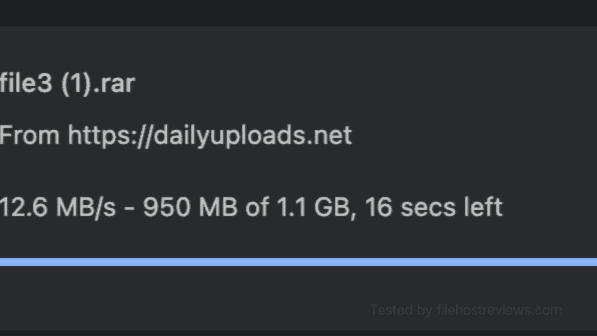
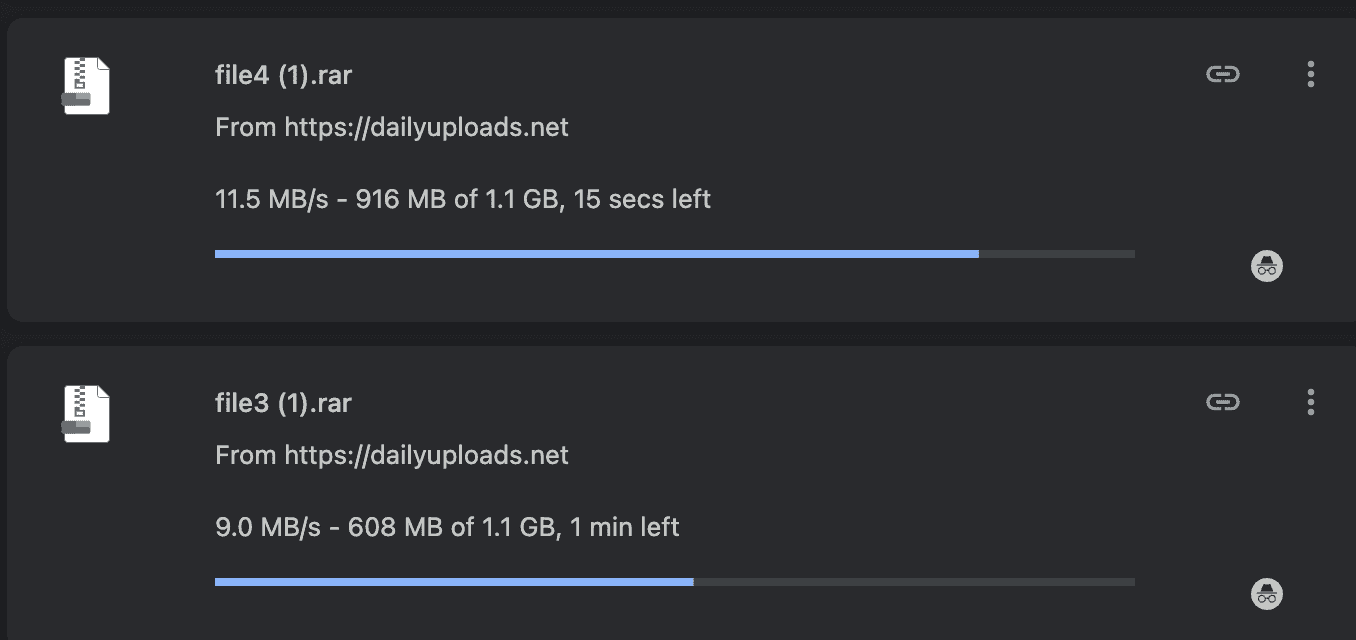
| Premium Chrome | 12.6 MB/s for one file; 20.5 MB/s across two |
| JD2 four-file queue | Chart Current: 35.01 and 31.91 MiB/s |
| Advertised daily bandwidth | 300 GB across the displayed plans |
| Older JD2 traffic balance | 229.749 GiB of 229.749 GiB left |
| Starting price | $12.99 for 30 days, before checkout differences |
Table of Contents
Pricing & Plans: Standard, Turbo and Max
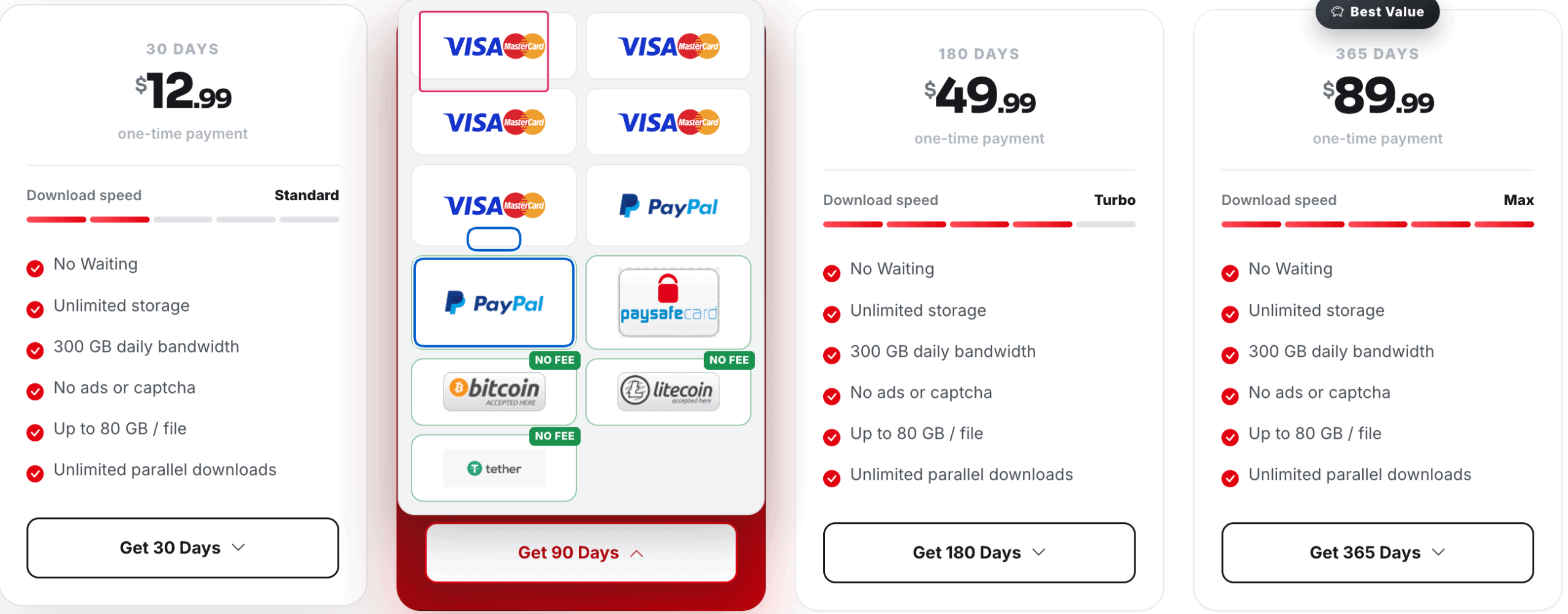
DailyUploads displays four plans marked “one-time payment.” Each card lists 300 GB of daily bandwidth, unlimited storage and parallel downloads. The cards also advertise no waiting, ads or CAPTCHAs, and a limit of up to 80 GB per file.
| Duration | Displayed total in USD | Speed label | Advertised daily bandwidth |
|---|---|---|---|
| 30 days | $12.99 | Standard | 300 GB |
| 90 days | $29.99 | Turbo | 300 GB |
| 180 days | $49.99 | Turbo | 300 GB |
| 365 days | $89.99 | Max | 300 GB |
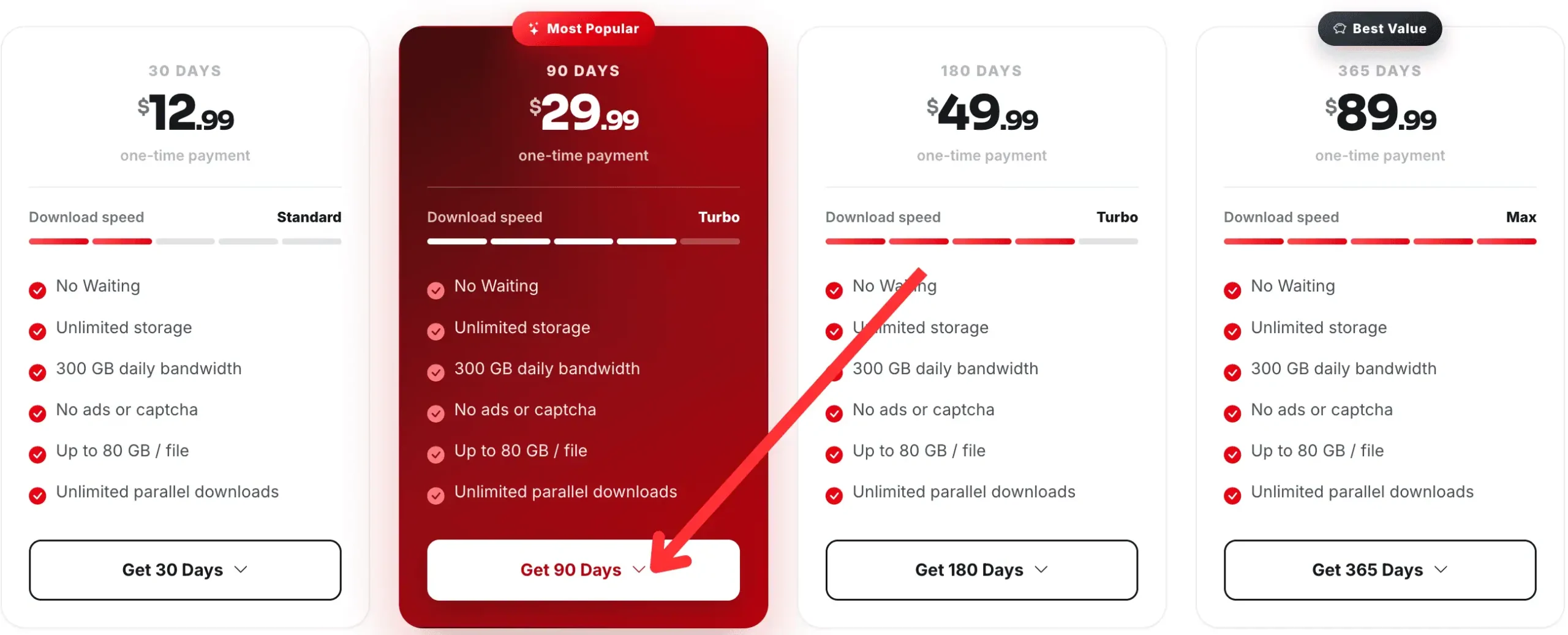
Our tested account was identified only as Premium Account. We cannot match it to these tiers or say that Max performed faster. The screenshots give no fixed MB/s rate for each label.
Check the final payment total
The 90-day plan card shows $29.99. One Visa/MasterCard checkout screen instead displays a $37.49 item price, $7.50 in Charges and a $44.99 total.
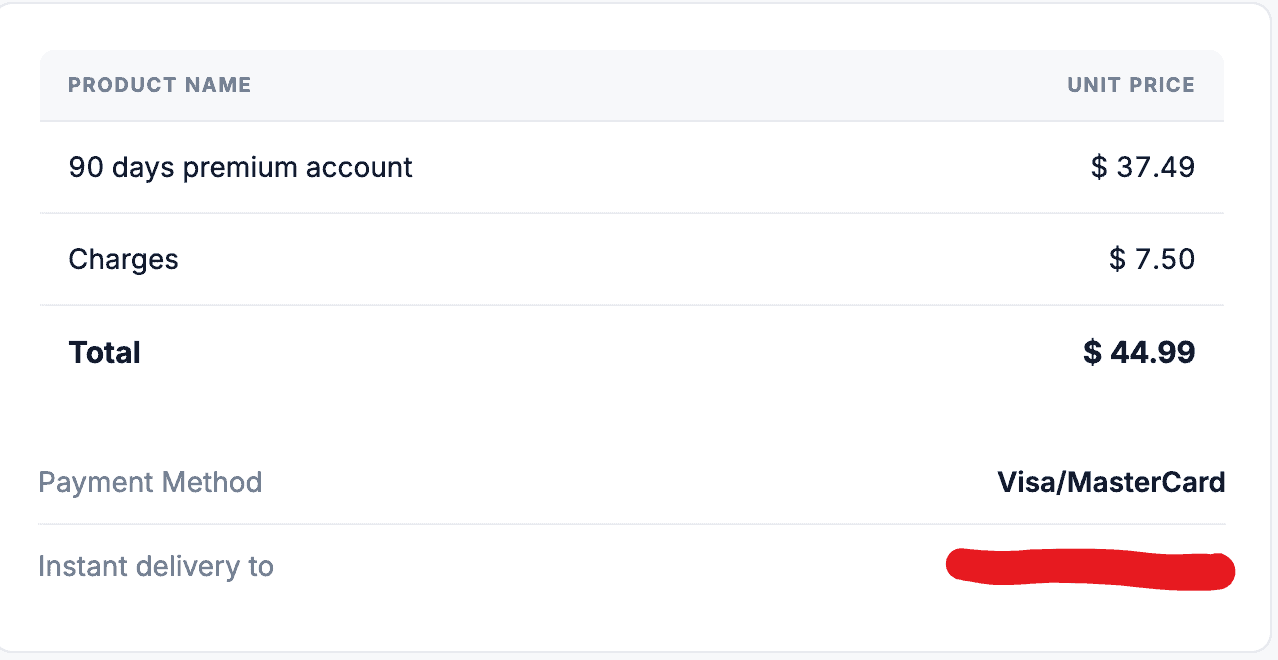
That total is $15 above the plan card price. Only $7.50 is labelled Charges; the reason for the higher item price is unknown. This screen shows an order total, not proof of payment or a fee rule for every gateway.
The annual price works out to about $7.50 per month when divided by twelve, before checkout differences. A short plan lets new users check their own connection and selected tier. Regular users can compare longer plans once they know the service meets their needs.
FileHostReviews may earn a commission from purchases through its links.
Check Current DailyUploads Plans
Free vs Premium
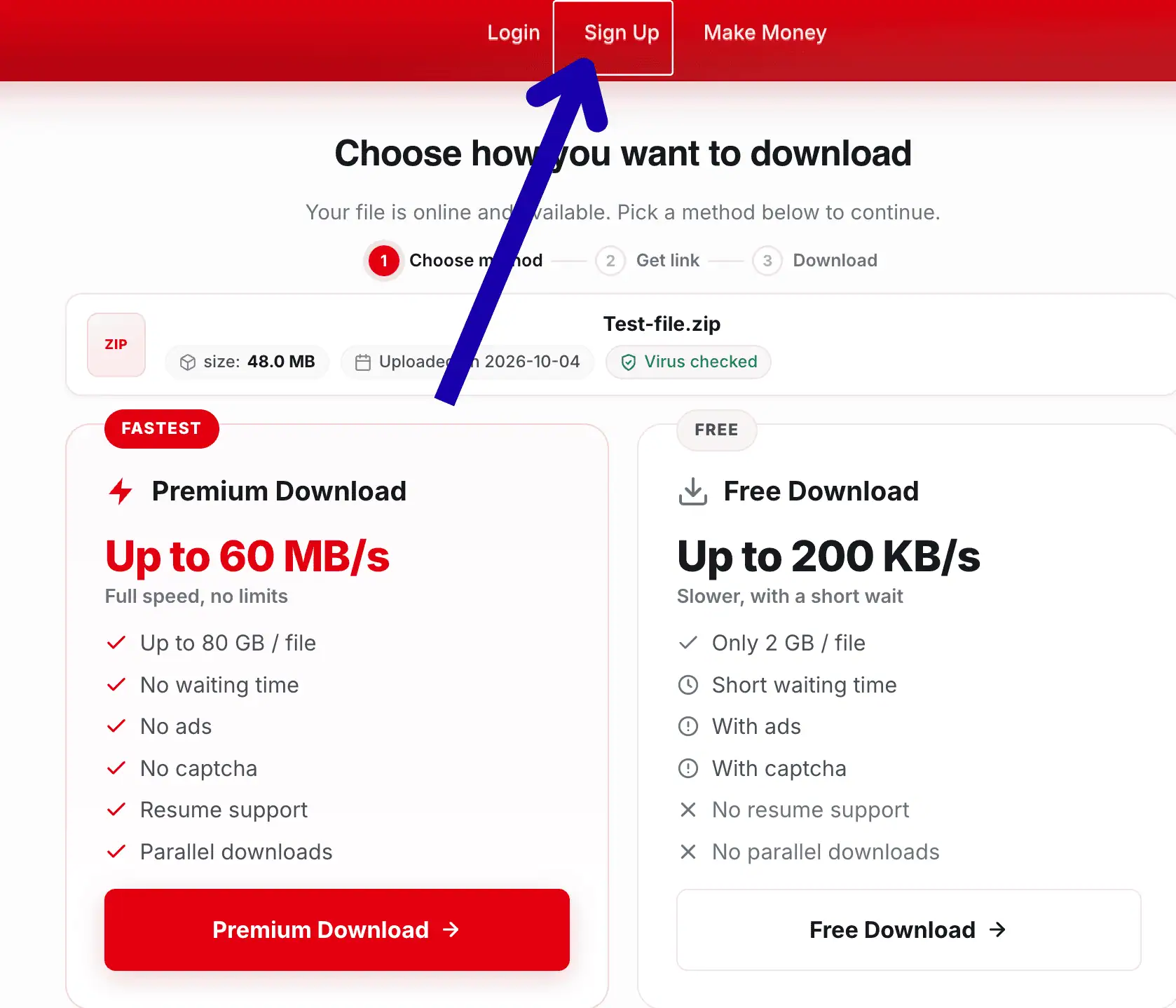
Our older free transfer reached 3.0 MB/s. A separate download-page screenshot advertises free speeds up to 200 KB/s and paid speeds up to 60 MB/s. These are page claims, not results from the same speed test.
| Feature | Free access | Premium access |
|---|---|---|
| Chrome speed observed | 3.0 MB/s in an older capture | 12.6 MB/s for one file |
| Advertised speed | Up to 200 KB/s | Up to 60 MB/s |
| Waiting and CAPTCHA | Wait and reCAPTCHA displayed | None advertised |
| Advertised file limit | 2 GB per file | Up to 80 GB per file |
| Advertised resume support | No | Yes |
| Parallel downloads | Not supported, according to the page | Supported and observed |
| Advertisements | Listed on the page | No ads advertised |
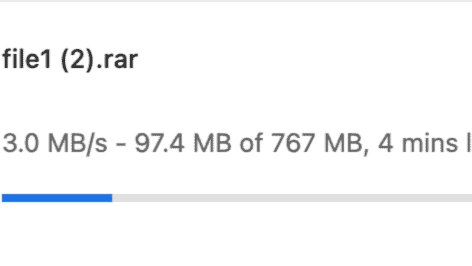
Chrome showed 97.4 MB transferred, with about four minutes remaining. That was an estimate, not the file’s total download time.
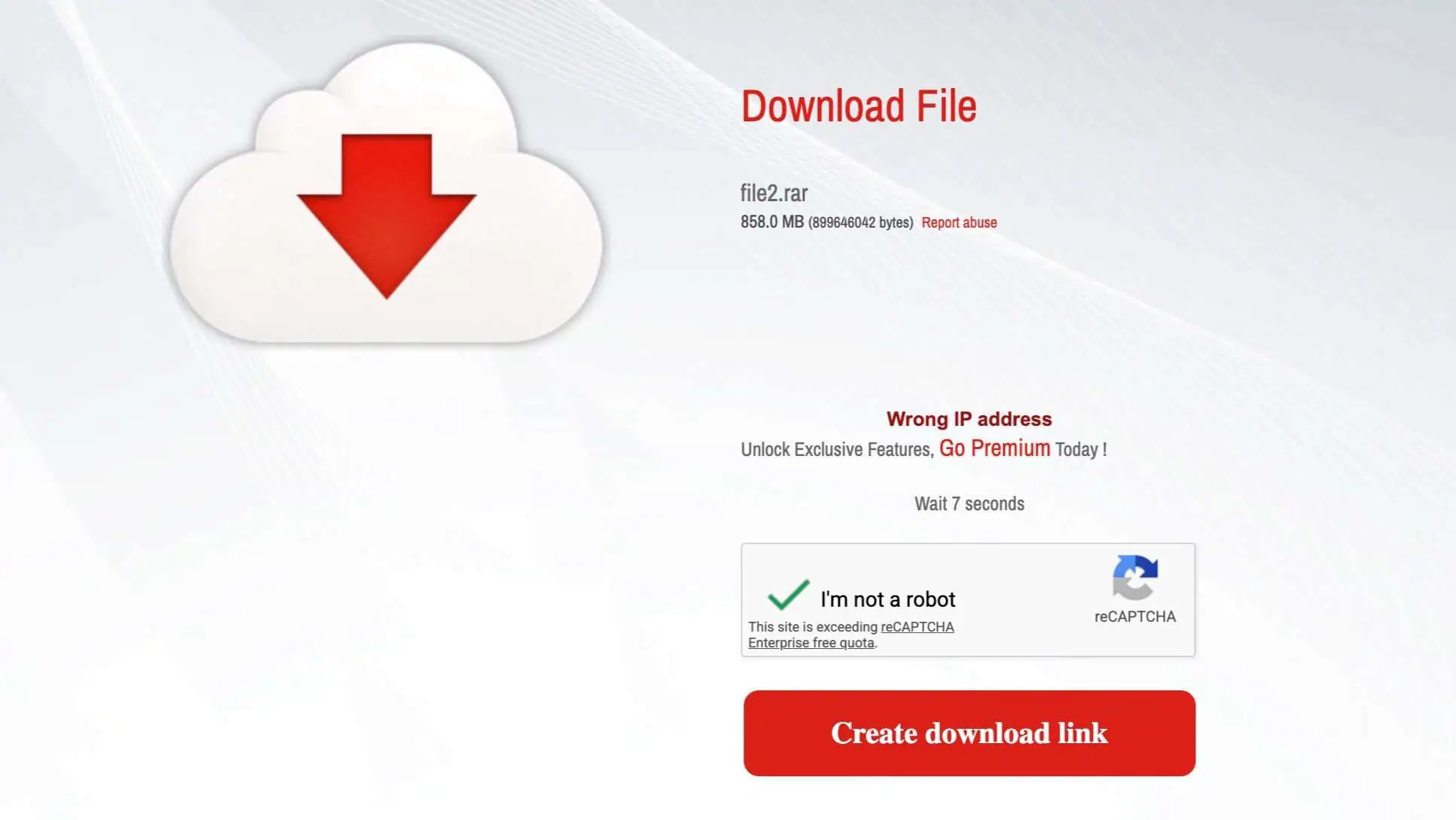
The screen reads “Wait 7 seconds” and shows a separate reCAPTCHA quota notice. It does not prove a fixed wait or explain the IP warning. We did not test the advertised file-size or resume limits.
Real Premium Speed Tests
The paid captures show browser downloads and four active JD2 files. They do not show a comparison between Standard, Turbo and Max. Treat these readings as evidence from our tested account, rather than promised speeds for every plan.
Chrome single-file download
Chrome displayed 12.6 MB/s for a 1.1 GB archive. Its progress bar showed 950 MB transferred and 16 seconds left. The figure is the rate shown when the screenshot was taken.
Two Chrome downloads
Two files downloading together displayed 11.5 MB/s and 9.0 MB/s. Their combined rate was 20.5 MB/s. This confirms that our paid account allowed two active browser transfers. The single-file reading above comes from another capture and is not added to this total.
Four JDownloader 2 downloads
The first JD2 screenshot shows four active files. Their displayed rates add up to 34.00 MiB/s, while the top chart shows Current 35.01 MiB/s. A later capture shows the same files at higher progress percentages, with Current 31.91 MiB/s.
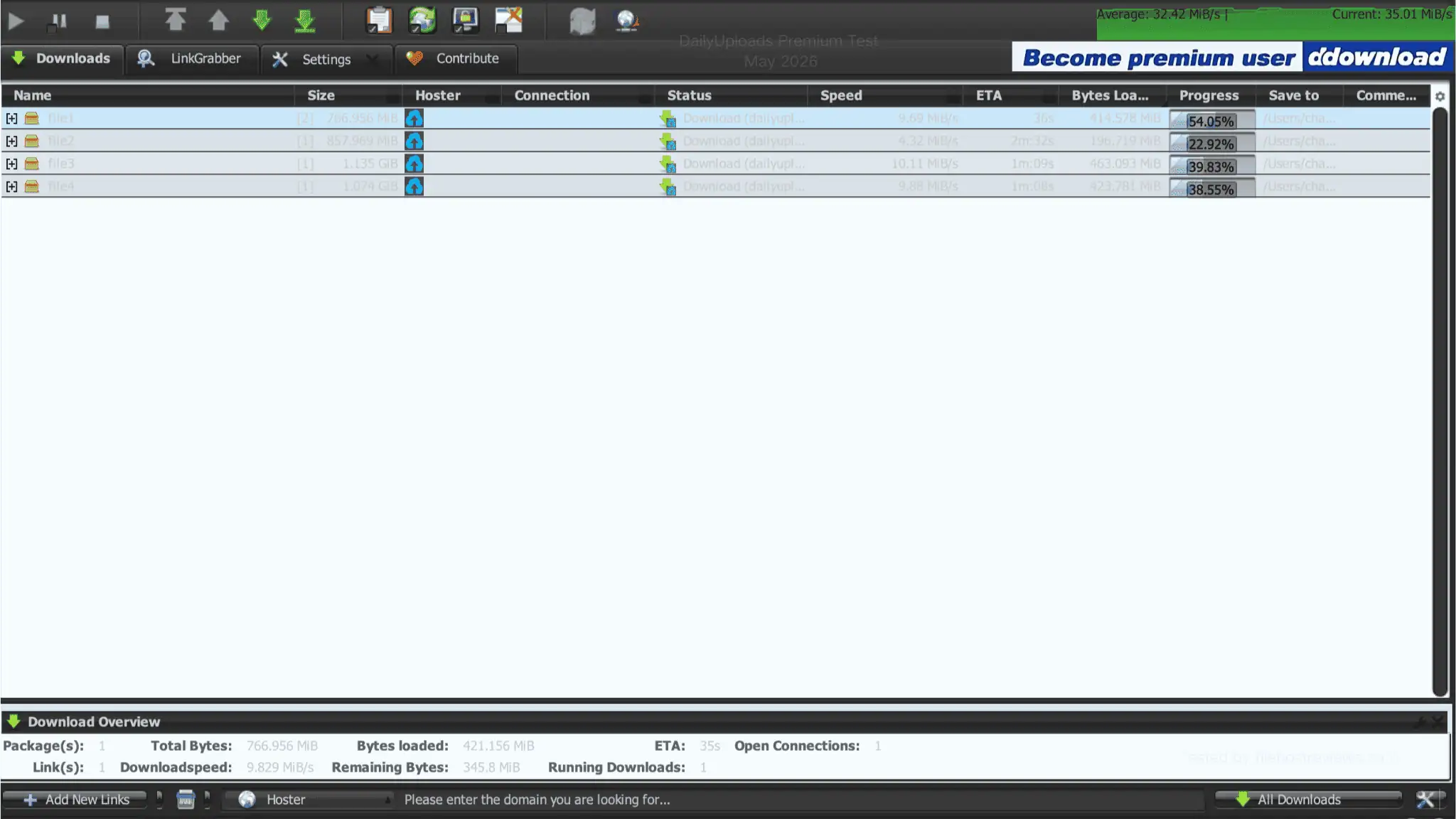
| JD2 display | First capture | Later capture |
|---|---|---|
| Chart Average | 32.42 MiB/s | 33.18 MiB/s |
| Chart Current | 35.01 MiB/s | 31.91 MiB/s |
| Sum of four file rows | 34.00 MiB/s | 33.03 MiB/s |
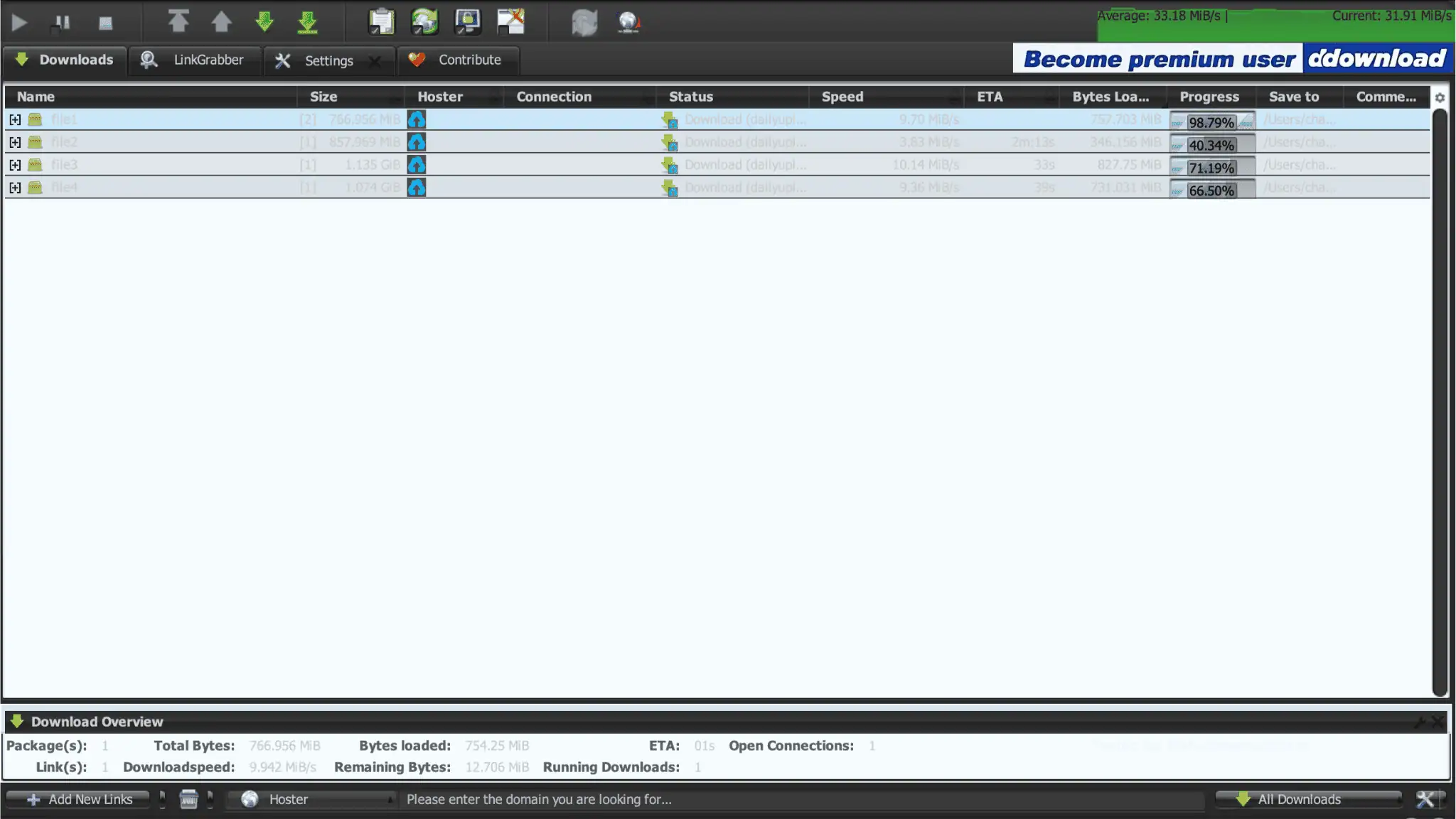
The panels can refresh at different times, so their readings need not match. The bottom Download Overview shows only the selected file1, at 9.829 and 9.942 MiB/s. Its one-download and one-connection counts describe that selection, not an account-wide limit.
These are two captures of the same queue, not independent repeat tests. The chart’s Average readings are not verified averages for a completed download session. Roughly 32–35 MiB/s is a useful summary of the captured Current readings.
How to Buy and Redeem a Premium Key
Create an account, choose a plan and inspect the final checkout screen before paying. The prices and payment choices illustrated here are those shown in our screenshots; availability may differ when you visit.
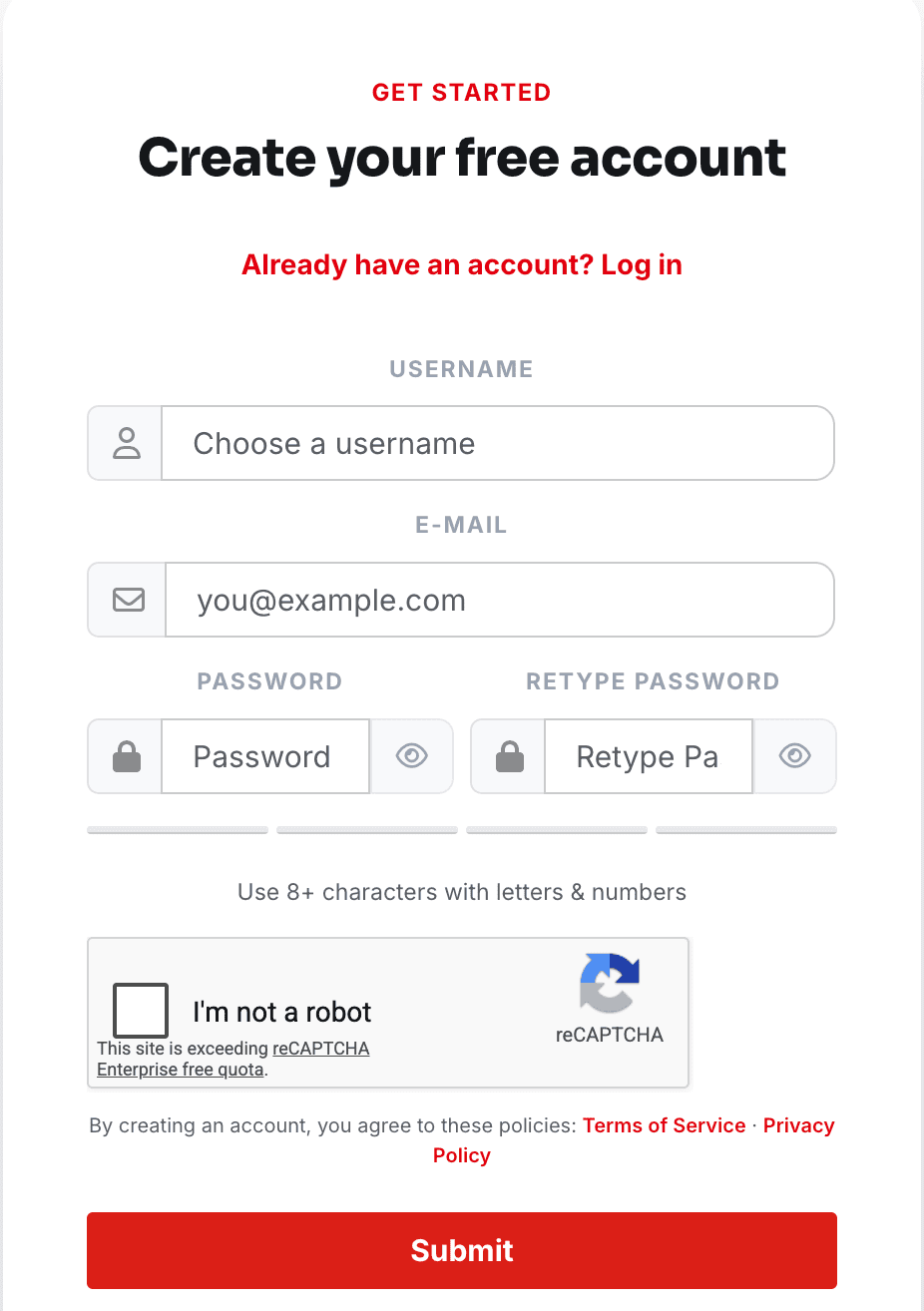
- Click Sign Up in the header. Enter a username, email, password and password confirmation. The form asks for eight or more characters with letters and numbers. Complete the CAPTCHA and click Submit.
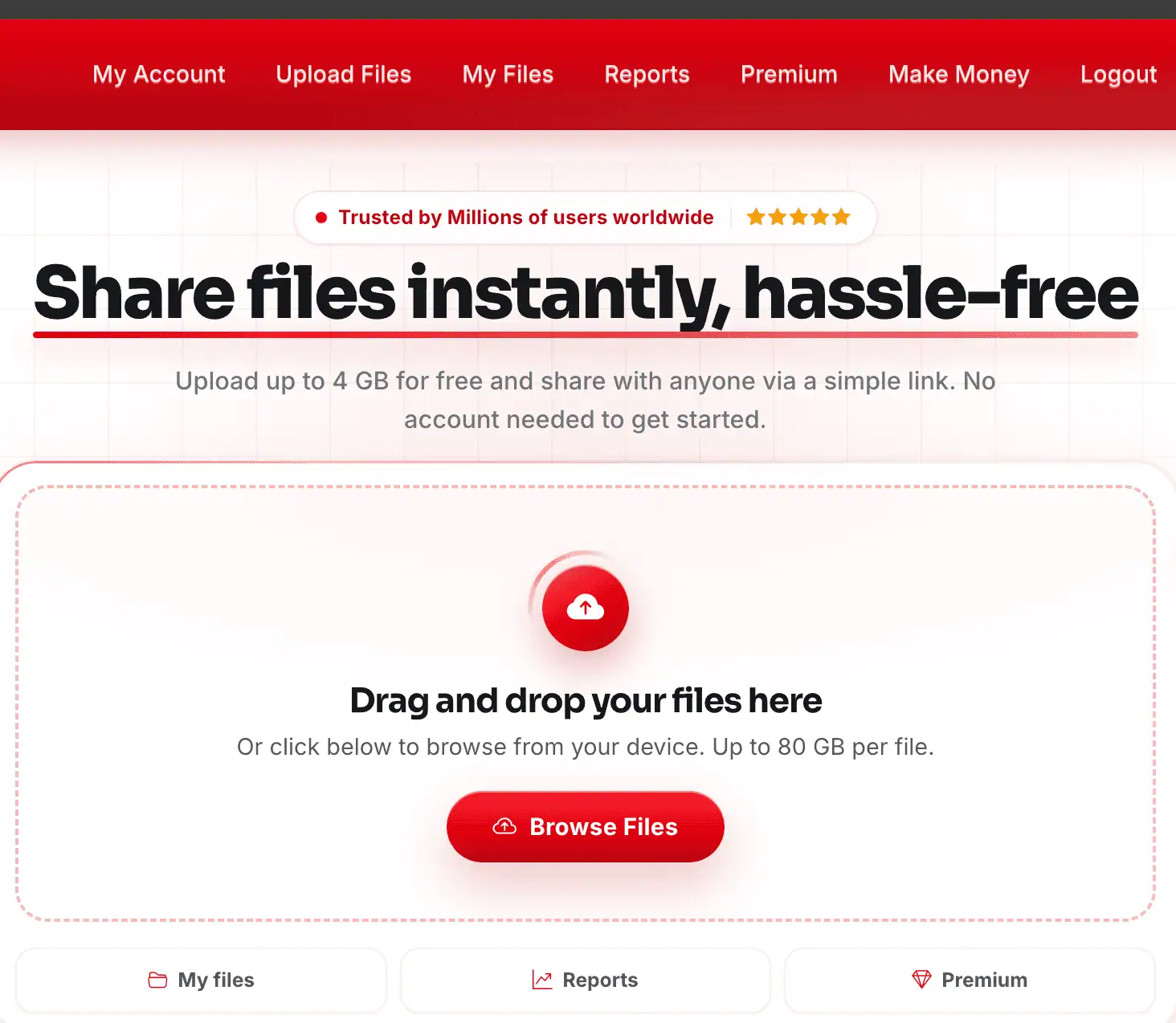
- Log in and click Premium in the main menu. Choose the duration and speed label you want, then open its payment choices.
- Select a payment route. The menu shows card options, PayPal, paysafecard, Bitcoin, Litecoin and Tether. Some crypto buttons carry a NO FEE label; that label does not verify all checkout or network costs.
- Check the duration, item price, charges and total on the next screen. Refer to the card example above when comparing the final amount with the plan page.
Redeeming a Premium Key
If you receive a membership voucher from a reseller, open My Account. Paste it into Apply Premium Key and click Apply. This is the membership activation field, separate from a checkout discount code.
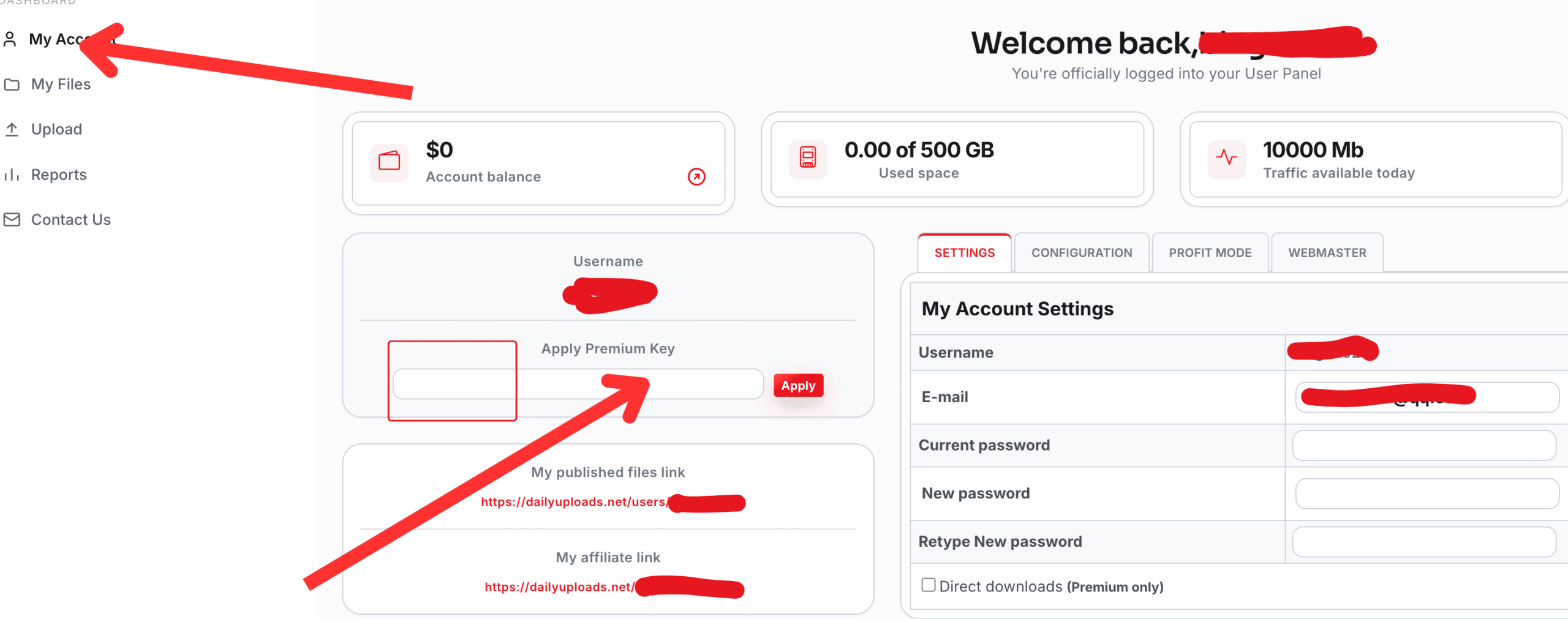
The empty form shows where to enter a key. It does not document a completed activation.
How to Use DailyUploads & JDownloader 2 Setup
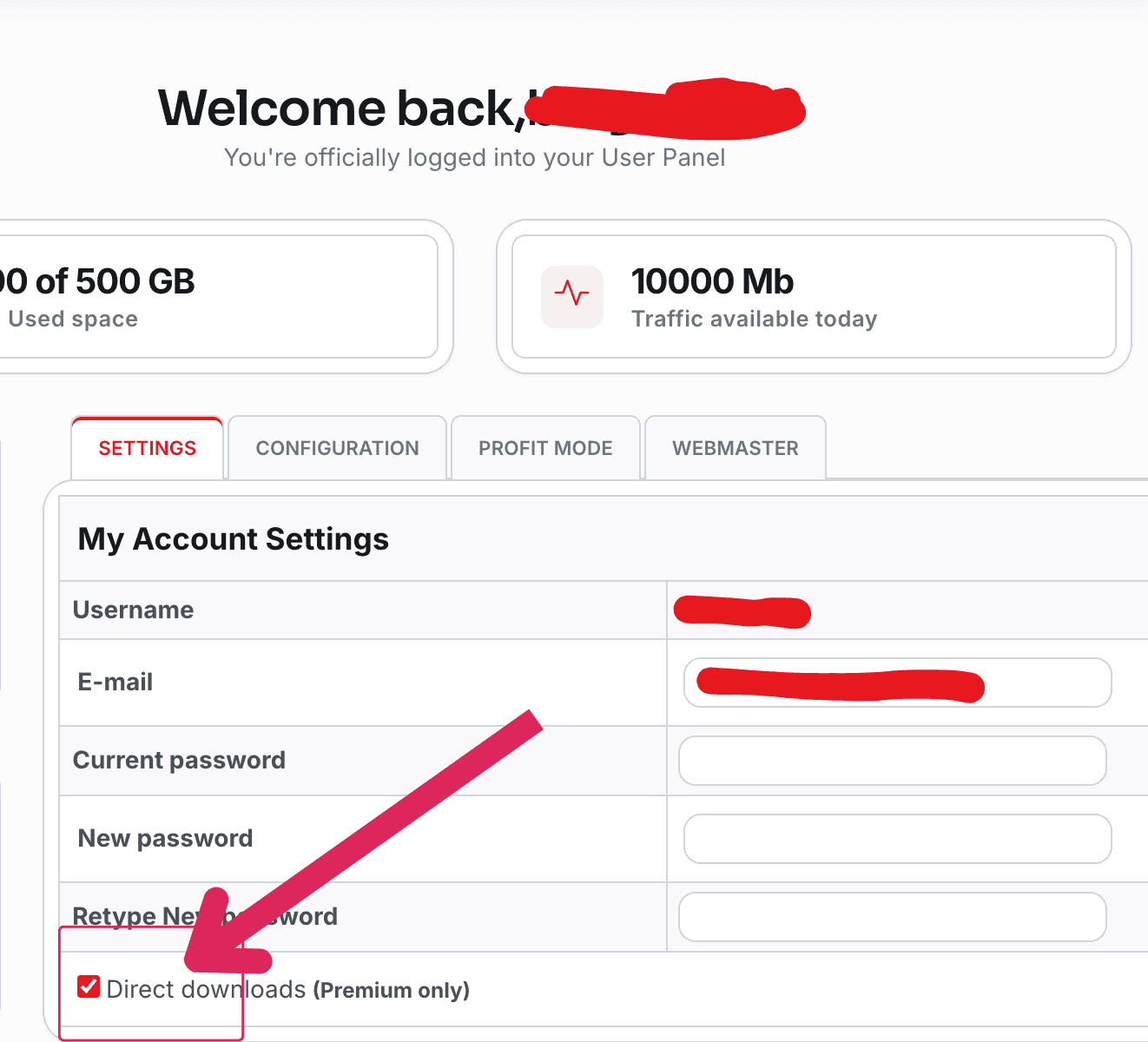
For browser downloads, log in before opening the file link. Account settings include a Direct downloads (Premium only) checkbox. Our screenshot shows it selected, but we did not separately test whether it bypasses every intermediate page.
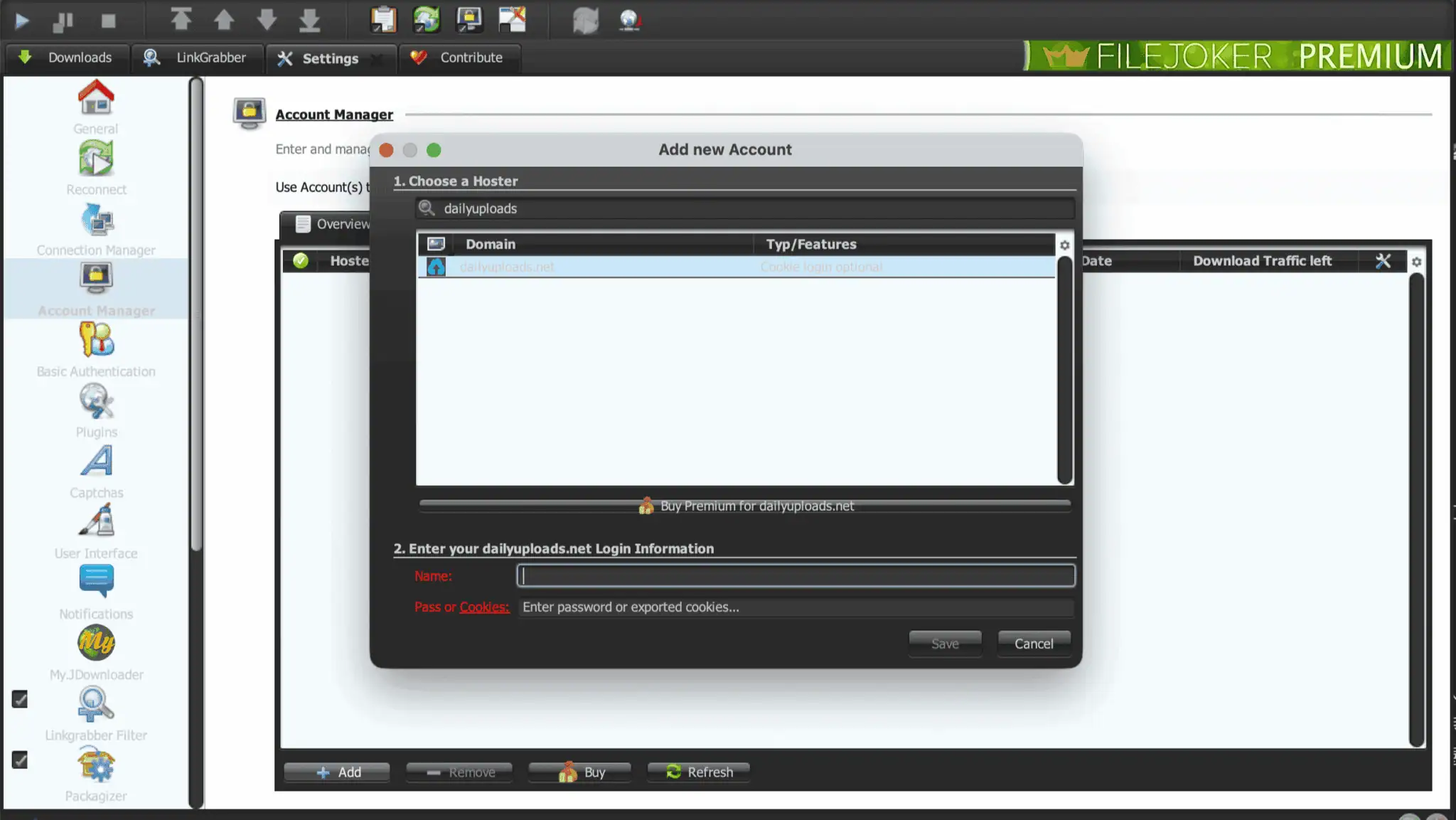
To add your account to JDownloader 2:
- Open Settings → Account Manager → Add.
- Find
dailyuploads.net. The dialog lists Cookie login optional. - Enter your registered username and password, then click Save.
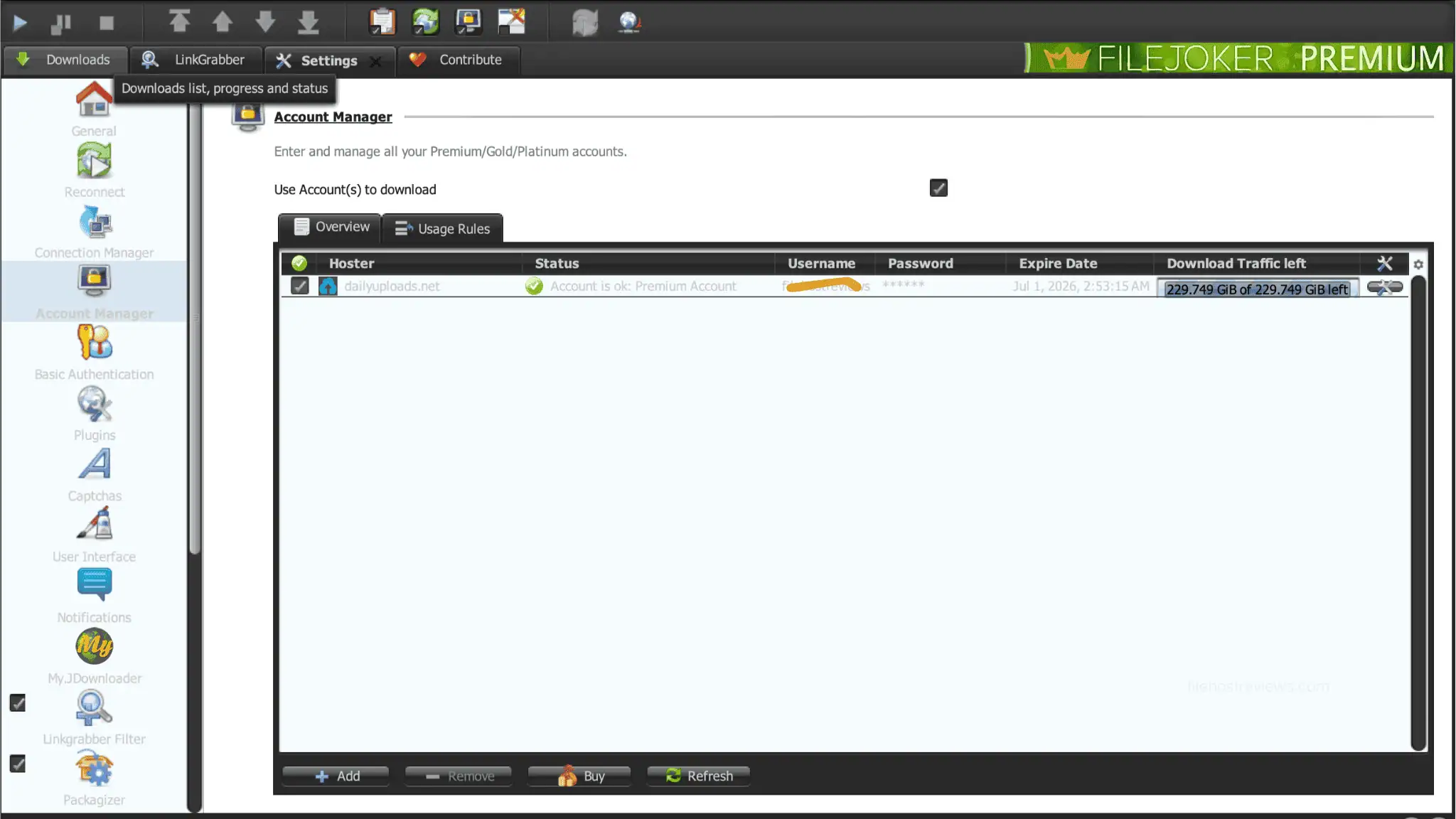
Our account check displayed Account is ok: Premium Account and 229.749 GiB of 229.749 GiB left. Check that the client recognises your account before starting a paid queue.
Four simultaneous files are a starting point based on our test. The screenshots do not establish a fixed connection limit. See our guide to JDownloader compatible file hosts for other hosts.
Check Current DailyUploads Plans
Limits & Things to Know Before Buying
- Traffic figures differ. The plan cards advertise 300 GB/day. The older JD2 screenshot shows 229.749 GiB remaining. That balance is not a binary conversion of 300 GB. We did not test quota exhaustion or the reset schedule. Check your active plan’s allowance.
- Speed tiers were not compared. The screenshots do not match our tested account to Standard, Turbo or Max. A short Standard plan may help you assess that tier, but cannot establish the speed of the annual Max plan.
- The checkout can cost more. Our illustrated card route shows both a higher item price and listed charges. Compare the final total with the plan card; other routes need their own checks.
- IP errors are not diagnosed. “Wrong IP address” and the reCAPTCHA quota notice appear separately on the free page. We did not establish their cause or prove that buying Premium fixes either issue.
- Check billing terms. The plan cards say one-time payment. Confirm that description on the payment gateway or reseller order before purchasing.
Alternatives / When Not to Buy
First check where your target files are hosted. If the uploader offers a working mirror on a service you already pay for, use that account before buying another subscription. DailyUploads adds value when its links are ones you actually need.
If you use a multihoster or debrid service, check its current DailyUploads support and traffic allowance. A supported-host list alone may not tell you whether the link works today. Occasional small downloads may also be manageable with free access, subject to the displayed wait and limits.
Who Should Buy DailyUploads Premium?
Consider buying if:
- You often need files available on DailyUploads.
- You want parallel browser transfers or JD2 batch queues.
- The advertised file limits, resume feature and daily allowance suit your needs.
Consider skipping if:
- You only need occasional files that fit the free page’s limits.
- Working mirrors are covered by accounts you already have.
- The final checkout price does not offer enough value for your use.
FAQ
Is DailyUploads Premium worth it?
It may be worth buying if you often download DailyUploads files or manage batches in JD2. Paid access supported parallel downloads in our captures. For occasional small files, compare the free option with your selected tier’s price and advertised limits.
How fast is DailyUploads Premium?
Chrome showed 12.6 MB/s for one file and 20.5 MB/s across two files. Four active JD2 downloads produced chart Current readings of 35.01 and 31.91 MiB/s. These are captured rates, not guaranteed speeds or completed-session averages.
What is the daily download limit?
The displayed plan cards advertise 300 GB/day. An older JD2 account check showed 229.749 GiB remaining. The images do not explain that difference or verify a reset schedule. Confirm the allowance for your active plan rather than treating the older balance as today’s limit.
What do Standard, Turbo and Max mean?
The cards label 30 days as Standard, 90 and 180 days as Turbo, and 365 days as Max. They do not assign a fixed MB/s rate to each label. We did not compare the three tiers in speed tests.
Does DailyUploads work with JDownloader 2?
Yes. Our client recognised a DailyUploads Premium Account and downloaded four files in parallel. Add dailyuploads.net through Account Manager, enter your username and password, and save. The login dialog also lists cookies as optional; check the returned status before downloading.
Why can checkout cost more than the advertised price?
One 90-day card checkout displayed a $37.49 item price plus $7.50 in Charges, totalling $44.99. The plan card showed $29.99. The higher item price is unexplained, so this example does not establish a fee rule for all payment routes.
Does DailyUploads Premium renew automatically?
The displayed plan cards describe a one-time payment. Our screenshots do not confirm the billing terms of every card gateway or reseller. Read the final order’s renewal terms before paying, especially if its description differs from the plan page.
Final Verdict
DailyUploads Premium is a practical option for regular users of its links and for parallel download queues. Our captures showed 12.6 MB/s in Chrome and roughly 32–35 MiB/s across four JD2 files. Choose a tier that fits your needs, check the daily allowance and compare the final payment total. Longer plans deserve consideration once you know the service works well for you.