
Tested: June 2026 · Tested on a paid Premium account, including a retest after an initial JD2 issue
Our Real-World Setup
- Internet: 1 Gbps fiber line
- Gear: Mac running Chrome & JDownloader 2
- Testing account: Clicknupload Premium (active account, retested after initial errors)
- Test files: 858 MB free-tier archive; four-part set (~3.796 GiB total) on premium, tested twice in JD2
Clicknupload is a smaller file host that turns up on some download and archive pages. It isn’t as widely mirrored as Rapidgator or Katfile, but it can still matter if your specific target files are hosted there. We bought a premium account, ran into a real problem during JD2 testing, contacted support about it, and retested before writing this up.
Our rating: 6.5/10 — genuinely fast once it works, but the only host in our test set where we had to go back and retest after contacting support mid-review.
Clicknupload Pricing 2026: A Smaller Host, Comparable Rates
Clicknupload sells standard duration-based plans. Reseller pricing observed for this tier:
| Plan | Price | |
|---|---|---|
| 30 days | ~$16.50 | Buy 30 Days |
| 90 days | ~$27.50 | Buy 90 Days |
| 180 days | ~$44.00 | Buy 180 Days |
| 365 days | ~$55.00 | Buy 365 Days |
Pricing sits in a similar range to other secondary hosts in this category. Given the reliability question we ran into during testing (more on that below), we’d steer even harder than usual toward the 30-day plan here — confirm the service is stable for your specific usage pattern before committing to anything longer.
Check Current Clicknupload Pricing →Affiliate link. See our disclosure.
Clicknupload Free Tier: Heavy Ads, hCaptcha, and a Crawl
The free tier here is difficult to use for anything beyond a very small file, and the friction starts before the download does.
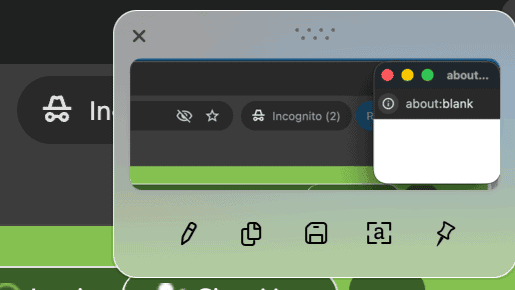
The free download path opened popup and redirect tabs during our test — a new browser window appeared blank mid-flow, a clear sign of an ad redirect firing in the background.
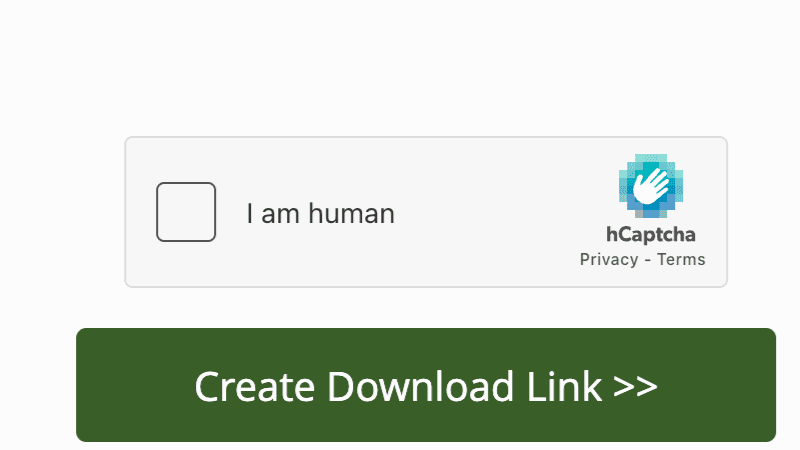
Free users also have to clear a manual hCaptcha check before a download link is generated.
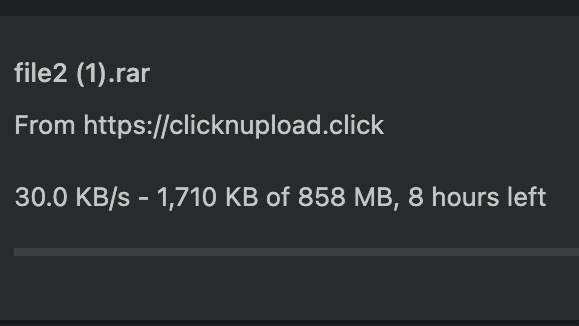
Once the link unlocked, the download itself crawled at 30.0 KB/s, with Chrome estimating 8 hours remaining on an 858 MB file.
Full free-tier restrictions confirmed in our test:
- ~30.0 KB/s measured download speed
- Popups and redirect tabs during the download flow
- Manual hCaptcha required before the link is generated
- No parallel downloads confirmed
Verdict on the free tier: technically usable for a small file if you can tolerate the ad behavior. For anything larger, the combination of ads, captcha, and 30 KB/s speed makes it impractical — consistent with the original assessment that this is one of the more ad-heavy free tiers we’ve tested.
Support Response and Retest: What Actually Happened
This is the part of testing Clicknupload that set it apart from every other host in this series, and it’s worth documenting in full rather than smoothing over.
Our first JDownloader 2 test produced temporary 503 errors on the premium account. Rather than write that off as a one-time fluke, we contacted Clicknupload support directly about it.
Support’s response was specific: older files had previously been allowed to reach higher speeds on the free tier, but newer uploads were being throttled more strictly to reduce server bandwidth load. That’s a plausible, if imperfect, explanation — it describes a policy change on the free side, not a fix for the 503 errors we saw on premium. We can’t independently verify the throttling claim, but we’re reporting it as told to us, which is the same standard we hold every other unverified claim to in this review series.
After that exchange, we retested. The 503 behavior did not reappear in our environment on either of two follow-up JD2 sessions.
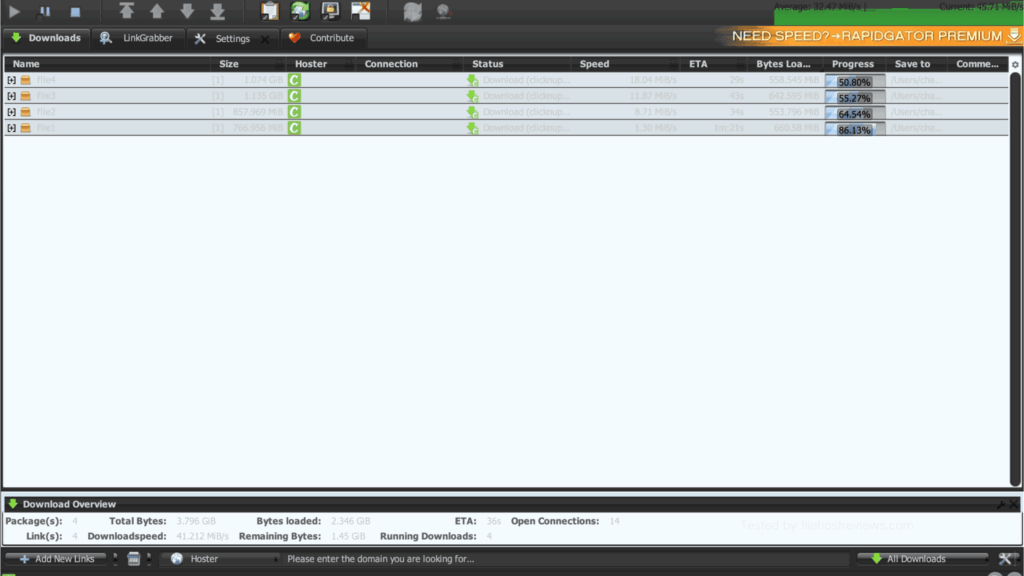
Retest 1 reached a combined 41.212 MiB/s across four files, with per-file speeds of 18.04, 11.87, 8.71, and 1.30 MiB/s. Open Connections: 14.
Retest 2, run separately to check consistency, reached a lower combined 30.853 MiB/s, with per-file speeds of 11.99, 9.63, 5.56, and 4.31 MiB/s. Open Connections: 16.
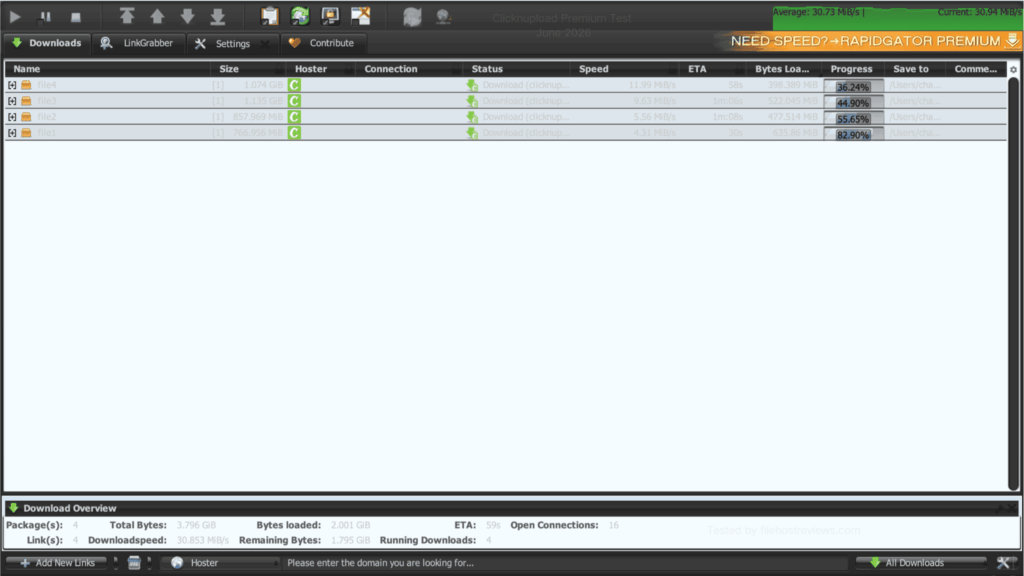
Both retests completed without the earlier errors, which is the useful signal here. But the gap between 41.212 and 30.853 MiB/s — roughly 25% — is wider than the run-to-run variance we’ve measured on more established hosts like DDownload or Rapidgator. That inconsistency, on top of an account that produced 503 errors on the very first attempt, is the core reason we’re not giving this host a blanket recommendation for automation-heavy use without your own short-plan test first.
Premium Browser Speed: Strong When It’s Working
Setting the 503 issue aside, Chrome performance on premium was genuinely strong.
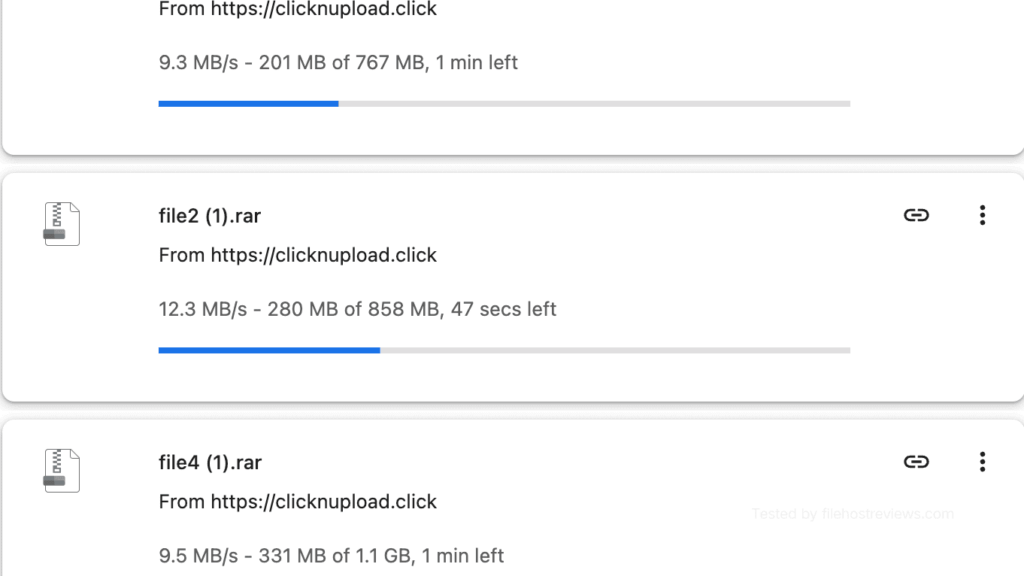
Individual files ran at 9.3, 12.3, and 9.5 MB/s across a multi-file session.
A separate single-file download reached 13.5 MB/s, the fastest individual result in our Chrome testing.
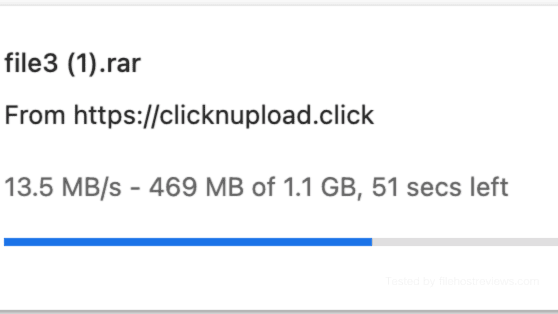
This matches the original finding: premium browser speed in the 10–13 MB/s range is a real, strong result for a host of this size, and was far more usable than the 30 KB/s free-tier experience.
JDownloader 2 Setup
Setup itself was straightforward, separate from the reliability issue above.
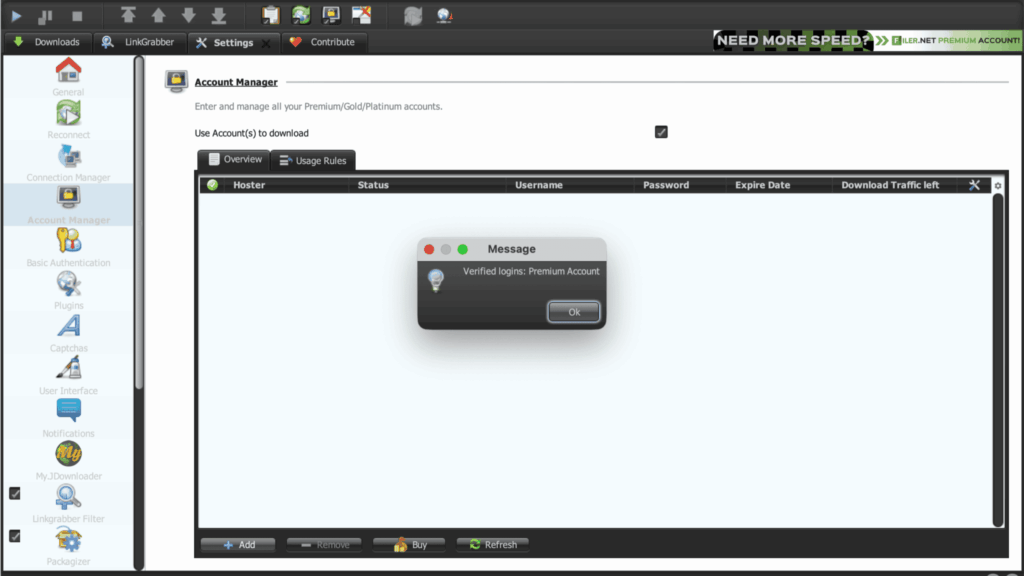
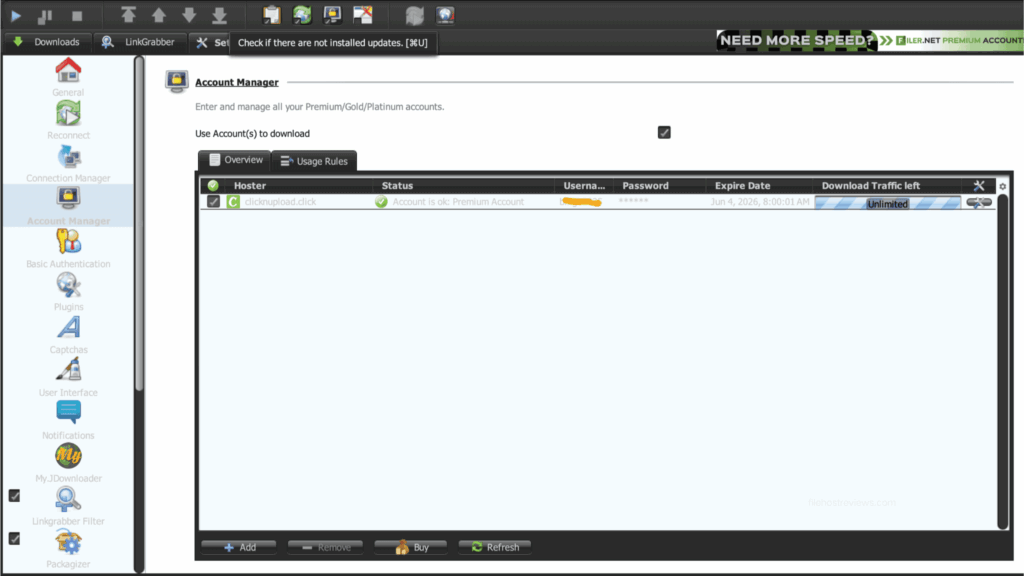
We searched “clicknupload” in JD2’s Account Manager. It appeared as clicknupload.click with “Cookie login optional” noted — standard email and password login works by default.
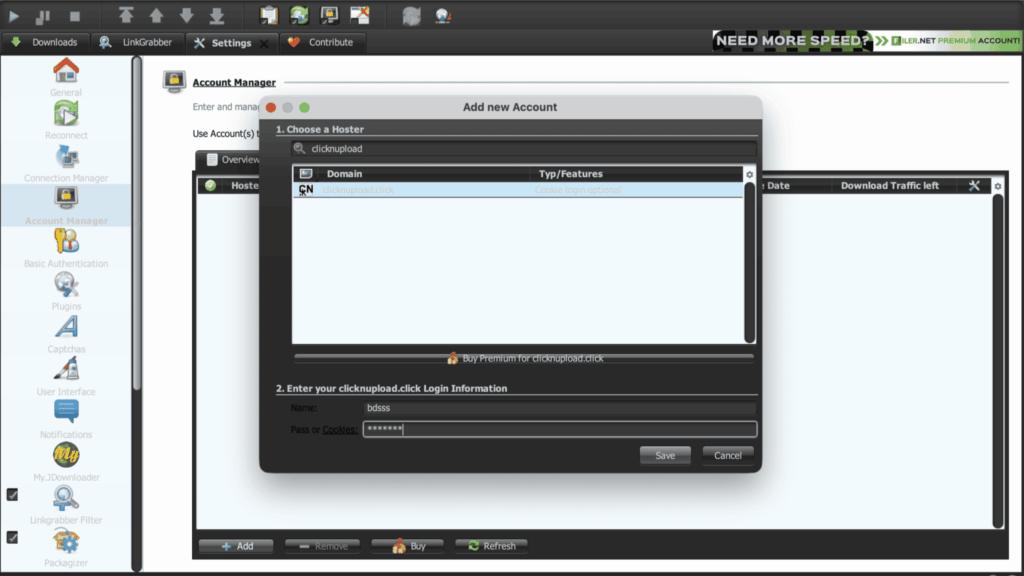
JD2 verified the account immediately.
The account row showed premium status, an expiry date of June 4, 2026, and “Unlimited” displayed in the traffic column.
Who Should Consider Clicknupload Premium
30 days — the only plan we’d recommend starting with. Given the 503 errors we hit on first test, treat the first month as a trial run for your own connection and use case before considering anything longer.
90–365 days — only worth it once you’ve personally confirmed stable JD2 performance over a full billing cycle. The pricing discount on longer terms doesn’t offset the risk of prepaying into an account that behaves inconsistently.
Free — fine for confirming a link is alive on a small file. Budget for popups, an hCaptcha step, and 30 KB/s speeds.
Pros and Cons
Pros
- 41.212 MiB/s combined in JD2 on our first successful retest, and 30.853 MiB/s on a second retest — both error-free
- Strong Chrome premium speed: 13.5 MB/s single-file, 9–12 MB/s across simultaneous files
- JD2 account setup verified cleanly, no captcha step
- Support responded with a specific explanation when we raised the 503 issue
- Potentially useful as a lower-cost secondary host if your target links are there
Cons
- Initial JD2 testing produced 503 errors — the only host in this review series where that happened
- Retest speeds varied by roughly 25% between two sessions (41.212 vs 30.853 MiB/s)
- Free tier is heavy on ads, popups, and redirect behavior
- hCaptcha required on every free download
- JD2 traffic shown as “Unlimited,” unverified against any published policy
- Narrower file availability than larger hosts like Rapidgator or Katfile
Verdict
Clicknupload Premium is worth considering only if your target files are specifically hosted there, and only after you’ve run your own short test. That’s a more cautious recommendation than most hosts in this series get, and it’s earned: this is the one account where our first JD2 session produced real errors, not just slower-than-hoped numbers.
To Clicknupload’s credit, support responded when we flagged the issue, and two follow-up retests both completed without the earlier 503 behavior — reaching 41.212 MiB/s and 30.853 MiB/s respectively. Premium browser performance was consistently strong throughout, with a single file hitting 13.5 MB/s in Chrome.
But the free tier is heavily ad-driven, and the run-to-run speed variance in JD2 was wider than we’d like to see on an account marketed as reliable premium automation. If your uploader regularly mirrors to Clicknupload, a 30-day plan is a reasonable way to find out whether the service is stable for you specifically. We wouldn’t recommend skipping straight to an annual plan here.
Our pick: 30-day plan, and test your own queue before renewing
~$16.50 · 41.212 MiB/s best JD2 result · retest confirmed after an initial 503 issue
Visit Clicknupload →Affiliate link — we may earn a commission at no extra cost to you.
Clicknupload FAQ
Is Clicknupload worth it in 2026?
Only if your target files are specifically hosted there. Our first JD2 test hit 503 errors; two retests afterward reached 41.212 MiB/s and 30.853 MiB/s with no errors. Premium browser speed was consistently strong (10–13.5 MB/s). Test with a short plan before committing longer.
Why did Clicknupload show errors in JDownloader 2?
Our first test session produced temporary 503 errors. Support told us newer uploads were being throttled more strictly than older files to reduce server bandwidth — an explanation for free-tier behavior, not a direct fix for the premium 503s we saw. Two retests afterward completed without the issue recurring.
How slow is the Clicknupload free tier?
30.0 KB/s in our test, with an 8-hour estimate on an 858 MB file. Free downloads also include popups, redirect tabs, and a mandatory hCaptcha step.
Does Clicknupload work with JDownloader 2?
Yes, after our retest. Add clicknupload.click in Account Manager with standard email and password login — it verified instantly. Whether it stays error-free depends on server conditions we can’t fully predict from one test.
How much does Clicknupload premium cost?
Roughly $16.50 for 30 days up to $55.00 for 365 days, in line with other secondary-tier hosts.
Is Clicknupload reliable enough for heavy automation?
Based on our testing, we can’t fully vouch for that yet. We measured two different combined speeds (41.212 and 30.853 MiB/s) across two retests, and hit real errors on the first attempt. Test your own queue on a short plan before relying on it heavily.
Related: Best File Hosting Services · Fastest File Hosts Tested · JDownloader Compatible File Hosts · Cheapest Premium File Hosts