

Beginner-friendly walkthrough, pricing tables, and FAQ — updated October 2026
This guide walks through setting up a FileJoker account, comparing the Premium and Premium VIP tiers, applying a bonus-days promo code, and configuring JDownloader 2. We also ran our own speed checks on both the free tier and a paid account so you can see the real-world gap before spending any money.
FileJoker Premium: Key Features & Benefits
Moving from the free tier to a paid FileJoker subscription unlocks six capabilities listed on the plan page. We tested speed, instant starts, and parallel downloads ourselves; the other three are vendor claims we did not verify:
- Unlimited Download Speed: Lifts the 127 KB/s free-tier cap entirely, reaching 11.8 MB/s on a single file in Chrome and climbing to a combined 32.7 MB/s (Chrome) or 37.77 MiB/s (JDownloader 2) when three files run together.
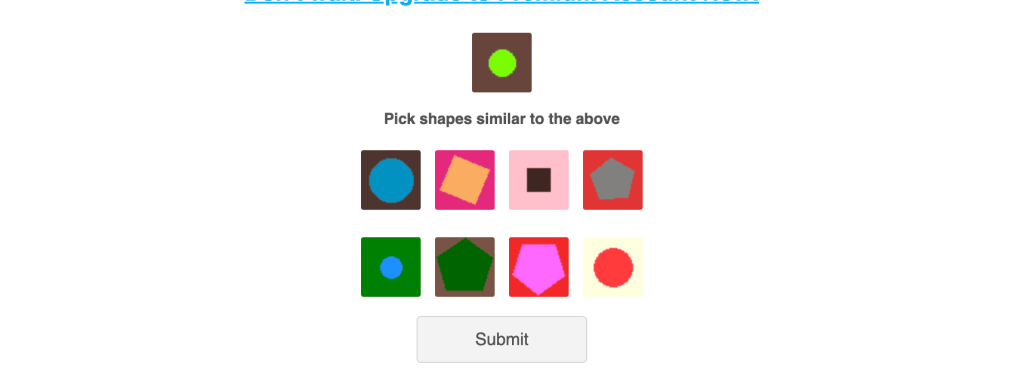
- Instant Downloads (No Wait Timers or CAPTCHAs): Transfers begin right away — no 85-second countdown and no shape-matching puzzle, both of which gate free downloads.
- Simultaneous Multi-File Downloads: Multiple archive parts download in parallel instead of one at a time.
- Resumable Downloads: Paused or interrupted transfers can be resumed in a browser or a download manager such as JDownloader 2.
- Mobile App Access: Both the iOS and Android FileJoker apps become available (listed on the App Store and Google Play).
- VIP-Exclusive Extras: The Premium VIP tier layers on an Online Video Player and Encrypted Download Traffic, plus five times the traffic allowance.
FileJoker Plan Tiers & Pricing
FileJoker offers two paid membership levels, differentiated mainly by how much you can download in a five-day window and a handful of extra features:
- Premium (Standard): Unlimited speed, instant starts, resumable transfers, mobile app access, and a 60,000 MB allowance per rolling five-day period.
- Premium VIP: Everything in Premium, plus a 300,000 MB five-day allowance, an Online Video Player, and Encrypted Download Traffic.
| Tier Variant | Core Benefits | Five-Day Traffic | Supported Payment Types | Target User Profile |
|---|---|---|---|---|
| Premium | Unlimited speed, instant start, resume support, iOS/Android app | 60,000 MB | Credit Cards (Visa/MasterCard), PayPal, Crypto (BTC/XRP/AlfaCoins), Resellers | Regular downloaders pulling archives under 60 GB every 5 days |
| Premium VIP | All Premium features + Online Video Player & Encrypted Download Traffic | 300,000 MB | Credit Cards (Visa/MasterCard), PayPal, Crypto (BTC/XRP/AlfaCoins), Resellers | Heavy archivists pulling 60 GB to 300 GB inside a 5-day span |
Both plans come in duration packages from 30 to 365 days:
PREMIUM
| Days | Price |
|---|---|
| 30 | $22.95 ($0.76/day) |
| 90 | $44.95 ($14.98/mo) |
| 180 | $89.95 ($14.99/mo) |
| 365 | $134.95 ($11.24/mo) |
PREMIUM VIP
| Days | Price |
|---|---|
| 30 | $33.95 ($1.13/day) |
| 90 | $73.95 ($24.65/mo) |
| 180 | $109.95 ($18.32/mo) |
| 365 | $169.95 ($14.16/mo) |
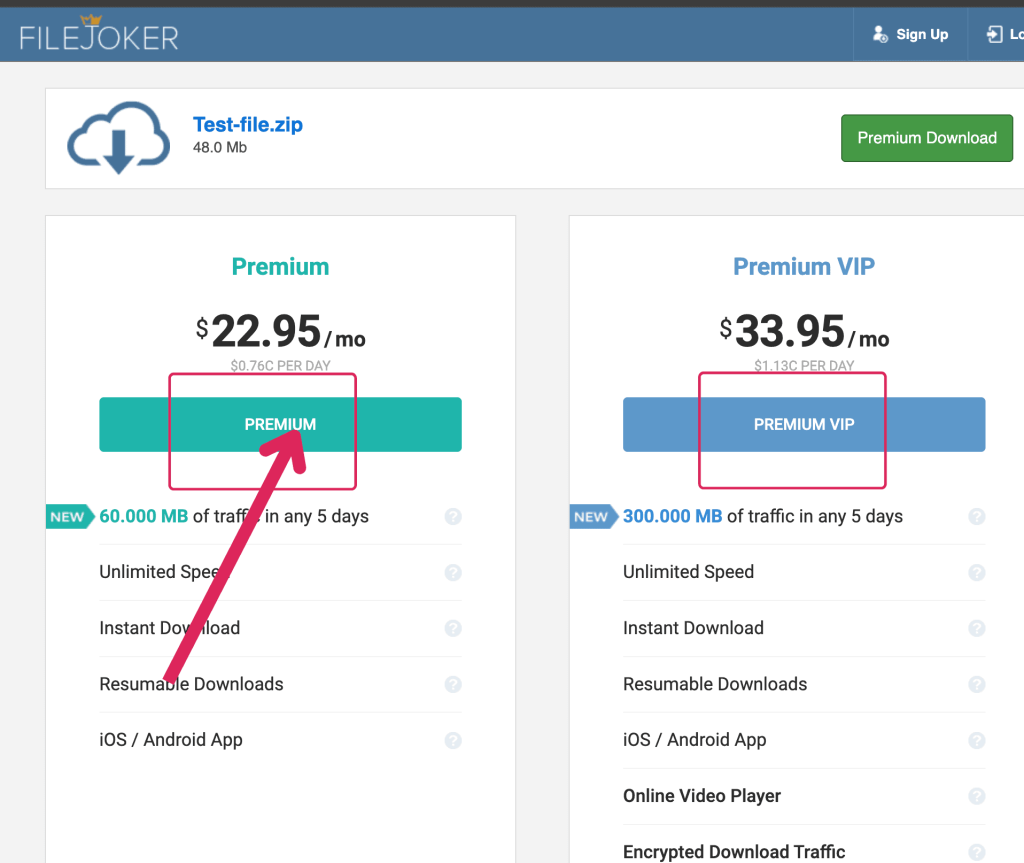
Our take: A 30-day Premium subscription at $22.95 handles most single archives comfortably. Only step up to VIP if your five-day usage regularly exceeds 60,000 MB.
Get FileJoker Premium → Faster Downloads, No Wait TimerAffiliate link. See our disclosure.
Free vs Premium: What Actually Changes
Rather than recite marketing claims, we clocked a real free download against a real paid one.
| Free Tier | Paid (Premium) | |
|---|---|---|
| Speed (measured) | 127 KB/s | 11.8 MB/s (single file, Chrome) |
| Wait timer | 85 seconds | None |
| CAPTCHA | Shape-matching puzzle | None |
| Parallel downloads | 1 file at a time | Multiple files at once |
| Multi-file total (measured) | Not supported | 32.7 MB/s across 3 files (Chrome) / 37.77 MiB/s in JDownloader 2 |
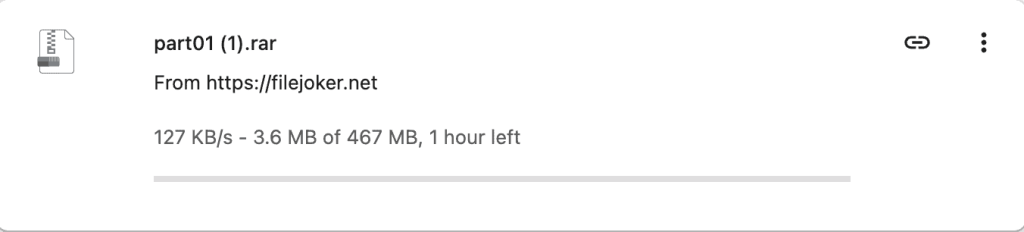
On the free tier, a 467 MB file (part01 (1).rar) crawled along at 127 KB/s, with Chrome projecting roughly an hour left — and that’s after clearing a shape CAPTCHA (“Pick shapes similar to the above”) and waiting out an 85-second countdown before the Download Now button activated. With a paid account, a single 1.1 GB file hit 11.8 MB/s in Chrome, and running three files concurrently pushed the combined throughput to 32.7 MB/s.
Bottom line: Free works fine for a single, small, non-urgent file. For a multi-part archive, expect to spend an afternoon babysitting manual downloads.

Real Speed Test Results
Every test ran on a 1 Gbps symmetric fiber line using Google Chrome and JDownloader 2, following our standard testing methodology. Chrome reports speeds in MB/s and JDownloader 2 in MiB/s — we’ve kept each figure in its native unit.
Single file in Chrome
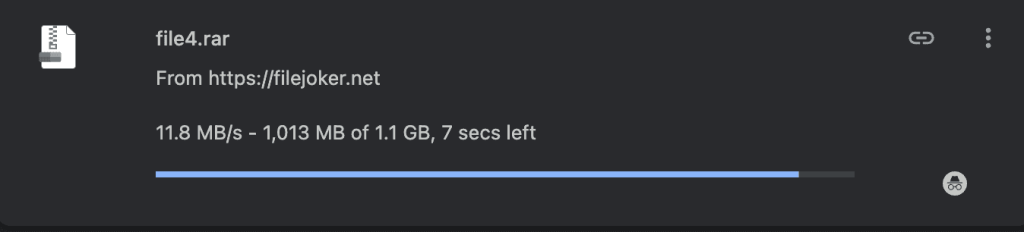
A 1.1 GB archive (file4.rar) peaked at 11.8 MB/s, with 1,013 MB of the 1.1 GB transferred and about 7 seconds remaining at the moment of capture.
Three files in Chrome
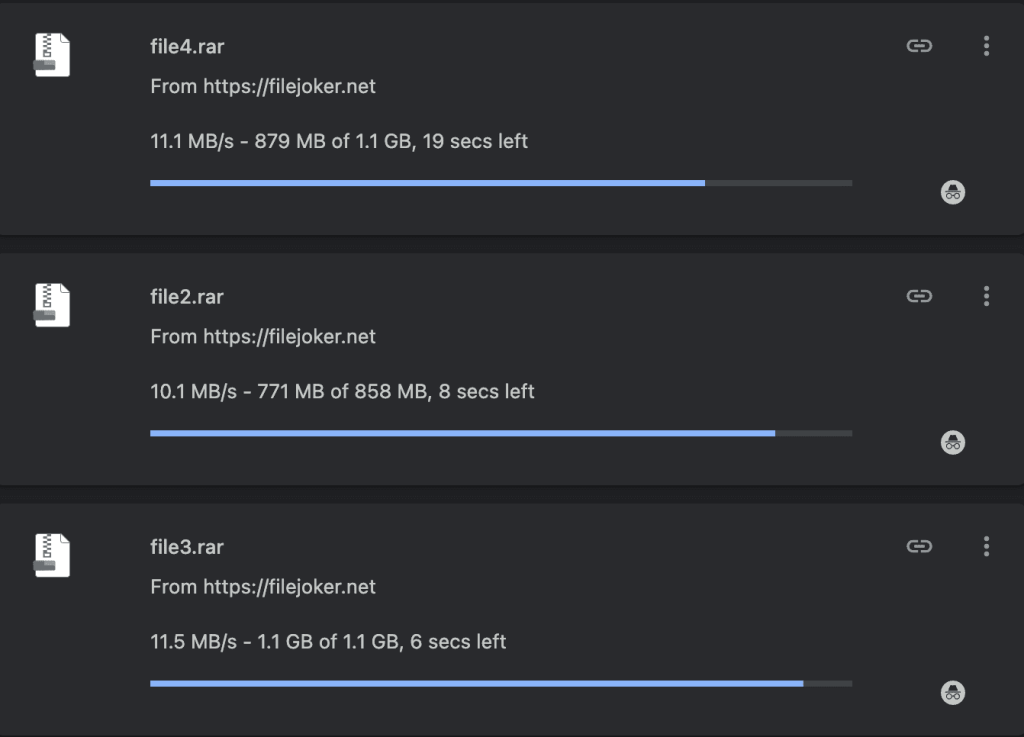
Running three downloads at once produced 11.1 MB/s (file4.rar, 879 MB of 1.1 GB, 19 secs left), 10.1 MB/s (file2.rar, 771 MB of 858 MB, 8 secs left), and 11.5 MB/s (file3.rar, 1.1 GB of 1.1 GB, 6 secs left) — a combined 32.7 MB/s at that instant.
Three files in JDownloader 2
JDownloader 2 handled the same three-file test with a current combined speed of 37.77 MiB/s and a 34.19 MiB/s average. Per-file speeds were 12.77 MiB/s (file4, 1.074 GiB), 11.63 MiB/s (file1, 766.956 MiB), and 12.45 MiB/s (file3, 1.135 GiB). The Download Overview panel at the bottom reported 12.624 MiB/s and a single open connection for the selected file.
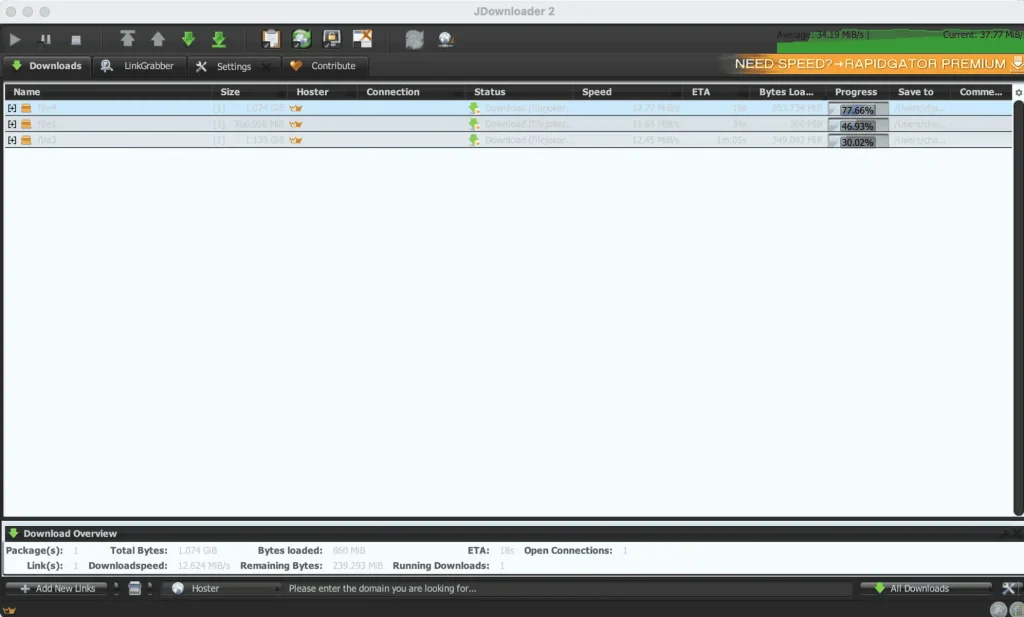
What this means: A lone file caps out near 11.8 MB/s in Chrome or 12.77 MiB/s in JDownloader 2 — that’s the per-connection ceiling. Higher totals come from parallel downloads, not from any single file speeding up further. If you want an entire archive fast, queue all its parts simultaneously.
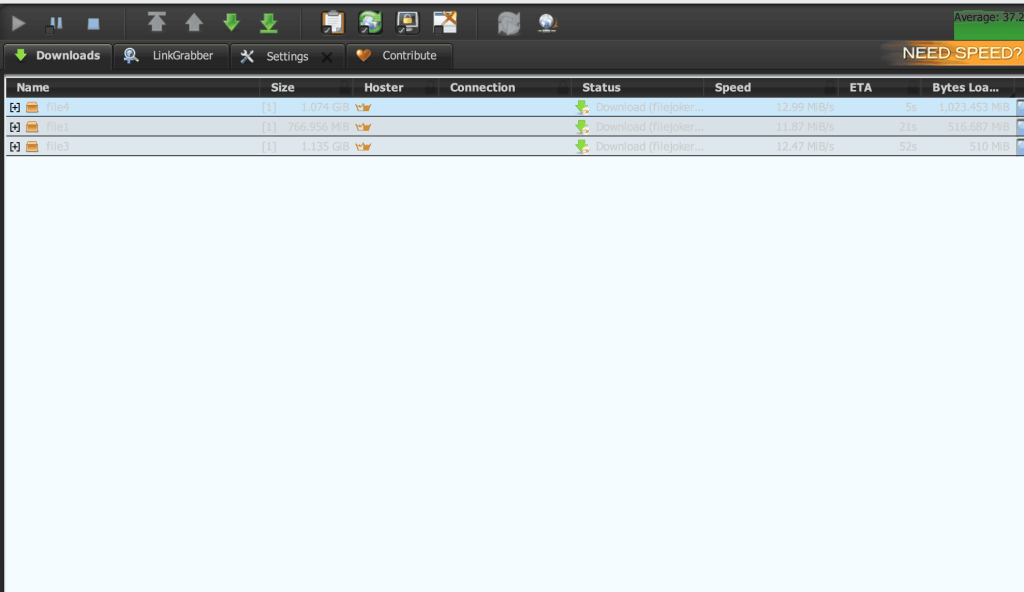
We ran the same three-file queue again on a different day: 12.99, 11.87, and 12.47 MiB/s, summing to 37.33 MiB/s. Against 37.77 MiB/s on the first run, that is a 0.44 MiB/s spread across two separate days — so treat roughly 37–38 MiB/s as the repeatable result rather than a lucky capture.
How to Buy FileJoker Premium
- Select Premium or Premium VIP on the pricing page.
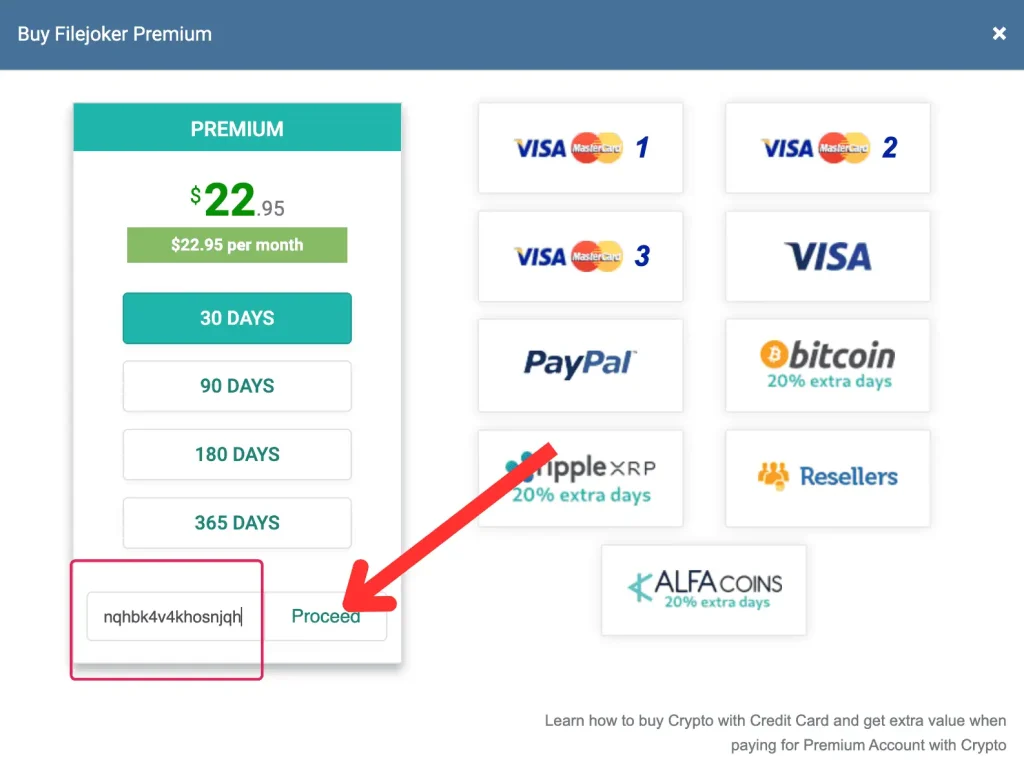
- Enter the coupon code — in the Buy Filejoker Premium window, type the promo code
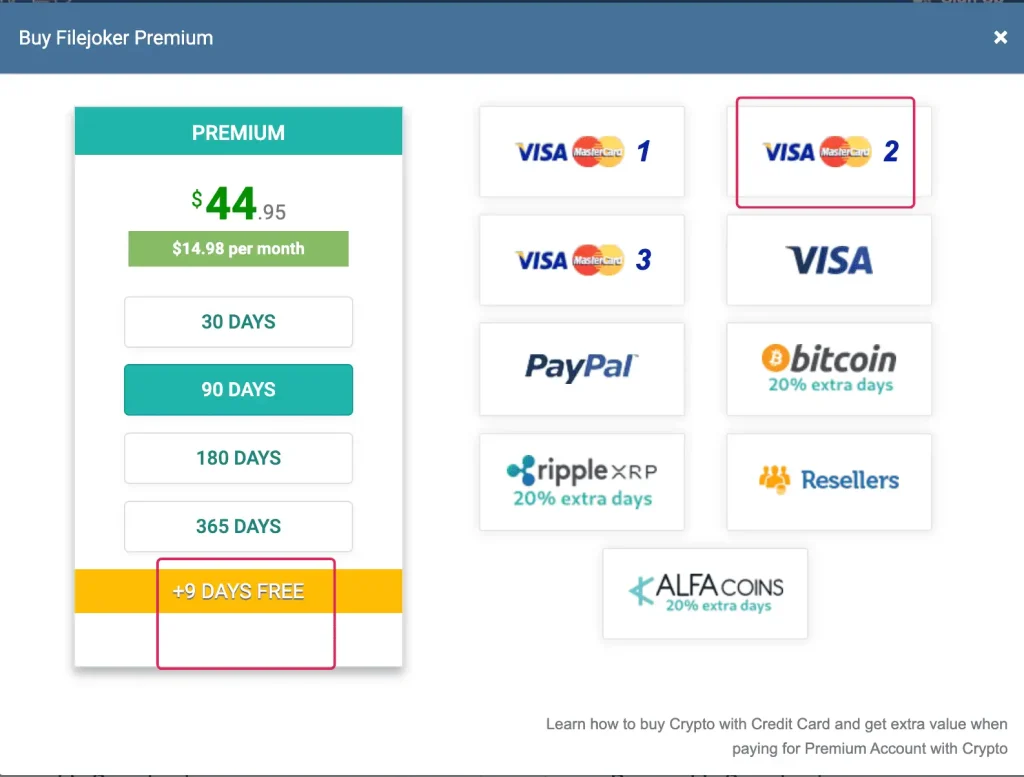
nqhbk4v4khosnjqhinto the field at the bottom of the pricing card and click Proceed. - Select the duration and payment method — choose a term (30, 90, 180, or 365 days), note the bonus days displayed on the yellow bar, and pick your payment option.
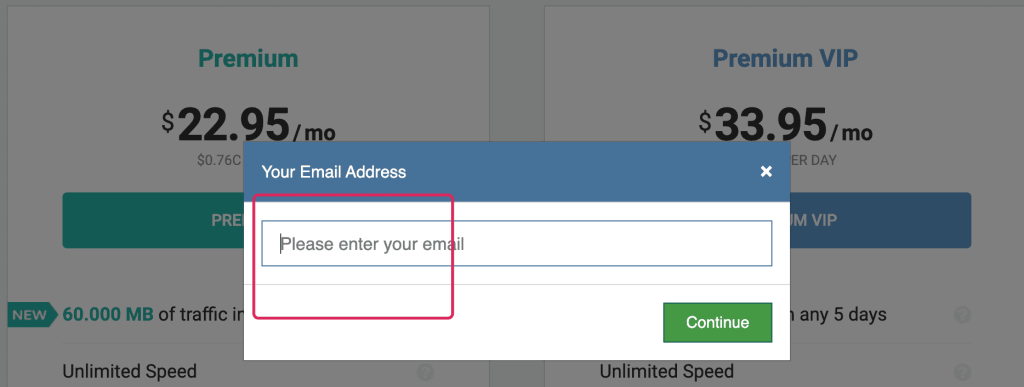
- Enter the email address — in the Your Email Address prompt (Please enter your email), type in an address you can access and click Continue.
- Pay — review the final summary screen and click Proceed to payment to finish the purchase.
There’s no need to register an account beforehand — FileJoker collects your email address as part of the direct checkout flow.
The promo code adds days, not a discount
nqhbk4v4khosnjqh doesn’t reduce the price — it extends your membership:
| Plan Length | Price | Bonus Days | Total Days |
|---|---|---|---|
| 30 days | $22.95 | +3 days | 33 days |
| 90 days | $44.95 | +9 days | 99 days |
| 180 days | $89.95 | +18 days | 198 days |
| 365 days | $134.95 | +36 days | 401 days |
The 90-day checkout page displays “+9 DAYS FREE” right on the yellow bar; the remaining figures come from the published offer terms.
Since you’re getting extra days for the same cost, your effective daily rate drops: $44.95 ÷ 90 days = $0.499/day before the bonus, versus $44.95 ÷ 99 days = $0.454/day once the bonus is applied.
Card vs PayPal: check this before you pay
This single decision determines your actual total.
| Route | Plan price | Fee | Total |
|---|---|---|---|
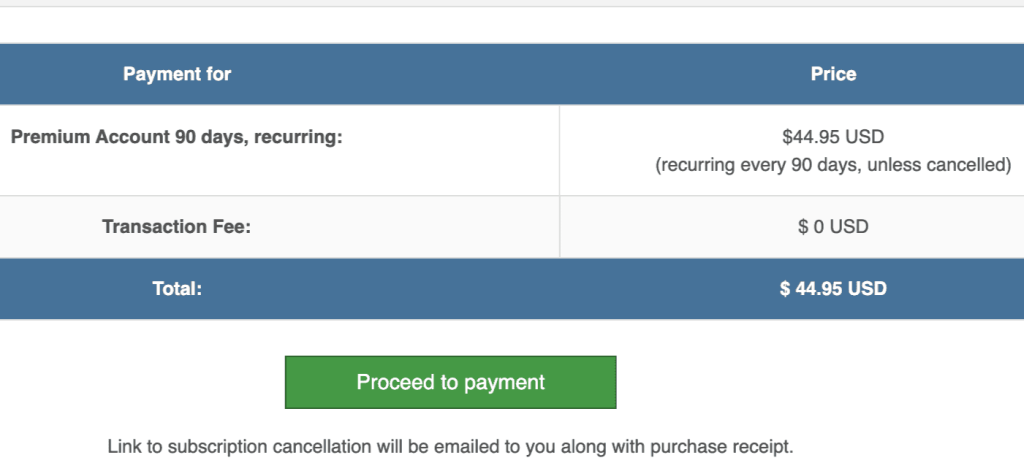
| Credit card (90 days) | $44.95 USD | $0 USD | $44.95 USD |
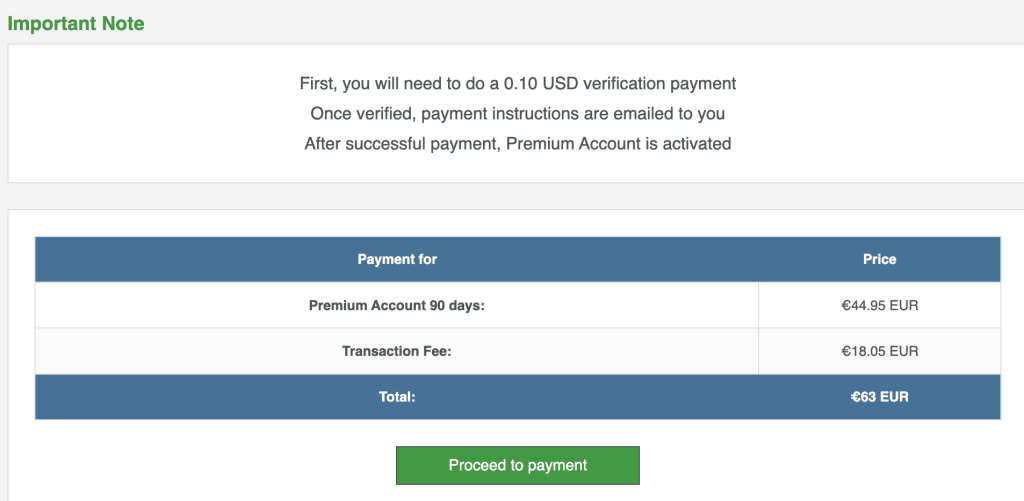
| PayPal (90 days) | €44.95 EUR | €18.05 EUR | €63 EUR |
The PayPal surcharge (€18.05 EUR) works out to 40% of the €44.95 EUR base price, and PayPal checkout also requires a 0.10 USD verification charge upfront before payment instructions are sent to your inbox.
If a card is an option for you, use it.
Automatic renewal
The 90-day card checkout reads Premium Account 90 days, recurring: with a note that it’s (recurring every 90 days, unless cancelled). The cancellation link arrives by email alongside your receipt — hang onto that message.
Activate Your FileJoker Account NowHow to Buy a Coupon from a Reseller
Resellers come in handy when the standard checkout doesn’t support a payment method available in your country.
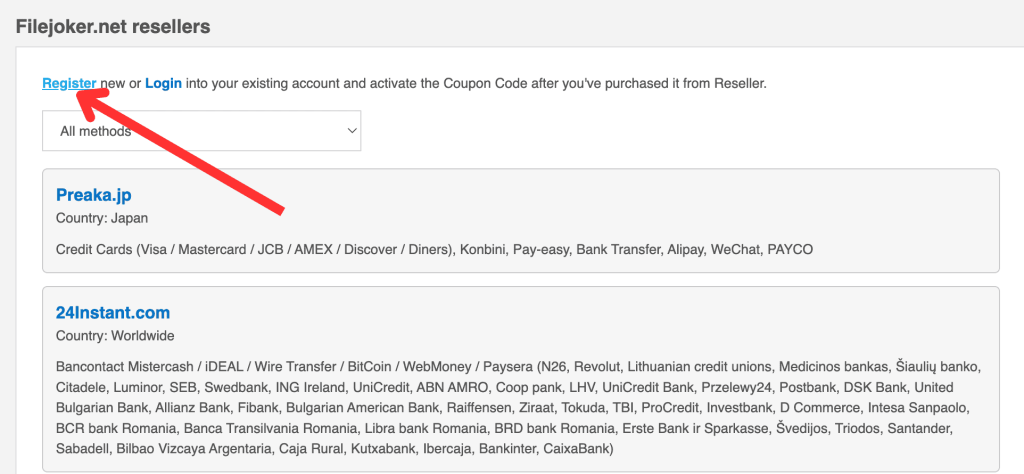
- Click Resellers on the checkout page to reach the Filejoker.net resellers listing.
- Click Register (or Login if you already have one) at the top — FileJoker requires an account before you can redeem a reseller coupon.
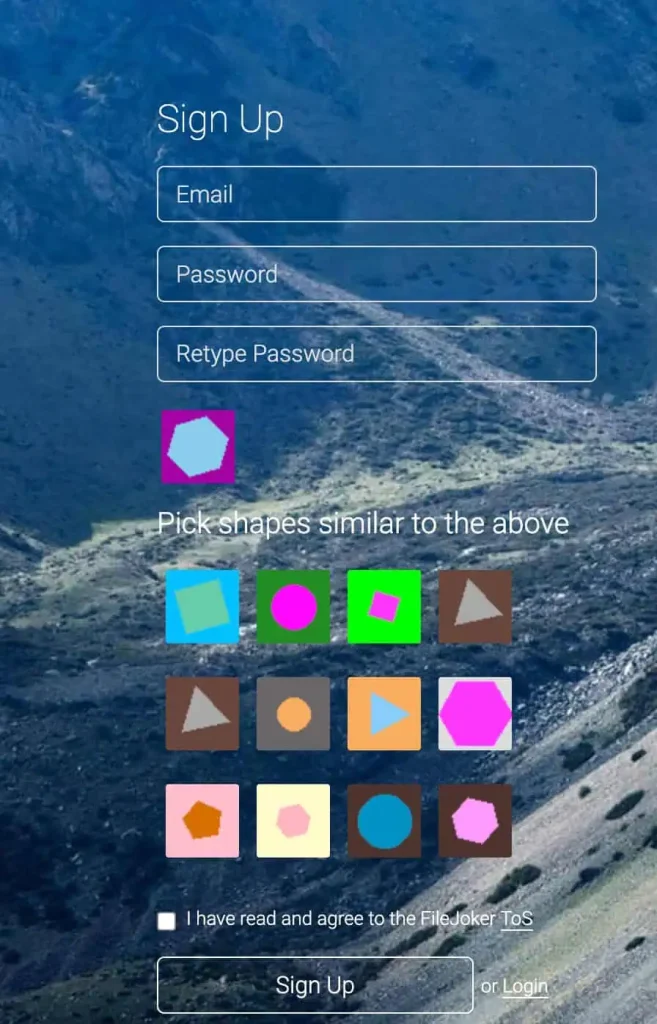
- On the Sign Up page, fill in Email, Password, and Retype Password, complete the shape-matching puzzle, tick I have read and agree to the FileJoker ToS, then click Sign Up.
- Pick a reseller from the list and purchase your coupon.
The directory currently includes Preaka.jp (Country: Japan — Credit Cards including Visa, Mastercard, JCB, AMEX, Discover, Diners, plus Konbini, Pay-easy, Bank Transfer, Alipay, WeChat, PAYCO) and 24Instant.com (Country: Worldwide — Bancontact Mistercash, iDEAL, Wire Transfer, BitCoin, WebMoney, and Paysera across N26, Revolut, Przelewy24, and European banks).
How to Activate a Coupon
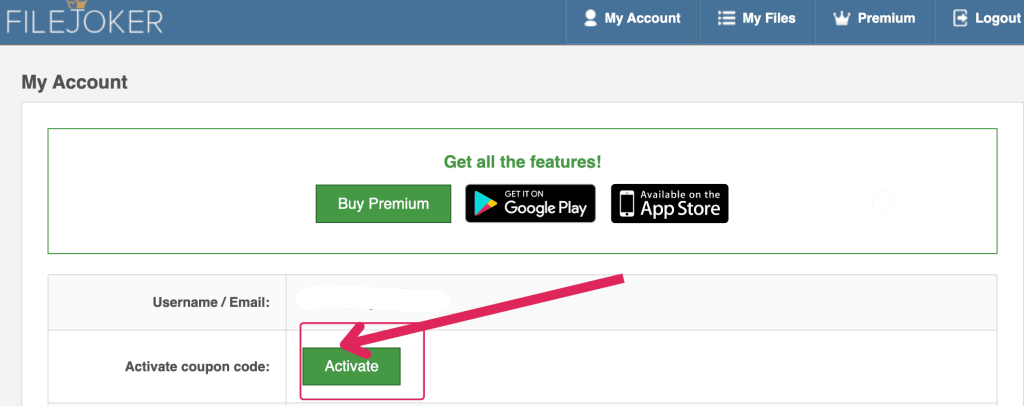
- Log into FileJoker and open My Account from the top navigation.
- Click the green Activate button next to Activate coupon code:.
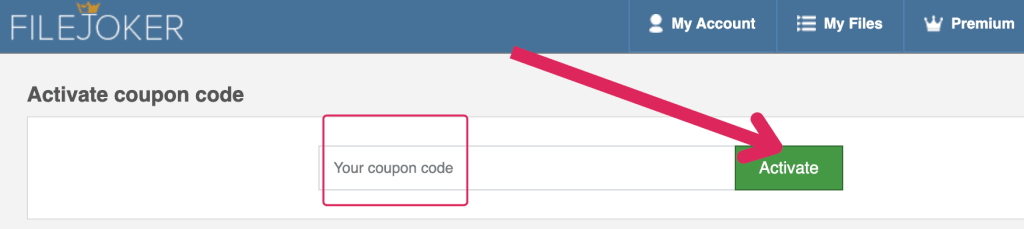
- Paste your voucher code into the Your coupon code field.
- Click Activate.
Note the distinction: the public promo code nqhbk4v4khosnjqh grants bonus days during direct checkout, while a reseller voucher is redeemed separately through My Account to activate paid status.
How to Download Files from FileJoker
- Open the link you were given.
- Click Get Download Link.
- The button changes to Download File — click it.
On a free account this is where the shape CAPTCHA and the 85-second countdown appear. On a paid account the link is generated without either.
Setting Up JDownloader 2
With a paid subscription active, linking your account to JDownloader 2 lets multi-part archives queue and download automatically.
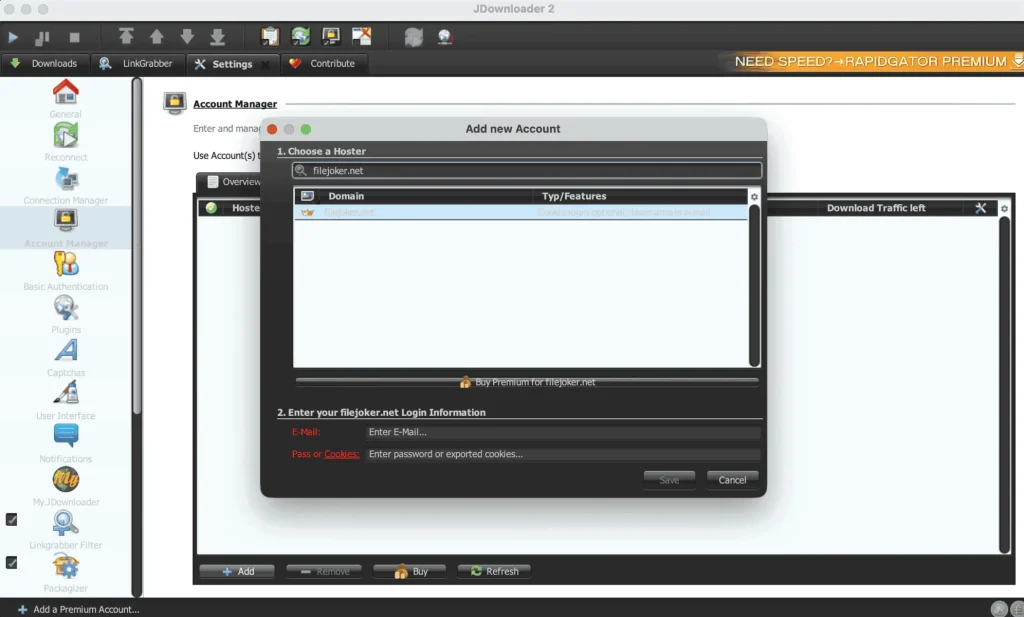
- Open JDownloader 2 and navigate to Settings → Account Manager.
- Click + Add in the bottom-left corner and search for filejoker.net under 1. Choose a Hoster.
- Under 2. Enter your filejoker.net Login Information, input your FileJoker email and password (or exported cookies), then click Save.
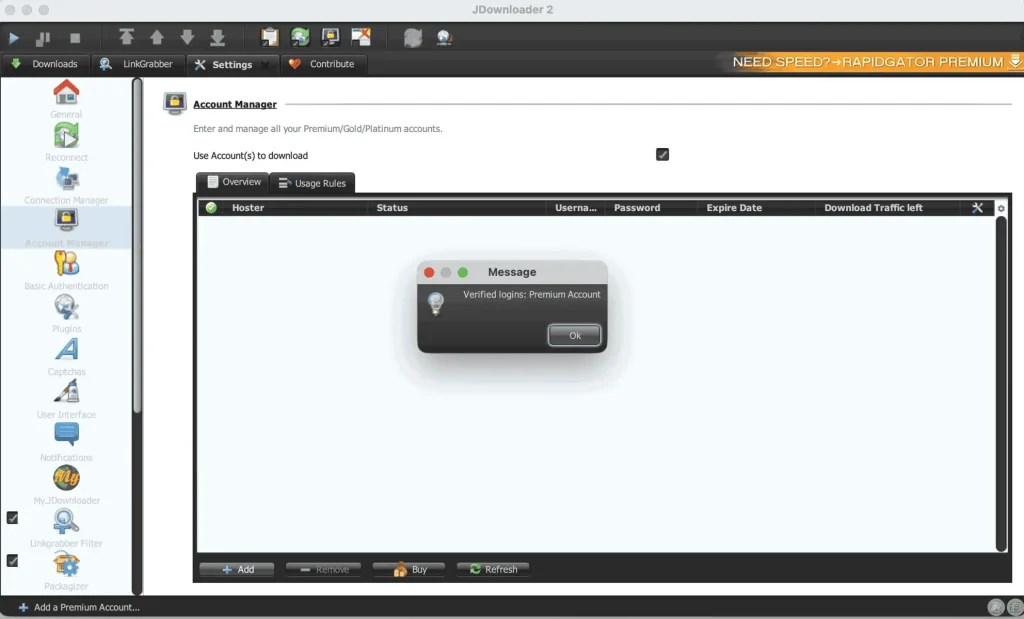
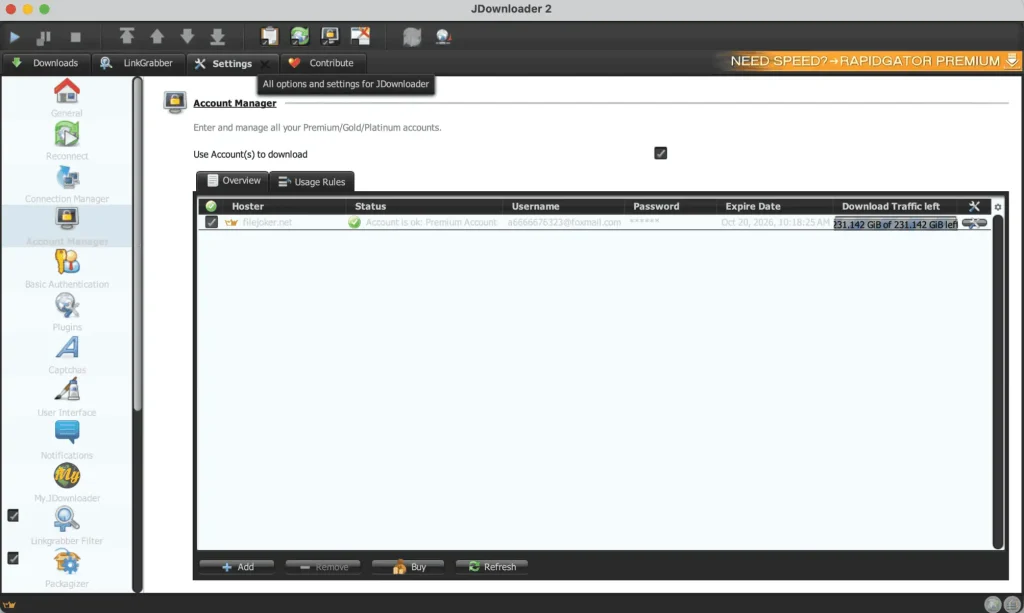
- Verify the account shows Premium Account status (our test panel displayed 231.142 GiB of 231.142 GiB remaining, with active transfers marked by a gold crown icon in the Hoster column).
For other services, see our guide to JDownloader-compatible file hosts.
Why bother: With three files queued, JDownloader 2 reached an aggregate 37.77 MiB/s current speed (34.19 MiB/s average), slightly ahead of the 32.7 MB/s we measured across three files in Chrome.
Frequently Asked Questions
Does FileJoker auto-renew?
Via credit card, yes — the 90-day checkout explicitly states recurring every 90 days, unless cancelled, with the cancellation link emailed alongside your receipt. Keep that email handy for whenever you want to stop the subscription.
How much does FileJoker cost per day with the promo code?
Standard 30-day plans list at $0.76/day for Premium ($22.95/mo) and $1.13/day for Premium VIP ($33.95/mo). On the 90-day Standard Premium plan ($44.95), applying promo code nqhbk4v4khosnjqh adds +9 free days for 99 total days, lowering the per-day cost from $0.499 to $0.454 when paid by card.
Which plan should I choose?
Base your choice on five-day download volume. Standard Premium offers 60,000 MB every 5 days for $22.95/mo; Premium VIP offers 300,000 MB every 5 days for $33.95/mo. Both include the same unlimited speed and instant-start downloads.
Why is my single download only running around 11–12 MB/s on Premium?
FileJoker assigns one open connection per file (we measured 11.8 MB/s in Chrome and 12.624 MiB/s in JDownloader 2). To push combined speeds higher, download multiple files simultaneously — three parallel files reached an aggregate 32.7 MB/s in Chrome and 37.77 MiB/s in JDownloader 2 in our tests.
Should I buy direct or from a reseller?
Direct credit card checkout is the easiest path — it carries a $0 USD fee and lets you apply promo code nqhbk4v4khosnjqh for bonus days. A reseller purchase makes sense if you’d rather pay through Konbini, Alipay, WeChat, iDEAL, Bancontact, or European bank transfer, then activate the resulting voucher inside My Account.
Summary
FileJoker’s free tier throttles downloads to 127 KB/s behind a shape CAPTCHA and an 85-second wait. Upgrade to a paid plan, and a single file reaches 11.8 MB/s in Chrome, while three files running together climb to a combined 32.7 MB/s in Chrome — or 37.77 MiB/s in JDownloader 2.
Grab the 30-day Premium plan at $22.95 if you’ve got an archive sitting ready to go; apply code nqhbk4v4khosnjqh for 33 total days and pay by card to dodge the 40% (€18.05 EUR) PayPal surcharge. If the files you need are already mirrored on a host you’re already subscribed to, this one might not be necessary.